




01. Edit your form online
Type text, add images, blackout confidential details, add comments, highlights and more.

Type text, add images, blackout confidential details, add comments, highlights and more.

Draw your signature, type it, upload its image, or use your mobile device as a signature pad.

Send it via email, link, or fax. You can also download it, export it or print it out.
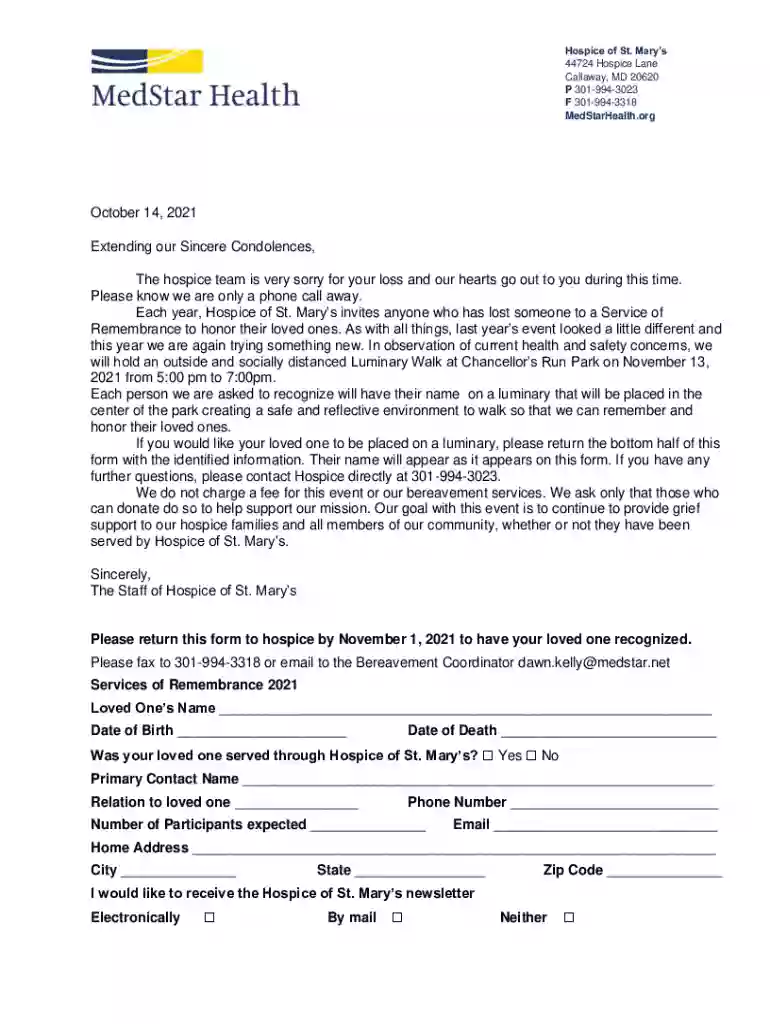
The MedStar Health Letterhead Template is a professionally designed document layout used for official correspondence associated with MedStar Health. This template ensures consistency and professionalism across all official documents, providing a recognizable brand image. The letterhead typically includes the organization’s logo, contact information, and sometimes a slogan or mission statement, which together convey authentication and authority. The use of a letterhead is crucial for branding and helps in establishing trust among recipients, indicating that the communication is genuine and comes from a verified source within the organization.
Utilizing the MedStar Health Letterhead Template involves several steps to ensure the document's professional standards are met:
Open the Template: Access the template using a compatible digital platform like DocHub. Ensure the software supports the format of the template, be it a DOC or PDF file.
Customize Content: Insert your specific message or information. Ensure the content aligns with the purpose of the correspondence and maintains a professional tone.
Maintain Consistency: Make sure that any additional elements like graphics or contact information adhere to MedStar Health’s branding guidelines.
Review and Edit: Proofread the document to avoid any typographical errors or unprofessional content. This step ensures coherence and accuracy in the communication.
Save and Export: Once finalized, save the document in your preferred format and export it for printing or digital dissemination.
To acquire the MedStar Health Letterhead Template, one must typically have access to MedStar Health’s internal resources or have permission from the administrative team. Here’s how you can obtain it:
Internal Resources: Employees or affiliates of MedStar Health can request the template from their IT department or communications team.
Authorized Access: For contractors or partners, a formal request through an official MedStar Health contact might be necessary.
Online Repositories: If available, secure access through authorized cloud-based services or intranets where organizational resources are shared.
Completing the MedStar Health Letterhead Template requires attention to detail, ensuring all necessary information is accurately included:
Opening Document: Start by accessing the template file in supported software.
Input Required Information: Type your text directly into the text fields provided, ensuring clarity and professionalism.
Add Signature: Utilize electronic signature tools within DocHub if required to authenticate the document.
Include Additional Elements: Insert any necessary images or graphs that are required for comprehensive communication.
Final Review: Check the document to ensure all content is included and formatted correctly.
Save and Archive: Save the document in the desired format and ensure it is properly archived for future reference.
The MedStar Health Letterhead Template is predominantly utilized by professionals within or associated with the MedStar Health system:
Healthcare Providers: Including doctors, nurses, and administrative staff for official medical documentation.
Administrative Professionals: For issuing formal communication, policies, and announcements.
Marketing and Communications Teams: To maintain brand consistency in external and internal correspondence.
Legal Departments: For legal notices, contracts, and compliance-related documentation.


Essential components of a MedStar Health Letterhead Template comprise the following:
Logo: The MedStar Health logo, serving as the primary branding element.
Contact Information: Includes address, phone number, and email contact.
Design Elements: Such as color schemes and fonts that align with MedStar Health’s branding guidelines.
Mission Statement or Header: A concise statement reflecting the organization’s ethos or function.
Legal Disclaimers: If required, legal text relevant to the document type.
Several scenarios illustrate the effective use of the MedStar Health Letterhead Template:
Official Correspondence: When communicating with external parties, such as other healthcare providers or regulatory bodies.
Internal Memos: For organization-wide announcements or administrative updates.
Patient Communication: Such as care plans or appointment details provided to patients.
Event Invitations: Formal invitations to medical conferences or community health events organized by MedStar Health.
Ensuring legal compliance while using the MedStar Health Letterhead Template includes:
Adhering to Branding Regulations: Following internal guidelines for use and modifications.
Confidentiality Requirements: Ensuring sensitive information is handled appropriately, using disclaimers where necessary.
Fraud Prevention: Ensuring the template is used responsibly to prevent misuse.
Users must ensure that the template is employed in accordance with legal standards to prevent potential liabilities or misunderstandings.
We've got more versions of the MedStar Health Letterhead Template Letterhead Template form. Select the right MedStar Health Letterhead Template Letterhead Template version from the list and start editing it straight away!
| Versions | Form popularity | Fillable & printable |
|---|---|---|
| 2021 | 4.8 Satisfied (40 Votes) |
At DocHub, your data security is our priority. We follow HIPAA, SOC2, GDPR, and other standards, so you can work on your documents with confidence.
Good Samaritan Hospital Letterhead Template Page 1 At MedStar Health. MedStar Health is a not-for-profit health system 44 877-772-6505 PHONE 202-877-6775 FAX
Feb 13, 2025 MedStar Health Letterhead Template Page 1. MedStar Health is the largest healthcare provider in Maryland and the Washington, D.C. region.


