Myoptumhealthphysicalhealth 2026

Get Form
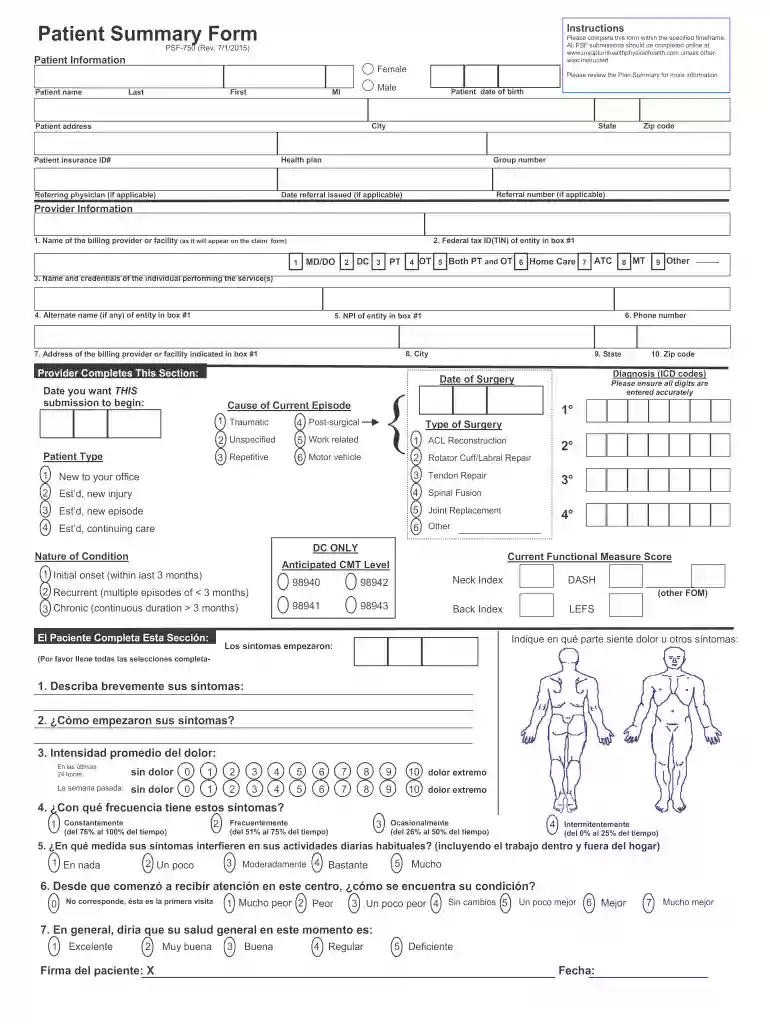
myoptumhealthphysicalhealth Preview on Page 1

Here's how it works

01. Edit your myoptumhealthphysicalhealth online
Type text, add images, blackout confidential details, add comments, highlights and more.

02. Sign it in a few clicks
Draw your signature, type it, upload its image, or use your mobile device as a signature pad.

03. Share your form with others
Send myoptumhealthphysicalhealth com via email, link, or fax. You can also download it, export it or print it out.

How to use or fill out myoptumhealthphysicalhealth with our platform

Form edit decoration
9.5
Ease of Setup
DocHub User Ratings on G2
9.0
Ease of Use
DocHub User Ratings on G2
  1. Click ‘Get Form’ to open the myoptumhealthphysicalhealth document in the editor.
  2. Begin by filling out the Patient Information section. Enter the patient's name, date of birth, address, and insurance details accurately to ensure proper processing.
  3. Next, move to the Provider Information section. Input the billing provider's name, tax ID, and NPI number as required. Ensure that all contact information is correct for seamless communication.
  4. In the Cause of Current Episode section, select the appropriate patient type and provide details regarding their condition. This helps in tailoring treatment plans effectively.
  5. Complete any additional sections related to symptoms and functional measures. Be thorough in describing symptoms and their impact on daily activities for a comprehensive assessment.
  6. Finally, review all entries for accuracy before submitting your form online through our platform.

Start using our platform today to fill out your myoptumhealthphysicalhealth form easily and efficiently!

be ready to get more

Complete this form in 5 minutes or less

Get form

Got questions?

We have answers to the most popular questions from our customers. If you can't find an answer to your question, please contact us.
Contact us
Optum ID has transitioned to One Healthcare ID Optum ID is being rebranded to One Healthcare ID as we migrate our services to the cloud. For providers, the only change you will see is the branding.
UnitedHealthcare Provider Portal The secure place for accessing patient and practice-specific information including checking eligibility and referral requirements.
Contact Information If you have other questions about doing business with OptumHealth Physical Health, please contact Provider Services at: (800) 873-4575 or send us an email.
One Healthcare ID delivers a secure, centralized identity management solution that enables a single sign-on to all integrated applications. You register for a One Healthcare ID once and use that One Healthcare ID to access all of the associated applications seamlessly.
Optum Health delivers comprehensive, patient- centered care to drive better outcomes and experiences for patients and care providers at a lower total cost of care. We proactively engage people in their health through in-clinic, in-home, virtual and digital clinical platforms.

Security and compliance

At DocHub, your data security is our priority. We follow HIPAA, SOC2, GDPR, and other standards, so you can work on your documents with confidence.

Learn more
ccpa2
pci-dss
gdpr-compliance
hipaa
soc-compliance

People also ask

One Healthcare ID is an identity application that allows you to login to multiple supported applications with a single sign-in ID.

myoptumhealthphysicalhealth provider login