Type text, add images, blackout confidential details, add comments, highlights and more.
02. Sign it in a few clicks
Draw your signature, type it, upload its image, or use your mobile device as a signature pad.
03. Share your form with others
Send cit0177 via email, link, or fax. You can also download it, export it or print it out.
How to use or fill out cit 0177 with our platform
Ease of Setup
DocHub User Ratings on G2
Ease of Use
DocHub User Ratings on G2
Click ‘Get Form’ to open the cit 0177 in the editor.
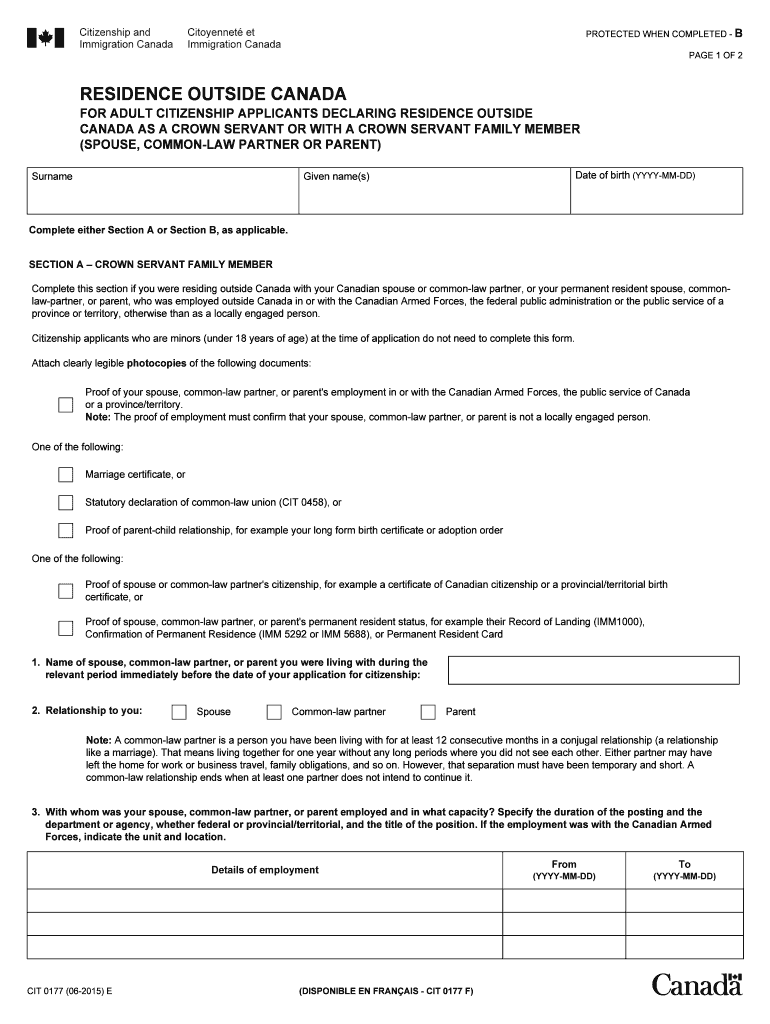
Begin by entering your surname, given name(s), and date of birth in the designated fields at the top of the form.
Choose either Section A or Section B based on your situation. If you are a family member of a Crown servant, complete Section A; otherwise, proceed to Section B.
In Section A, provide details about your spouse, common-law partner, or parent, including their employment information and relationship to you.
Attach required documents such as proof of employment and relationship certificates. Use our platform's upload feature for easy document management.
Complete Section C by signing and dating the form to confirm that all information is accurate and truthful.
Start filling out your cit 0177 today for free using our platform!
Near Infrared Camera and Multi-Object Spectrometer
0177m. Maximum throughput: 25.697%. Central pixel fraction: 0.100. Figure A CIT system was originally based on Beckwith et al. (1976, Ap.J., 208,. 390);Read more
Description. Insufficient password protection in the attestation database for Open CIT may allow an authenticated user to potentially enable informationRead more
Cookie consent notice
This site uses cookies to enhance site navigation and personalize your experience.
By using this site you agree to our use of cookies as described in our Privacy Notice.
You can modify your selections by visiting our Cookie and Advertising Notice.