Aris solutions timesheet pdf 2026

Get Form
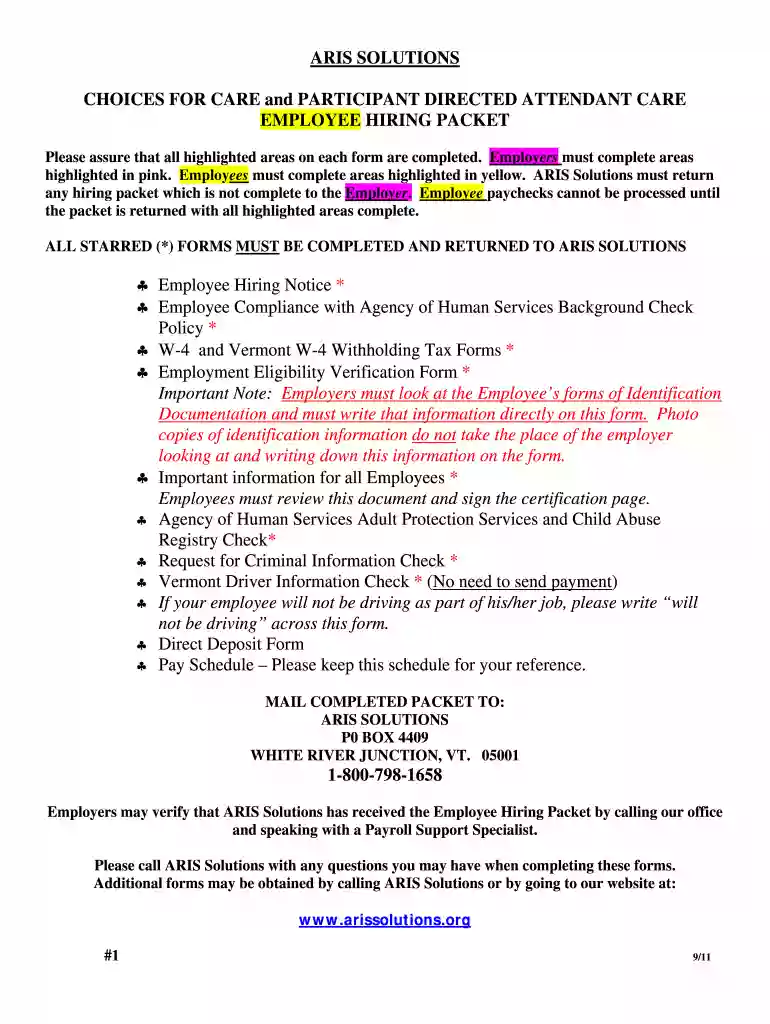
aris solutions timesheet pdf Preview on Page 1

Here's how it works

01. Edit your aris solutions timesheet pdf online
Type text, add images, blackout confidential details, add comments, highlights and more.

02. Sign it in a few clicks
Draw your signature, type it, upload its image, or use your mobile device as a signature pad.

03. Share your form with others
Send aris timesheet via email, link, or fax. You can also download it, export it or print it out.

How to use or fill out aris solutions timesheet pdf with our platform

Form edit decoration
9.5
Ease of Setup
DocHub User Ratings on G2
9.0
Ease of Use
DocHub User Ratings on G2
  1. Click ‘Get Form’ to open the aris solutions timesheet PDF in the editor.
  2. Begin by filling out the highlighted areas. Employers should complete sections highlighted in pink, while employees should focus on yellow-highlighted areas.
  3. For the Employee Hiring Notice, enter the employee's name, consumer name, mailing address, and Social Security number. Ensure both employer and employee sign where indicated.
  4. Complete the Employment Eligibility Verification Form by entering personal details and ensuring that both employer and employee review and sign it.
  5. Fill out the W-4 forms for tax withholding information. Employees must provide their allowances accurately to avoid issues with payroll.
  6. Review all completed forms for accuracy. Make sure no fields are left blank, especially those marked with an asterisk (*).
  7. Once all forms are filled out correctly, save your changes and download or print the completed packet for submission.

Start using our platform today to streamline your document editing and ensure a hassle-free experience!

be ready to get more

Complete this form in 5 minutes or less

Get form

Got questions?

We have answers to the most popular questions from our customers. If you can't find an answer to your question, please contact us.
Contact us
Quick find Step 1: Determine start and end time. Time clocks. Spreadsheets. Step 2: Convert time to military time. Time clocks. Step 3: Subtract start time from end time. Time clocks. Step 4: Subtract unpaid breaks. Time clocks. Step 5: Convert to decimal format. Time clocks. Step 6: Add up total hours for pay period. Time clocks.
Download our free timesheet templates so you dont have to start from scratch. Step 1: Format your spreadsheet. Step 2: Title your timesheet. Step 3: Add labels to your timesheet. Step 4: Add the timesheet. Step 5: Add formulas for automatic calculations. Step 6: Print or keep it online.
How to Fill Out A Timesheet Step 1: Enter the Employees Name. Step 2: Add the Date Range. Step 3: Add Project Details. Step 4: Add Work Hours for Each Workday. Step 5: Determine Total Work Hours. Step 6: Add Notes, if Required. Step 7: Submit the Timesheet for Approval.
How to fill out a timesheet (step-by-step guide) Step 1: Enter the employees name. Step 2: Add the date or date range. Step 3: Fill in the project and task details. Step 4: Add working hours for each day of the week. Step 5: Calculate the total hours. Step 6: Add notes if required. Step 7: Get approval.
Filling Out a Weekly, Biweekly, or Monthly Time Sheet Step 1: Write down your name and the date range. Step 2: Record your start time. Step 3: Record your break. Step 4: Record your shift end time. Step 5: Repeat Steps 2-4. Step 6: Total up the hours. Step 1: Write down your name and basic project info.

Security and compliance

At DocHub, your data security is our priority. We follow HIPAA, SOC2, GDPR, and other standards, so you can work on your documents with confidence.

Learn more
ccpa2
pci-dss
gdpr-compliance
hipaa
soc-compliance

People also ask

A timesheet (or time sheet) is a method for recording the amount of a workers time spent on each job. Traditionally a sheet of paper with the data arranged in tabular format, a timesheet is now often a digital document or spreadsheet.
Filling Out a Daily Time Sheet Step 1: Write your name, date, and start time. Step 2: Write down your first task. Step 3: Record your task end time. Step 4: Repeat Steps 2 and 3 for each subsequent task. Step 5: Total up the hours. Step 1: Write down your name and the date range. Step 2: Record your start time.
Payroll and wage management: Timesheets are primarily used to calculate employee wages or salaries based on the hours worked. They provide the necessary data for accurate payroll processing, including regular hours, overtime, vacation time, and other types of leave.

aris timesheets