Type text, add images, blackout confidential details, add comments, highlights and more.
02. Sign it in a few clicks
Draw your signature, type it, upload its image, or use your mobile device as a signature pad.
03. Share your form with others
Send it via email, link, or fax. You can also download it, export it or print it out.
How to use or fill out aov background with our platform
Ease of Setup
DocHub User Ratings on G2
Ease of Use
DocHub User Ratings on G2
Click ‘Get Form’ to open the aov background document in the editor.
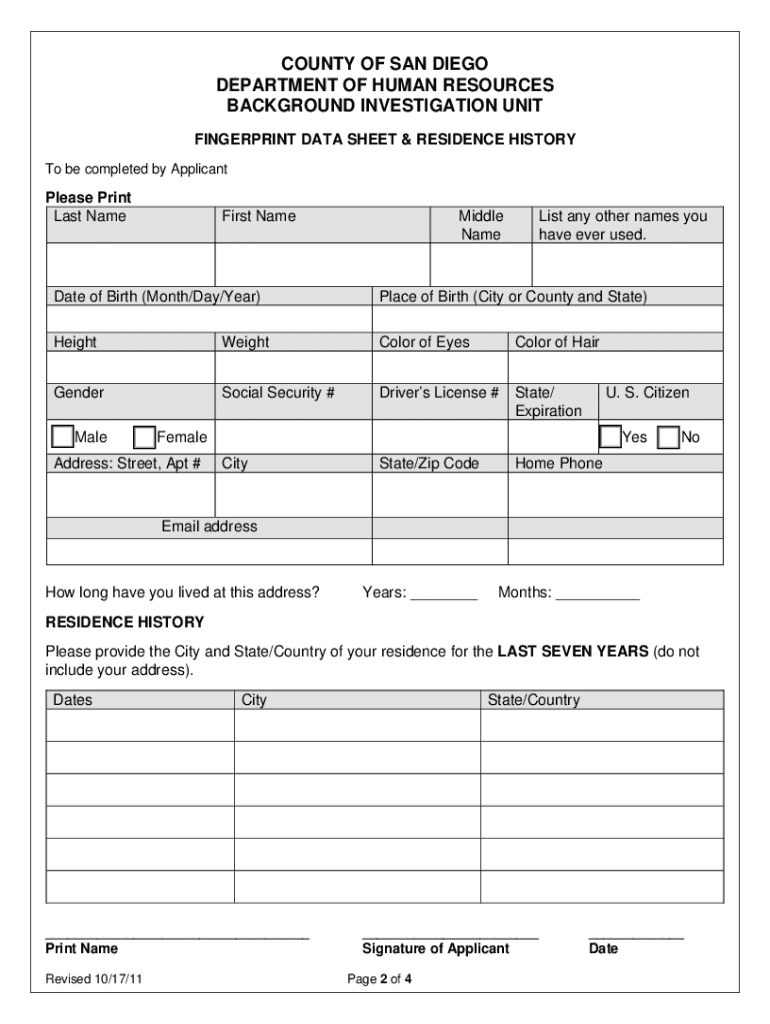
Begin by filling in your personal information, including your last name, first name, middle name, and any other names you have used. Ensure accuracy as this information is crucial for identification.
Provide your date of birth and place of birth. This section helps verify your identity during the background check process.
Complete the physical description fields such as height, weight, eye color, hair color, and gender. These details assist in confirming your identity.
Fill in your Social Security number and driver’s license information. Make sure to double-check these entries for accuracy.
In the residence history section, list all cities and states where you have lived over the past seven years. This is essential for thorough background verification.
Once all fields are completed, save your document without signing it. Remember that a wet signature is required later in person.
Attach the completed forms to Step 1 of the application process by navigating to the attachments section and uploading them as 'ROV Background Forms'.
Start using our platform today to streamline your form completion process for free!
In addition to the AOV strategies that are the focus on Enhancement Area III-A, the goals of III-A will be met in at least two other ways as well. FirstRead more
Oct 1, 2014 7. Background: a. The FAA established the Air Traffic Safety Oversight Service (AOV) in 2005 to provide independent oversight of air trafficRead more
Cookie consent notice
This site uses cookies to enhance site navigation and personalize your experience.
By using this site you agree to our use of cookies as described in our Privacy Notice.
You can modify your selections by visiting our Cookie and Advertising Notice.