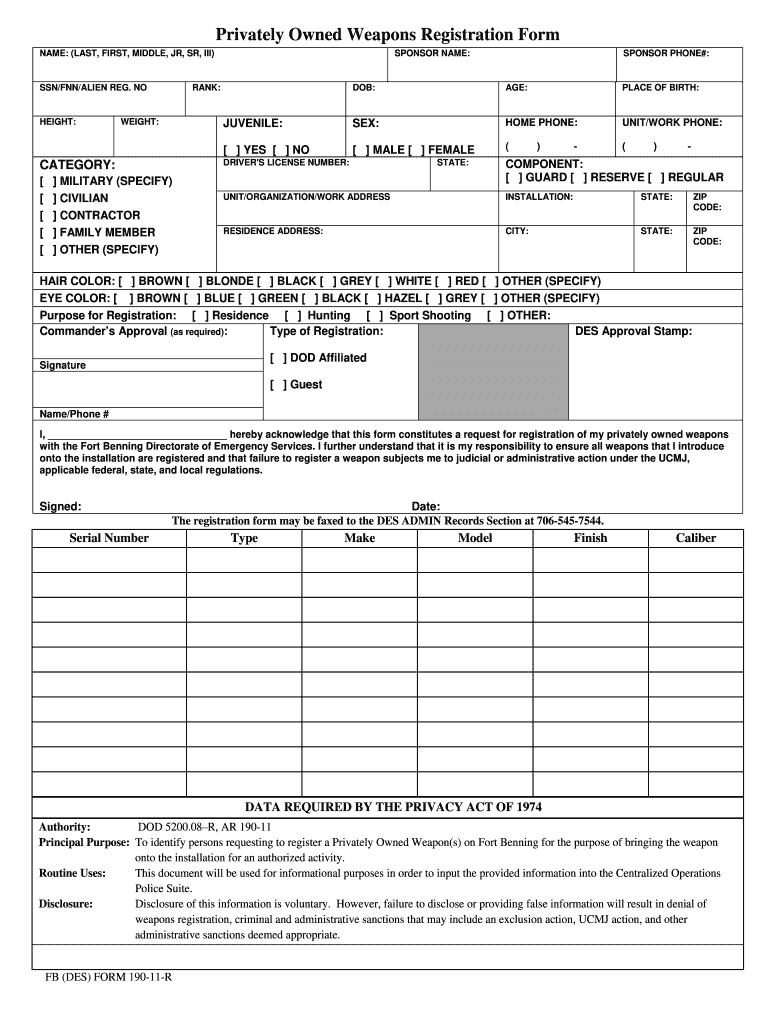
Fort benning weapons registration 2026

Get Form
fort moore weapons registration Preview on Page 1

Here's how it works

01. Edit your fort moore weapons registration online
Type text, add images, blackout confidential details, add comments, highlights and more.
02. Sign it in a few clicks
Draw your signature, type it, upload its image, or use your mobile device as a signature pad.
03. Share your form with others
Send what fort bliss regulation covers weapons on post via email, link, or fax. You can also download it, export it or print it out.

How to use or fill out fort benning weapons registration with our platform

Form edit decoration
9.5
Ease of Setup
DocHub User Ratings on G2
9.0
Ease of Use
DocHub User Ratings on G2
  1. Click ‘Get Form’ to open the Fort Benning Weapons Registration form in the editor.
  2. Begin by entering your name in the format of LAST, FIRST, MIDDLE, JR, SR, III. This is essential for identification.
  3. Fill in your SSN/FNN/ALIEN REG. NO and provide your height and weight for accurate records.
  4. Indicate your status by selecting one of the options: Military, Civilian, Contractor, Family Member, or Other.
  5. Complete personal details such as sponsor phone number, date of birth, age, place of birth, and sex.
  6. Provide your driver's license number and select your military component (Guard, Reserve, Regular).
  7. Fill out both residence and unit/work addresses including city, state, and ZIP code.
  8. Select hair color and eye color from the provided options to complete your physical description.
  9. Specify the purpose for registration (Residence, Hunting, Sport Shooting) and ensure you have commander’s approval if required.
  10. Finally, sign and date the form to acknowledge that you understand the responsibilities associated with weapon registration.

Start using our platform today to streamline your Fort Benning Weapons Registration process for free!

be ready to get more

Complete this form in 5 minutes or less

Get form

Got questions?

We have answers to the most popular questions from our customers. If you can't find an answer to your question, please contact us.
Contact us

Managing your paperwork with DocHub this way is very simple after you have downloaded its extension for Google Chrome. Go to the Chrome Web Store and set up DocHub - Sign PDF from Gmail to obtain it. Give our tool access to your Google account, and then open an email with the fort moore gun registration attached and point to the file with your cursor - the DocHub extension key will automatically show up there. Click on it to open your document in our editor. Make any required modifications, complete the blanks, and click Sign to create your legally-binding eSignature.

Document editing with DocHub is equally convenient on desktop and mobile devices. You only need an internet browser to revise your fort bliss weapons registration on Android. Open our site and sign in to access the tools you require. Add your file and introduce your intended modifications. After that, you can keep your form in your file storage or send it out instantly.

(3) Military personnel who reside on post in other than family housing (in barracks or bachelor officer quarters, for example) must store privately owned firearms, explosives, and ammunition in the arms room of their immediate organizational commander in - ance with AR 190-11, Physical Security of Arms,
(2) All persons not residing on Fort Benning are required to register each firearm they intend to introduce to the installation for engaging in an authorized activity prior to bringing the weapon onto the installation. (3) Bows and cross bows are not required to be registered.
(5) Except as provided by Army Regulation (AR) 190-14, no individual, under any circumstance, may carry a privately-owned firearm in a concealed manner while on Fort Bliss, regardless of possession of any state permit or license to do so.

Security and compliance

At DocHub, your data security is our priority. We follow HIPAA, SOC2, GDPR, and other standards, so you can work on your documents with confidence.

Learn more
ccpa2
pci-dss
gdpr-compliance
hipaa
soc-compliance
be ready to get more

Complete this form in 5 minutes or less

Get form

People also ask

Service members will not be given permission to carry a concealed handgun if they have violated the Uniform Code of Military Justice "for any offense that calls into question the individual's right to carry a firearm," or if they have been convicted or face charges in civilian courts, the directive says.
Weapons must be registered on base and either kept in the home or stored in the base armory. Generally, service members who live in military barracks are not allowed to keep weapons in their room at all.
(3) Military personnel who reside on post in other than family housing (in barracks or bachelor officer quarters, for example) must store privately owned firearms, explosives, and ammunition in the arms room of their immediate organizational commander in - ance with AR 190-11, Physical Security of Arms,
Under Georgia law, active duty military personnel are exempted from the requirement of a firearms permit. The exemption is not limited to the performance of military duty. These personnel may, upon request, obtain a firearms permit if otherwise qualified.
(d) Provide instructions for securing privately owned firearms, ammunition, or weapons when individuals arrive on post with privately owned firearms, ammunition, or weapons and the unit-designated arms room is closed. The weapons must be secured IAW AR 190-11 and this regulation.

fort liberty weapon registration