







Definition & Meaning
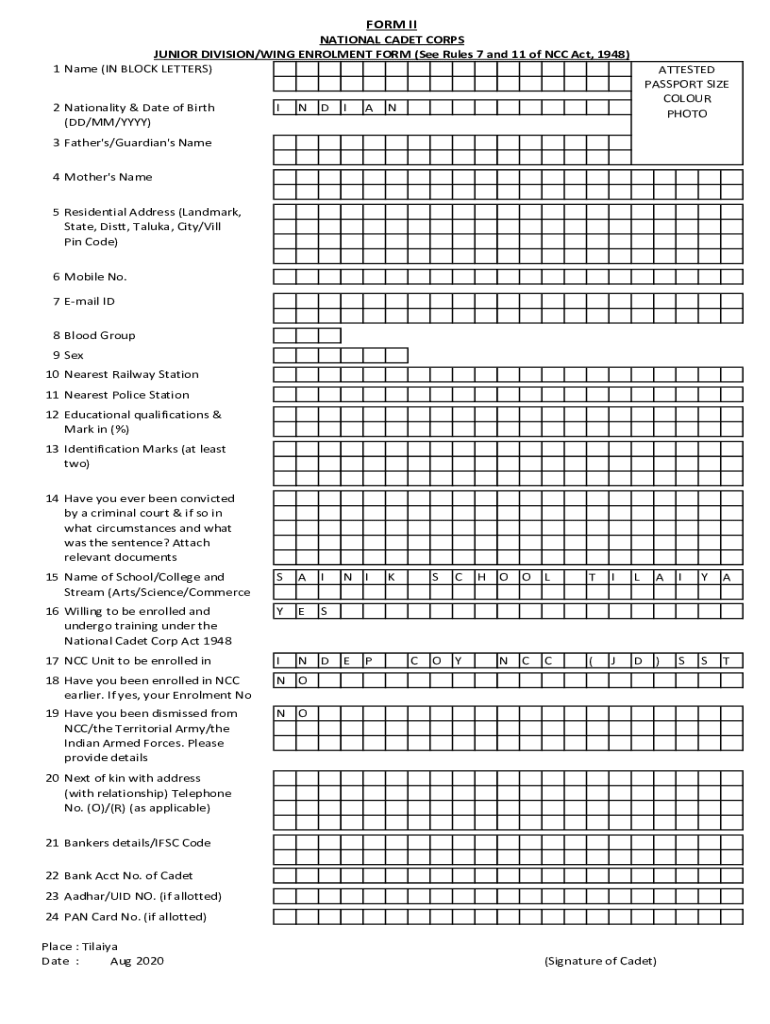
The "NCC Junior Division Wing Enrolment Form PDF" is used for enrolling cadets into the National Cadet Corps Junior Division/Wing. This form gathers essential personal data such as the applicant’s name, nationality, and educational background and includes sections for medical assessment and parental consent. This form is vital for verifying the eligibility of applicants, ensuring they meet the necessary criteria to join NCC activities, which are integral to its missions like promoting discipline and leadership among young individuals.
How to Use the NCC Junior Division Wing Enrolment Form PDF
Using the enrolment form involves several careful steps to ensure all necessary details are accurately provided:
- Personal Details: Fill out your full name, birthplace, and nationality.
- Educational Background: Include information about your current school and grade.
- Medical Fitness: Complete the section on medical fitness, ensuring a certified medical professional endorses it.
- Parental Consent: Obtain signatures from your parent or guardian, confirming their awareness and consent to the enrolment.
- Final Review: Carefully review all entered details before finalizing the submission to ensure accuracy and completeness.
Steps to Complete the NCC Junior Division Wing Enrolment Form PDF
Completing the form requires thorough attention to guidelines and legal requirements. Here is a step-by-step guide:
- Download and Print: Start by downloading the form in PDF format from the website and print it for manual completion.
- Gather Required Information: Prepare all personal, educational, and medical documents needed for reference.
- Complete the Sections: Carefully fill in each section, following provided instructions.
- Medical Examination: Schedule an appointment with a medical professional for the required examination and endorsement.
- Parental/Guardian Confirmation: Ensure a parent or guardian reads and signs the consent and indemnity sections.
- Submit the Form: Check for any errors and submit the form to the designated NCC office by the specified deadline.
Key Elements of the NCC Junior Division Wing Enrolment Form PDF
Critical elements embedded in this form ensure its completeness and compliance with NCC guidelines:
- Applicant Details: Name, age, address, and contact information.
- Education Information: Current and previous educational institutions and achievements.
- Medical Evaluation: Comprehensive health check details certifying fitness for physical activities.
- Parental Declarations: Consent acknowledging risks and responsibilities associated with NCC enrolment.
- Indemnity Bond: Agreement outlining responsibilities and liabilities of parties involved.
Who Typically Uses the NCC Junior Division Wing Enrolment Form PDF
The primary users of this enrolment form include:
- Eligible Students: Young individuals aspiring to become part of the NCC, typically aged 13-18 years.
- Parents/Guardians: Those responsible for providing consent and ensuring the applicant meets all prerequisites.
- Educational Institutions: Schools facilitating NCC programs often assist students in the enrolment process.
- NCC Officials: Administrative personnel in charge of processing enrolment forms and managing cadet applications.


Required Documents
To complete the enrolment form efficiently, ensure you have the following documents ready:
- Proof of Identity: A government-issued ID or certificate for verification.
- Educational Records: Latest report cards or school certificates.
- Medical Certificate: A certified document indicating medical fitness from a licensed practitioner.
- Parental Authorization: Written and signed consent from the applicant’s parent or guardian.
Legal Use of the NCC Junior Division Wing Enrolment Form PDF
Ensuring legal compliance when using the form is crucial:
- Accuracy: All provided information must be honest and accurate to avoid any legal issues.
- Data Protection: Maintain confidentiality of the applicant’s personal data and submit only through official channels.
- Consent: Properly endorsed consent forms are mandatory to legally bind the agreement between the involved parties.
Software Compatibility
The PDF format of the enrolment form ensures broad compatibility across several platforms:
- Document Editors: Software like Adobe Acrobat Reader or online platforms like DocHub can be used for editing.
- E-signature Tools: Systems offering digital signatures—adhering to ESIGN Act regulations—simplify the submission process.
- Cloud Storage Integration: Tools that allow direct uploads and sharing facilitate document access and distribution for all involved parties.




