Type text, add images, blackout confidential details, add comments, highlights and more.
02. Sign it in a few clicks
Draw your signature, type it, upload its image, or use your mobile device as a signature pad.
03. Share your form with others
Send it via email, link, or fax. You can also download it, export it or print it out.
How to use or fill out ccp415 46 with our platform
Ease of Setup
DocHub User Ratings on G2
Ease of Use
DocHub User Ratings on G2
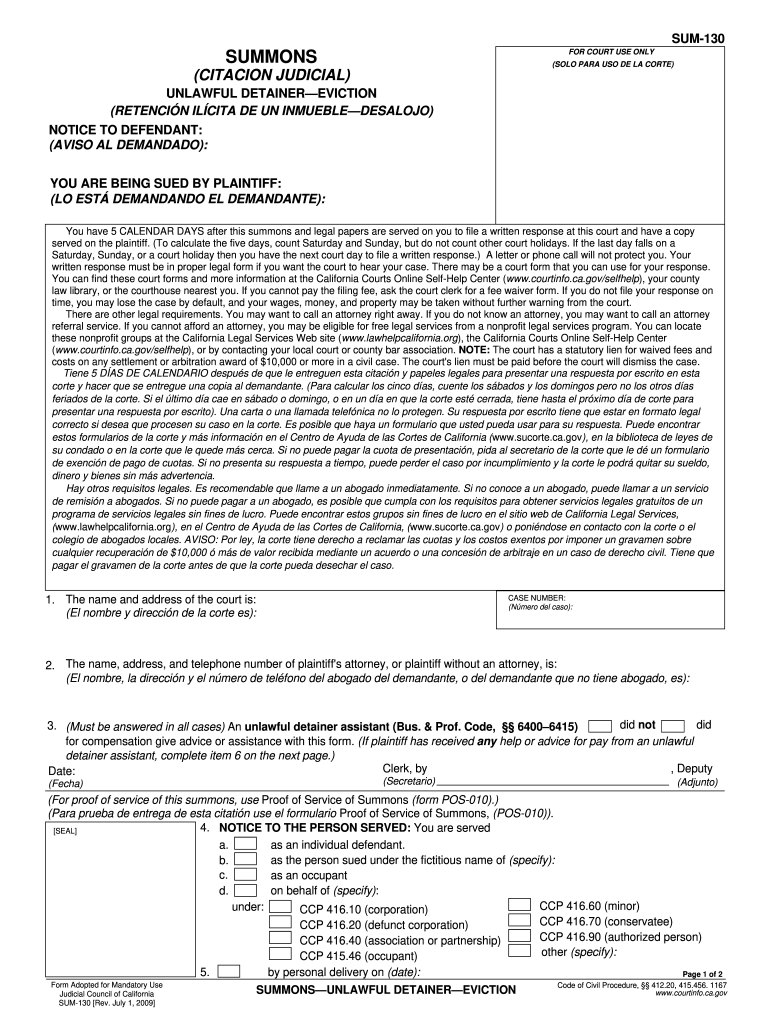
Click ‘Get Form’ to open the ccp415 46 document in the editor.
Begin by entering the name and address of the court in the designated fields. This information is crucial for proper identification of your case.
Next, fill in the case number. Ensure this matches any documentation you have received regarding your legal matter.
Provide the name, address, and telephone number of the plaintiff's attorney or, if unrepresented, the plaintiff's details. This section is essential for communication purposes.
Indicate whether an unlawful detainer assistant has provided assistance by checking 'did' or 'did not' as applicable. If assistance was received, complete item 6 on the next page.
Finally, review all entries for accuracy before saving or printing your completed form. Our platform allows you to easily modify any field as needed.
Start using our platform today to fill out your ccp415 46 form quickly and efficiently!
Form CP10 5Prejudgment claim of right to possession CaliforniaPrejudgment claim of right to possession formThe prejudgement claim of right to possession was not served in complianceCal code civ proc 474California Service by publication ProcedureCalifornia code of civil procedure findlawCalifornia Code of Civil Procedure PDF
Security and compliance
At DocHub, your data security is our priority. We follow HIPAA, SOC2, GDPR, and other standards, so you can work on your documents with confidence.
by PC Storti 1970 Cited by 4 SUBSTITUTED SERVICE OF PROCESS ON INDIVIDUALS: CODE OF CIVIL PROCEDURE SECTION 415.20(b). With the adoption of Senate Bill 503, California updates its law.Read more
Cookie consent notice
This site uses cookies to enhance site navigation and personalize your experience.
By using this site you agree to our use of cookies as described in our Privacy Notice.
You can modify your selections by visiting our Cookie and Advertising Notice.