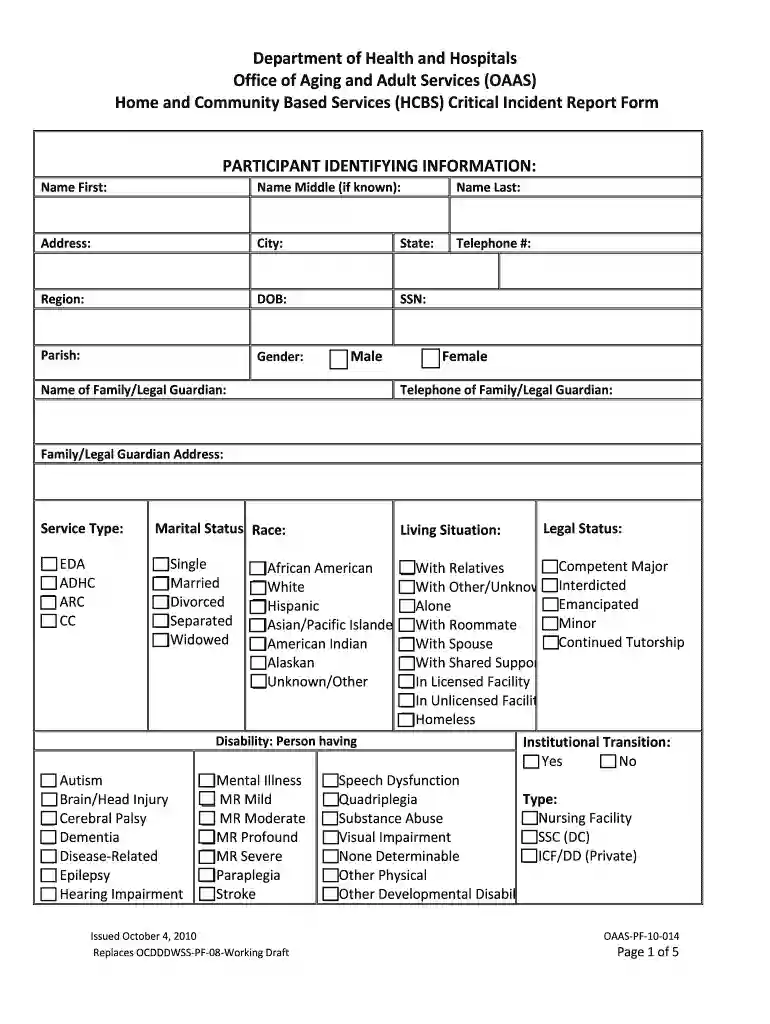
significant incident report example Preview on Page 1

Critical incident report template 2026

Here's how it works

  • 01. Edit your significant incident report example online

    Type text, add images, blackout confidential details, add comments, highlights and more.

  • 02. Sign it in a few clicks

    Draw your signature, type it, upload its image, or use your mobile device as a signature pad.

  • 03. Share your form with others

    Send critical incident via email, link, or fax. You can also download it, export it or print it out.

How to use or fill out critical incident report template with our platform

Form edit decoration
9.5
Ease of Setup
DocHub User Ratings on G2
9.0
Ease of Use
DocHub User Ratings on G2
  1. Click ‘Get Form’ to open the critical incident report template in the editor.
  2. Begin by filling out the 'Participant Identifying Information' section. Enter the participant's first, middle (if known), and last name, along with their address, city, state, telephone number, date of birth, and social security number.
  3. Next, complete the 'Incident Categories' section by checking all applicable boxes that describe the nature of the incident. Ensure you include any protective services allegations as required.
  4. In the 'Event Information' section, provide details about when and where the incident occurred. Include specific times and locations to ensure clarity.
  5. Finally, in the 'Critical Incident Description' area, write a comprehensive account of the incident. Be sure to include all relevant details such as who was involved and any follow-up actions taken.

Start using our platform today for free to streamline your critical incident reporting process!

be ready to get more

Complete this form in 5 minutes or less

Security and compliance

At DocHub, your data security is our priority. We follow HIPAA, SOC2, GDPR, and other standards, so you can work on your documents with confidence.

sample incident report

MassHealth Community Services Critical Incident Report

General Information (Complete one report form for each reportable critical incident. If multiple members are affected, list all affected members in Section 5.).Read more

Learn more
Incident Report Data Security

For this reason, we allow incidents to be reported anonymously. This is made available by the Anonymous checkbox on the report form itself. Once this is set,Read more

Learn more
If you believe that this page should be taken down, please follow our DMCA take down process here