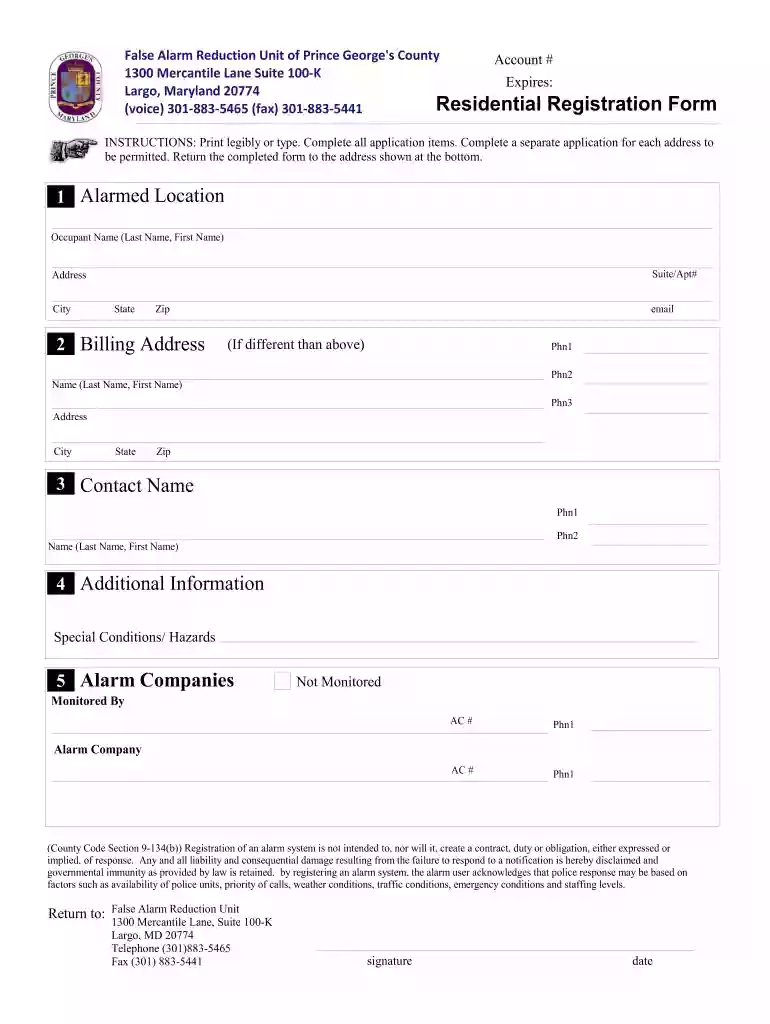
False Alarm Reduction Unit of Prince Georges County - princegeorgescountymd 2026

Get Form
princegeorgescomd alarm billing com Preview on Page 1

Here's how it works

01. Edit your princegeorgescomd alarm billing com online
Type text, add images, blackout confidential details, add comments, highlights and more.

02. Sign it in a few clicks
Draw your signature, type it, upload its image, or use your mobile device as a signature pad.

03. Share your form with others
Send pg county alarm permit via email, link, or fax. You can also download it, export it or print it out.

How to use or fill out False Alarm Reduction Unit of Prince Georges County - princegeorgescountymd with our platform

Form edit decoration
9.5
Ease of Setup
DocHub User Ratings on G2
9.0
Ease of Use
DocHub User Ratings on G2
  1. Click ‘Get Form’ to open it in the editor.
  2. Begin by filling out the 'Alarmed Location' section. Enter the occupant's name, suite or apartment number, and complete the address fields including city, state, and zip code.
  3. Next, move to the 'Billing Address' section. If different from the alarmed location, provide the billing name, address, email, and phone numbers.
  4. In the 'Contact Name' section, enter a contact person's name along with their phone numbers for any urgent communications.
  5. Fill out any 'Additional Information' regarding special conditions or hazards that may be relevant to your alarm system.
  6. Lastly, specify your alarm company details under 'Alarm Companies'. Indicate whether it is monitored or not and provide their contact information.
  7. Review all entries for accuracy before signing and dating the form at the bottom. Ensure you print legibly or type as instructed.

Start using our platform today to streamline your form completion process for free!

be ready to get more

Complete this form in 5 minutes or less

Get form

Got questions?

We have answers to the most popular questions from our customers. If you can't find an answer to your question, please contact us.
Contact us
False fire alarm fees and penalties First offense: A warning or a small fee (e.g., $50 $100). Repeat offenses: Fines can increase docHubly, sometimes docHubing $500 or more per incident.
In some cases, you might encounter fees for non-emergency services. For example, repeated false alarms from a malfunctioning alarm system can lead to fines. These fines are meant to discourage false alarms that waste resources and can range from $50 to $500 or more, depending on the local regulations.
If the alarm company is at fault for the false alarm, the alarm user will be charged and will have to recover the cost of the fee from the alarm company. A false alarm bill becomes delinquent after thirty days. A delinquent bill is due in 10 days and a Final Notice bill is due in 10 days.
First, Dont panic. Carefully enter your disarm code to reset your system. Wait for your alarm monitoring company to call and give them your password or ID number to cancel. Do not leave your home or business until you have talked with your alarm monitoring company!
A majority of false alarms are caused by the user entering an incorrect keypad code. To prevent false alarms, create an alarm code that every member of the family can remember. 2. Keep pets in their place or use pet immune sensors.

Security and compliance

At DocHub, your data security is our priority. We follow HIPAA, SOC2, GDPR, and other standards, so you can work on your documents with confidence.

Learn more
ccpa2
pci-dss
gdpr-compliance
hipaa
soc-compliance
be ready to get more

Complete this form in 5 minutes or less

Get form