Type text, add images, blackout confidential details, add comments, highlights and more.
02. Sign it in a few clicks
Draw your signature, type it, upload its image, or use your mobile device as a signature pad.
03. Share your form with others
Send tvs cgaf ve 2016 via email, link, or fax. You can also download it, export it or print it out.
How to use or fill out tvs cgaf ve 2016 with our platform
Ease of Setup
DocHub User Ratings on G2
Ease of Use
DocHub User Ratings on G2
Click ‘Get Form’ to open the tvs cgaf ve 2016 in the editor.
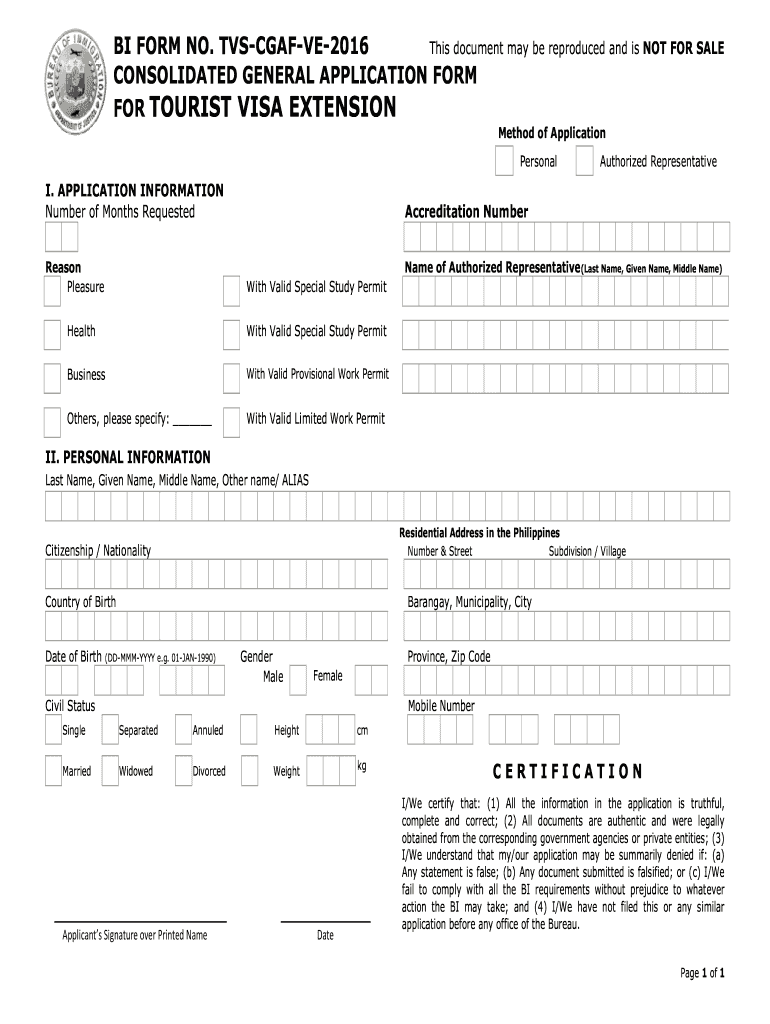
Begin by filling out the 'APPLICATION INFORMATION' section. Specify the number of months requested and select a reason for your application, such as pleasure, health, business, or others. If applicable, include details about your authorized representative.
Proceed to the 'PERSONAL INFORMATION' section. Enter your last name, given name, middle name, and any aliases. Provide your residential address in the Philippines, including street number, subdivision/village, barangay, municipality/city, province, and zip code.
Fill in your citizenship/nationality and country of birth. Include your date of birth in the format DD-MMM-YYYY. Indicate your gender and civil status by selecting from the options provided.
Complete the height and weight fields in centimeters and kilograms respectively. Finally, sign over your printed name and date the application.
Review all entries for accuracy before submitting to ensure compliance with BI requirements.
Start using our platform today to fill out your tvs cgaf ve 2016 form online for free!
CGAF FormCgaf student visaBI Form CGAF-001 Rev 26 months extension VisaHow long can I extend my visa in the PhilippinesHow much is visaHow long can a foreigner stay in the Philippines with visaECC-B
Security and compliance
At DocHub, your data security is our priority. We follow HIPAA, SOC2, GDPR, and other standards, so you can work on your documents with confidence.
Nov 14, 2023 CGAF BU C:B TAAT\F?@DAE. 044 ABDE BU I@EE^ $UTD@EL. %BC@U $UTD@E CGAF BB?L. I@T`EL TD` BU aG I@DVAFE. 0.3 bA BU I@EE**************+ /9*18 13Read more
Feb 24, 2016 Weve picked a lot of great bands for you to enjoy at the CGAF. YOU CANT. DO ANYTHING. REALLY. UNLESS YOU. KNOW WHO. YOU ARE. Page 47. 47. F.Read more
Cookie consent notice
This site uses cookies to enhance site navigation and personalize your experience.
By using this site you agree to our use of cookies as described in our Privacy Notice.
You can modify your selections by visiting our Cookie and Advertising Notice.