




Here's how it works

01. Edit your mybenefits dhw idaho gov online
Type text, add images, blackout confidential details, add comments, highlights and more.

02. Sign it in a few clicks
Draw your signature, type it, upload its image, or use your mobile device as a signature pad.

03. Share your form with others
Send mybenefits forms dhw idaho via email, link, or fax. You can also download it, export it or print it out.
How to use or fill out - healthandwelfare idaho with our platform

- Click ‘Get Form’ to open it in the editor.
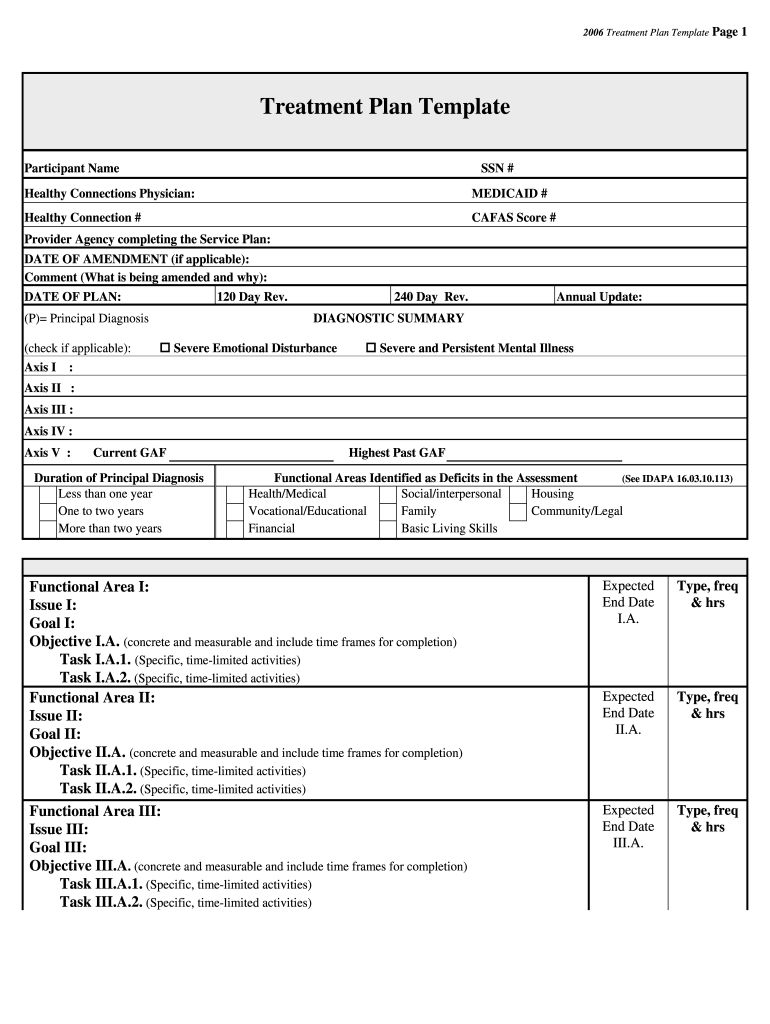
- Begin by entering the participant's name and SSN in the designated fields at the top of the form. This information is crucial for identification purposes.
- Fill in the Healthy Connections Physician, Medicaid number, and Healthy Connection number. Ensure accuracy as these details are essential for processing.
- Complete the diagnostic summary section by checking applicable boxes for emotional disturbances or mental illnesses. This helps in understanding the participant's needs.
- For each functional area identified, specify issues, goals, objectives, and tasks. Make sure objectives are concrete and measurable with clear time frames for completion.
- Finally, gather signatures from all participants involved in developing the treatment plan. This confirms agreement and consent for information exchange.
Start using our platform today to streamline your document editing and form completion process for free!
Fill out - healthandwelfare idaho online
It's free
It's free
Security and compliance
At DocHub, your data security is our priority. We follow HIPAA, SOC2, GDPR, and other standards, so you can work on your documents with confidence.
Learn more




