Type text, add images, blackout confidential details, add comments, highlights and more.
02. Sign it in a few clicks
Draw your signature, type it, upload its image, or use your mobile device as a signature pad.
03. Share your form with others
Send army erb via email, link, or fax. You can also download it, export it or print it out.
How to use or fill out enlisted record brief with our platform
Ease of Setup
DocHub User Ratings on G2
Ease of Use
DocHub User Ratings on G2
Click ‘Get Form’ to open the enlisted record brief in the editor.
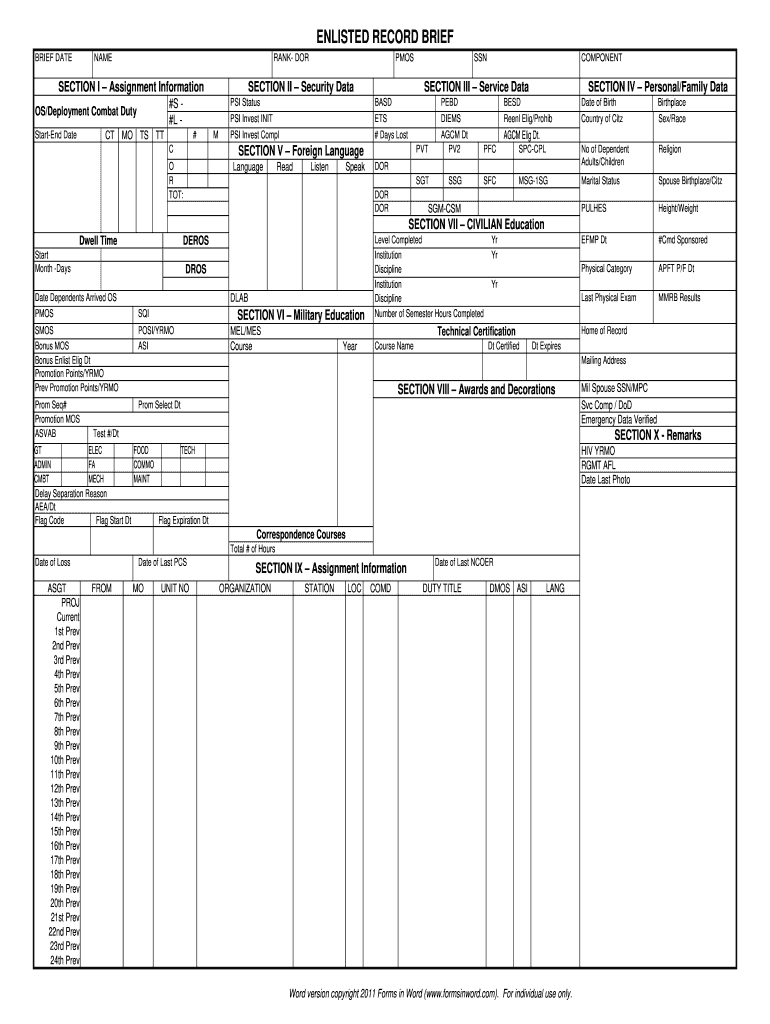
Begin with Section I – Assignment Information. Fill in your Start-End Date and CT, MO as required.
Proceed to Section II – Security Data. Enter your OS/Deployment Combat Duty details, PSI Status, and any language proficiency levels for reading, listening, and speaking.
In Section III – Service Data, input your BASD, ETS, and # Days Lost accurately.
Move to Section IV – Personal/Family Data. Complete fields such as Date of Birth, Country of Citizenship, Marital Status, and number of dependents.
Continue with Section VI – Military Education. Document your courses completed along with the institution names and number of semester hours.
Finally, review all sections for accuracy before saving or sharing your completed enlisted record brief.
Start using our platform today for free to streamline your document editing experience!
iPERMSEnlisted Record Brief ArmyArmy ERB loginEnlisted record brief NavyEnlisted record brief air forceWhere can I find my enlisted record briefEnlisted Record Brief National GuardSRB Army
Security and compliance
At DocHub, your data security is our priority. We follow HIPAA, SOC2, GDPR, and other standards, so you can work on your documents with confidence.
Cookie consent notice
This site uses cookies to enhance site navigation and personalize your experience.
By using this site you agree to our use of cookies as described in our Privacy Notice.
You can modify your selections by visiting our Cookie and Advertising Notice.