




Here's how it works

01. Edit your illinois nonprofit annual report online
Type text, add images, blackout confidential details, add comments, highlights and more.

02. Sign it in a few clicks
Draw your signature, type it, upload its image, or use your mobile device as a signature pad.

03. Share your form with others
Send sos wa gov annual report via email, link, or fax. You can also download it, export it or print it out.
How to use or fill out non corporation report with our platform

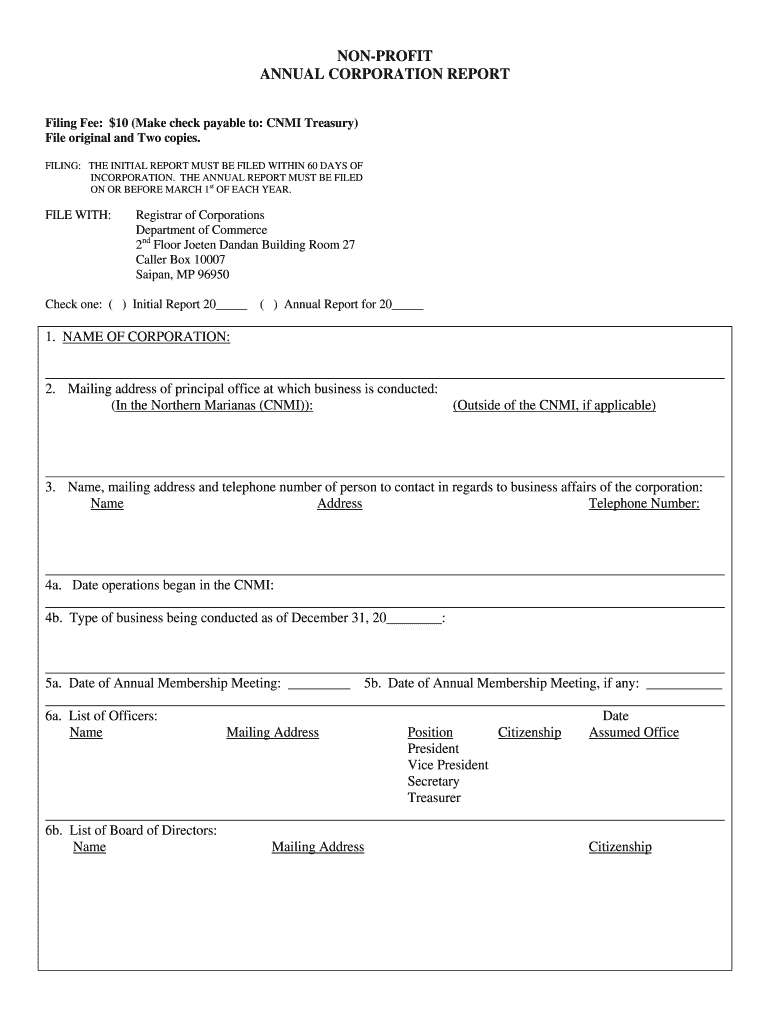
- Click ‘Get Form’ to open the non corporation report in the editor.
- Begin by selecting whether this is an Initial Report or an Annual Report for the specified year. Mark the appropriate checkbox.
- Fill in the NAME OF CORPORATION and provide the mailing address of your principal office, including any applicable addresses outside of CNMI.
- Enter the contact person's name, mailing address, and telephone number for business affairs.
- Indicate the date operations began in CNMI and specify the type of business being conducted as of December 31 of the reporting year.
- List details for your Annual Membership Meeting, including dates and names of officers and board members, along with their positions and citizenship.
- Provide information on authorized capital, issued capital stock, and paid-up capital amounts. If not applicable, state 'None'.
- List all members with their names, mailing addresses, and number of shares owned. Attach a separate listing if necessary.
- Detail any land owned or leased within CNMI by your corporation, including legal descriptions and purposes.
- Complete the acknowledgment section by signing as President, Secretary, or Treasurer. Ensure to have it notarized.
Start using our platform today to streamline your non corporation report completion for free!
Fill out non corporation report online
It's free
It's free
Security and compliance
At DocHub, your data security is our priority. We follow HIPAA, SOC2, GDPR, and other standards, so you can work on your documents with confidence.
Learn more




