Type text, add images, blackout confidential details, add comments, highlights and more.
02. Sign it in a few clicks
Draw your signature, type it, upload its image, or use your mobile device as a signature pad.
03. Share your form with others
Send it via email, link, or fax. You can also download it, export it or print it out.
How to use or fill out Form 211 - PDS 100318 with our platform
Ease of Setup
DocHub User Ratings on G2
Ease of Use
DocHub User Ratings on G2
Click ‘Get Form’ to open Form 211 - PDS 100318 in the editor.
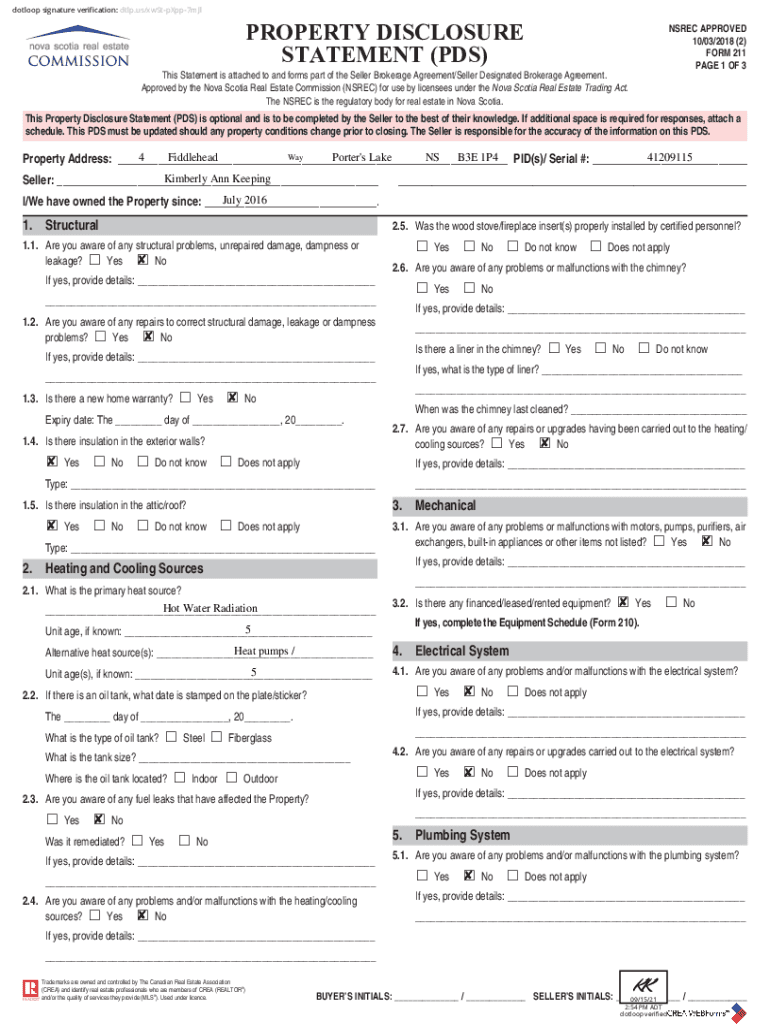
Begin by entering the property address and PID(s) in the designated fields at the top of the form.
Fill in the seller's name and ownership date. Ensure all information is accurate as it reflects your knowledge of the property.
Proceed through each section, answering questions regarding structural issues, heating sources, plumbing, and electrical systems. Use checkboxes for 'Yes' or 'No' responses.
If additional space is needed for details, utilize our platform’s text box feature to provide comprehensive answers.
Review all entries for accuracy before signing. Utilize our signature tool to complete the document electronically.
Start filling out your Form 211 - PDS 100318 today for free using our platform!
How can I file a whistleblower claim with the IRS and receive a cash award? To file a claim, whistleblowers must sign and mail IRS Form 211 to the IRSs Office of the Whistleblower in Ogden, Utah. The Office will not accept faxed or emailed claims.
How do I fill out a PDS form?
Entries in the PDS may be filled out through handwriting or via typewriter/computer. If handwritten, entries should be in block capital (e.g. PRINT) format using a pen. All information should be provided accurately. Do not leave blank entries.
What is a PDS sample?
This document is a personal data sheet that collects an individuals personal and family information.
Who needs to fill out a PDS form?
1. Job applicants who need to provide their personal data for employment. 2. Current employees for updating their records with the organization.
What to put in special skills and hobbies in pds pdf?
In your Data Sheet (PDS), list skills and hobbies that reflect your strengths and support your job application. Special skills include computer proficiency, public speaking, data analysis, critical thinking, and time management skills.
Related Searches
Irs form 211 pds 100318 pdfForm 211 pds 100318 pdf downloadIRS Whistleblower Form 211 PDF free downloadForm 211 IRS PDFIRS Form 211 fillableForm 211 pds 100318 2021Form 211 pds 100318 instructionsForm 211 pds 100318 2022
Security and compliance
At DocHub, your data security is our priority. We follow HIPAA, SOC2, GDPR, and other standards, so you can work on your documents with confidence.
You can fill out PDF forms in Google Drive on your Android device. On your Android device, open the Google Drive app. Tap the PDF that you want to fill out. At the bottom right, tap Edit. Form Filling . Enter your information in the PDF form. At the top right, tap Save. To save as a copy, click More.
Related links
100010 Office of the President Position Job Description E-
100010 Office of the President Position Job Description 211 To search by Keyword, please use the DocHub PDF search function above. 100318 Student Success Spec
Astatine-211 radiolabelling chemistry: from basics to - PMC
by M Vanermen 2024 Cited by 33 Astatine-211 is currently considered as one of the most promising alpha particle emitters for application in targeted alpha therapy (TAT) of cancers
Cookie consent notice
This site uses cookies to enhance site navigation and personalize your experience.
By using this site you agree to our use of cookies as described in our Privacy Notice.
You can modify your selections by visiting our Cookie and Advertising Notice.