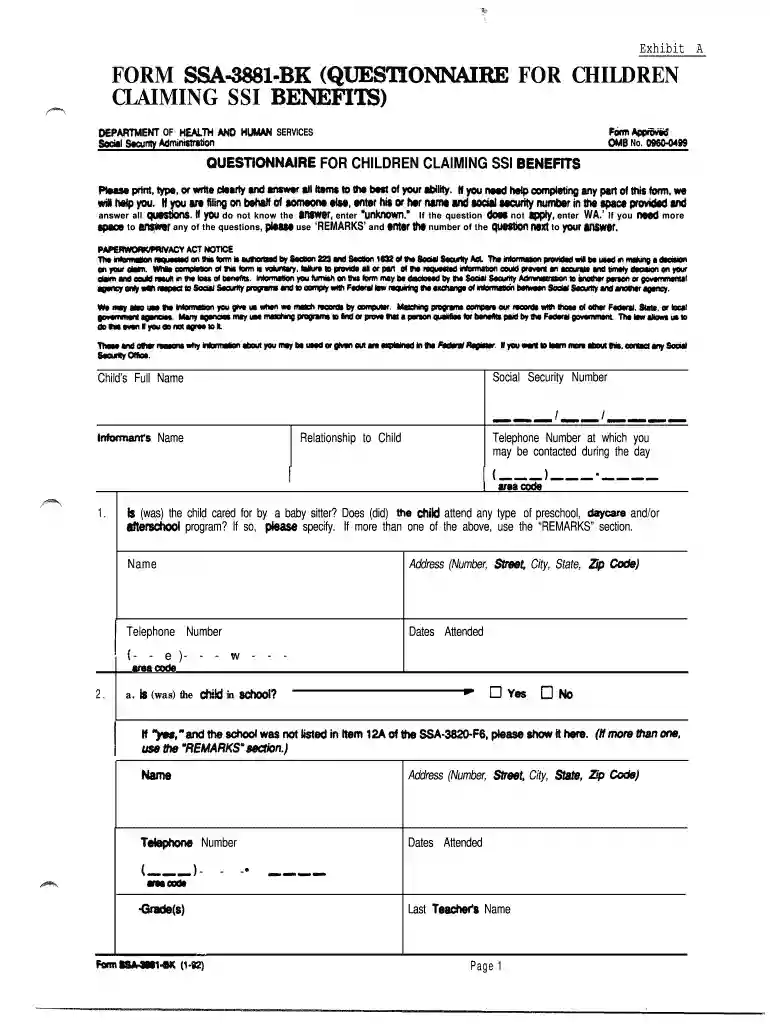
3881 Preview on Page 1

Social security form 3881-2026

Here's how it works

  • 01. Edit your 3881 online

    Type text, add images, blackout confidential details, add comments, highlights and more.

  • 02. Sign it in a few clicks

    Draw your signature, type it, upload its image, or use your mobile device as a signature pad.

  • 03. Share your form with others

    Send ssi application form via email, link, or fax. You can also download it, export it or print it out.

How to use or fill out social security form 3881 with our platform

Form edit decoration
9.5
Ease of Setup
DocHub User Ratings on G2
9.0
Ease of Use
DocHub User Ratings on G2
  1. Click ‘Get Form’ to open the social security form 3881 in the editor.
  2. Begin by entering the child's full name and Social Security Number in the designated fields. Ensure accuracy as this information is crucial for processing.
  3. Fill out your relationship to the child and provide a contact telephone number where you can be reached during the day.
  4. Answer questions regarding childcare arrangements, including whether a babysitter was involved or if the child attended preschool or daycare. Use the 'REMARKS' section for additional details if necessary.
  5. Complete sections about educational involvement, including any special education programs, counseling, or tutoring services received by the child. Be sure to include names and contact information for relevant professionals.
  6. If applicable, provide details about any vocational rehabilitation services received by the child, including counselor information and service dates.
  7. Finally, review all entries for completeness and accuracy before submitting. Utilize our platform's features to save your progress or share it with others for review.

Start filling out your social security form 3881 today using our platform for free!

be ready to get more

Complete this form in 5 minutes or less

Got questions?

We have answers to the most popular questions from our customers. If you can't find an answer to your question, please contact us.

Most eSignature solutions require users to have a paid subscription. With DocHub, there are two options for you to add an electronic signature to your social security form 3881 at no cost:

  • You can do it during a 7-day trial period;
  • You can sign up for a free plan.

The second option, though, has restrictions on the number of signatures, sign requests, emails, and documents for adjusting available per month. You can check for full details here.

Document editing with DocHub is equally convenient on desktop and mobile devices. You only need an internet browser to modify your social security form 3881 on Android. Open our website and sign in to access the tools you require. Add your file and introduce your intended changes. After that, you can keep your form in your file storage or send it out right away.

Security and compliance

At DocHub, your data security is our priority. We follow HIPAA, SOC2, GDPR, and other standards, so you can work on your documents with confidence.

Related links

Social Security Forms

Common Social Security Administration forms for public use. ... SSA-3881-BK, Questionnaire for Children Claiming SSI Benefits.

Learn more
History of rail transportation in the United States - Wikipedia

This article is part of the history of rail transport by country series. Wooden railroads, called wagonways, were built in the United States starting from ...

Learn more
View/Open - eCommons@Cornell

Form SSA-4290 or the Individual Plan for Employment (formerly IWRP) will be used to gather the necessary information. Information considered includes: ...

Learn more
If you believe that this page should be taken down, please follow our DMCA take down process here