Type text, add images, blackout confidential details, add comments, highlights and more.
02. Sign it in a few clicks
Draw your signature, type it, upload its image, or use your mobile device as a signature pad.
03. Share your form with others
Send it via email, link, or fax. You can also download it, export it or print it out.
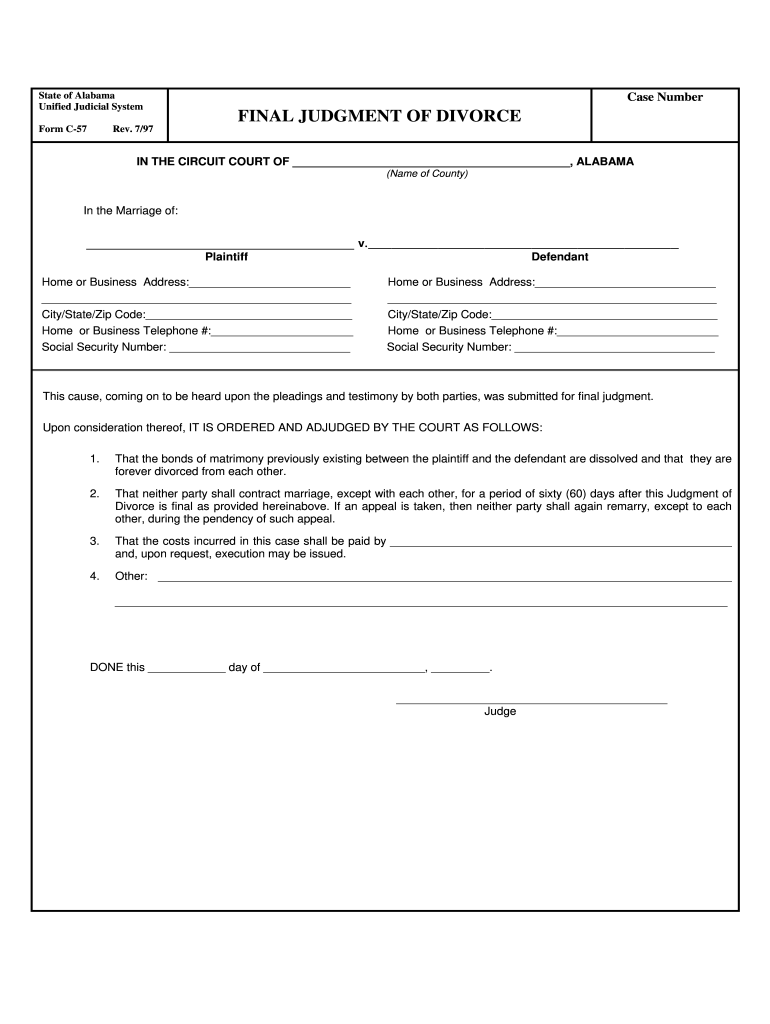
How to use or fill out fillable form C-57 with our platform
Ease of Setup
DocHub User Ratings on G2
Ease of Use
DocHub User Ratings on G2
Click ‘Get Form’ to open it in the editor.
Begin by entering the case number at the top of the form. This is essential for identifying your divorce case.
In the section labeled 'IN THE CIRCUIT COURT OF', input the name of the county where your case is filed.
Fill in the names of both parties involved in the marriage under 'In the Marriage of'. Ensure accuracy to avoid any legal issues.
Complete the home or business addresses, including city, state, and zip code for both plaintiff and defendant. This information is crucial for court records.
Enter contact telephone numbers and social security numbers for both parties as required by the form.
Review all sections carefully before finalizing. Make sure all information is correct and complete.
Start filling out your form C-57 online for free today!
Printable fillable form c 57Free printable fillable form c 57Fillable form c 57 templateFillable form c 57 pdfFillable form c 57 alabama pdfFillable form c 57 onlineFillable form c 57 freeFillable form c 57 alabama
Security and compliance
At DocHub, your data security is our priority. We follow HIPAA, SOC2, GDPR, and other standards, so you can work on your documents with confidence.
In order to help insure that you are properly reimbursed, list each item of expense below -- whether or not you obtained a receipt (wherever possible obtain.Read more
7-1 PURPOSE. This chapter provides definitions, responsibilities, and procedures for agency components to initiate, review, classify, publish, audit andRead more
Cookie consent notice
This site uses cookies to enhance site navigation and personalize your experience.
By using this site you agree to our use of cookies as described in our Privacy Notice.
You can modify your selections by visiting our Cookie and Advertising Notice.