Type text, add images, blackout confidential details, add comments, highlights and more.
02. Sign it in a few clicks
Draw your signature, type it, upload its image, or use your mobile device as a signature pad.
03. Share your form with others
Send contract sale via email, link, or fax. You can also download it, export it or print it out.
How to use or fill out va escape clause with our platform
Ease of Setup
DocHub User Ratings on G2
Ease of Use
DocHub User Ratings on G2
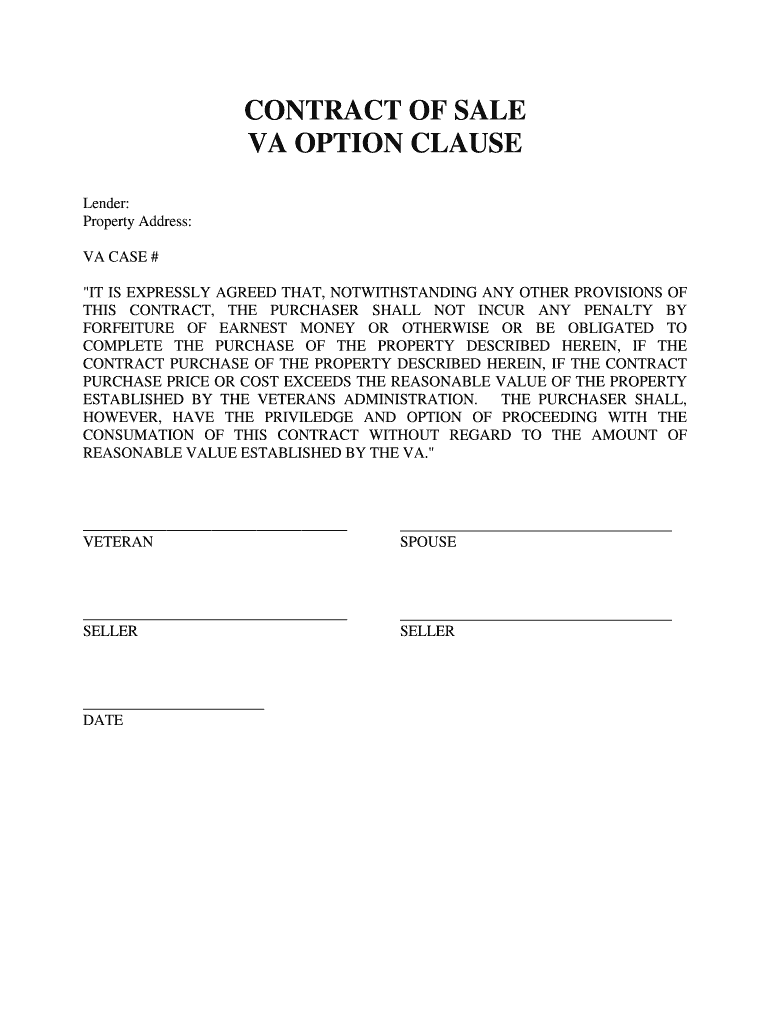
Click ‘Get Form’ to open the VA escape clause in the editor.
Begin by entering the lender's name in the designated field. This identifies who is providing the financing for the property.
Next, input the property address accurately. This ensures that all parties are clear about which property is being discussed.
Fill in the VA case number, which is essential for tracking and processing your application with the Veterans Administration.
Review the clause carefully. It states that you will not incur penalties if you choose not to complete the purchase due to price discrepancies. Ensure you understand this provision.
Sign and date the document in the appropriate fields provided for both veteran and seller signatures, confirming your agreement to these terms.
Start using our platform today to fill out your VA escape clause easily and for free!
Va escape clause pdfVA Escape Clause PDF free downloadVA Escape Clause formVa escape clause exampleVA amendatory clause PDFVa escape clause redditDoes seller have to sign VA Escape clauseWhen does the VA Escape Clause need to be signed
Security and compliance
At DocHub, your data security is our priority. We follow HIPAA, SOC2, GDPR, and other standards, so you can work on your documents with confidence.
Jan 14, 2026 If the loan papers are signed before the Notice of Value is received, the VA Escape Clause allows the buyer to back out of the purchase withoutRead more
Other Insurance Clauses In Garage Liability Policies
It is required by statute in Virginia that all motor vehicle liability policies issued in the State contain such a clause3 and this coverage will be read intoRead more
Cookie consent notice
This site uses cookies to enhance site navigation and personalize your experience.
By using this site you agree to our use of cookies as described in our Privacy Notice.
You can modify your selections by visiting our Cookie and Advertising Notice.