Type text, add images, blackout confidential details, add comments, highlights and more.
02. Sign it in a few clicks
Draw your signature, type it, upload its image, or use your mobile device as a signature pad.
03. Share your form with others
Send it via email, link, or fax. You can also download it, export it or print it out.
How to use or fill out form m660 26nr 2010 rediform with our platform
Ease of Setup
DocHub User Ratings on G2
Ease of Use
DocHub User Ratings on G2
Click ‘Get Form’ to open the m660 26nr 2010 rediform in the editor.
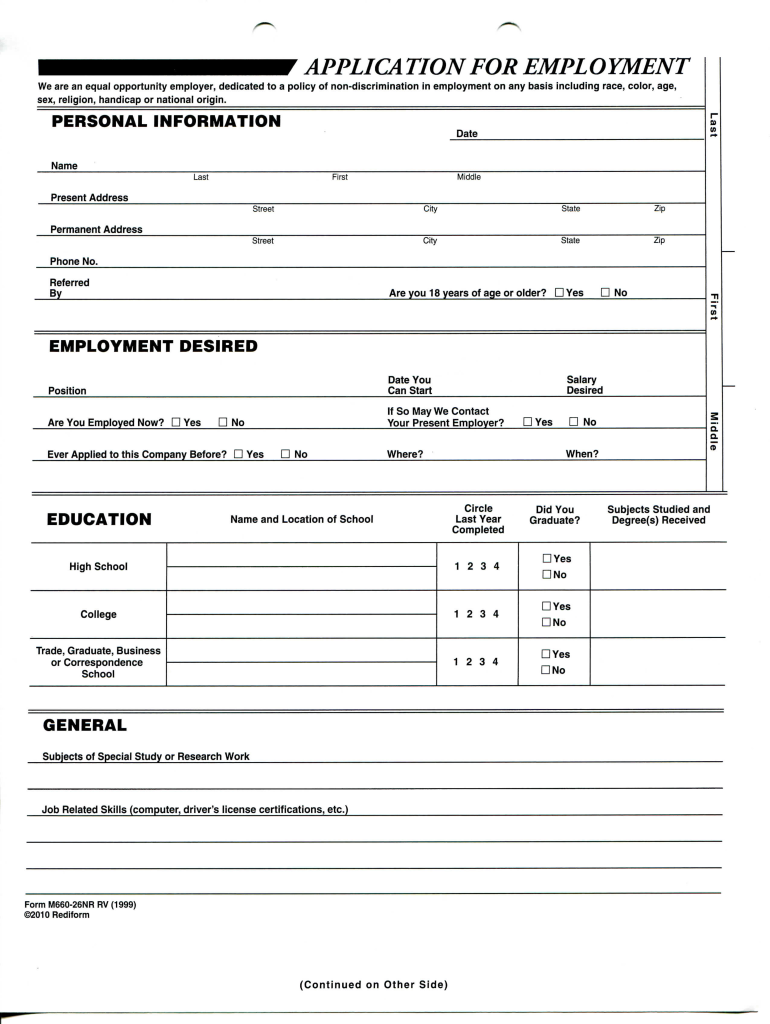
Begin by filling out your personal information. Enter your name, address, and phone number in the designated fields. Ensure accuracy as this information is crucial for your application.
In the 'Employment Desired' section, indicate whether you are currently employed and provide details about your desired salary and start date. This helps employers understand your expectations.
Complete the 'Education' section by listing schools attended and degrees received. Be sure to check if you graduated from high school or college.
Fill out your employment history by listing your last four employers, starting with the most recent. Include dates of employment, positions held, and reasons for leaving.
Provide references who can vouch for your character and work ethic. Ensure they are not related to you and have known you for at least a year.
Finally, review the authorization section carefully before signing. This confirms that all information provided is accurate and acknowledges company policies.
Start using our platform today to fill out form m660 26nr 2010 rediform online for free!
Fill out form m660 26nr 2010 rediform online It's free
Form M660 26NR is used to report income, deductions, and credits for nonresidents of California who have earned income from California sources and are required to file a California tax return.
by A You 2010 Job Related Skills (computer, drivers license certifications, etc.) Form M660-26NR RV (1999). 2010 Rediform I understand that acceptance of this formRead more
Cookie consent notice
This site uses cookies to enhance site navigation and personalize your experience.
By using this site you agree to our use of cookies as described in our Privacy Notice.
You can modify your selections by visiting our Cookie and Advertising Notice.