Type text, add images, blackout confidential details, add comments, highlights and more.
02. Sign it in a few clicks
Draw your signature, type it, upload its image, or use your mobile device as a signature pad.
03. Share your form with others
Send 3996 usps via email, link, or fax. You can also download it, export it or print it out.
How to use or fill out 3996 with our platform
Ease of Setup
DocHub User Ratings on G2
Ease of Use
DocHub User Ratings on G2
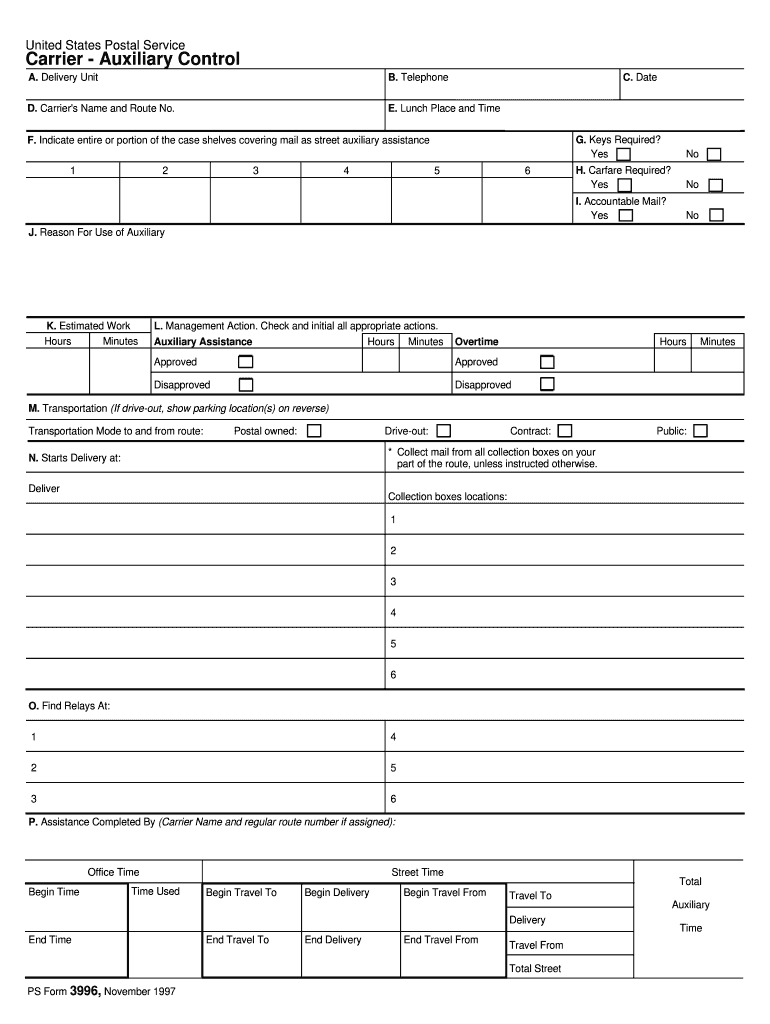
Click ‘Get Form’ to open the 3996 in the editor.
Begin by entering the delivery unit name in section A, followed by the telephone number in section B and the date in section C.
In section D, input your name and route number. For lunch details, fill out section E with your lunch place and time.
Indicate which case shelf requires assistance in section F by placing an 'X' next to the appropriate number. Specify if keys (G) or carfare (H) are needed for delivery.
For accountable mail, mark yes or no in section I. In section J, provide a reason for requesting auxiliary assistance.
Estimate work hours and minutes in section K. Management will complete section L after reviewing your request.
Fill out transportation details in section M and indicate starting points for delivery in sections N and O.
Finally, complete sections P with all relevant time entries before submitting the form to your manager.
Start using our platform today to streamline your form completion process for free!
20 U.S. Code 3996 - Submission of applications - LII
An applicant within a State that desires to receive a grant under this part [1] shall submit an application prepared in accordance with section 3995 of thisRead more
Cookie consent notice
This site uses cookies to enhance site navigation and personalize your experience.
By using this site you agree to our use of cookies as described in our Privacy Notice.
You can modify your selections by visiting our Cookie and Advertising Notice.