Printable financial forms 2025

Get Form
financial forms Preview on Page 1

Here's how it works

01. Edit your financial forms online
Type text, add images, blackout confidential details, add comments, highlights and more.

02. Sign it in a few clicks
Draw your signature, type it, upload its image, or use your mobile device as a signature pad.

03. Share your form with others
Send financial forms examples via email, link, or fax. You can also download it, export it or print it out.

How to use or fill out printable financial forms with our platform

Form edit decoration
9.5
Ease of Setup
DocHub User Ratings on G2
9.0
Ease of Use
DocHub User Ratings on G2
  1. Click ‘Get Form’ to open it in the editor.
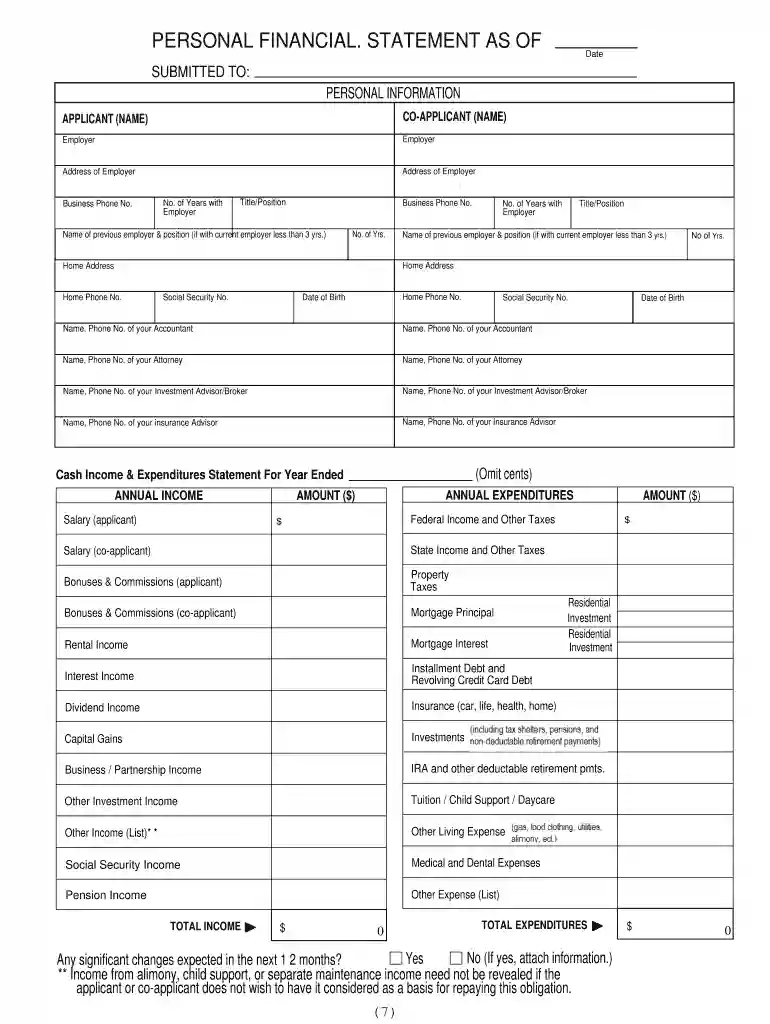
  2. Begin by entering your personal information in the designated fields, including your name, co-applicant's name, and contact details. Ensure accuracy as this information is crucial for processing.
  3. Proceed to the employment section. Fill in your current employer's details, including business phone number and title. If you have changed jobs recently, provide information about your previous employer.
  4. Next, move on to the income and expenditures section. Carefully list all sources of income such as salary, bonuses, and any other earnings. Then detail your annual expenditures including taxes and living expenses.
  5. Complete the balance sheet by entering your assets and liabilities. This includes cash in bank accounts, real estate investments, and any debts owed.
  6. Finally, review all entries for accuracy before saving or printing the completed form. Utilize our platform’s features to ensure everything is correctly filled out.

Start using our platform today for free to streamline your financial form completion!

be ready to get more

Complete this form in 5 minutes or less

Get form

Got questions?

We have answers to the most popular questions from our customers. If you can't find an answer to your question, please contact us.
Contact us

With DocHub, you can rapidly approve your personal financial statement or any other paperwork on iOS, even without setting up additional applications. You can access your DocHub account from any web-connected browser and complete and sign your form in any preferred method with just a few clicks.

With DocHub, you have several convenient methods to edit your personal financial statement form online. You can drag and drop the form and edit it straight at the DocHub website or use our browser extension to fill out your form immediately. On top of that, you can edit your PDF on your smartphone, as DocHub is compatible with all the available mobile platforms.

If you mailed a tax return and havent heard from them, please check expected wait times for current IRS operations and services. Are tax forms available at my local Post Office? No, Post Offices do not have tax forms available for customers.
Picking up copies at an IRS Taxpayer Assistance Center. Going to the IRS Small Business and Self-Employed Tax Center page. Requesting copies by phone 800-TAX-FORM (800-829-3676). Hours of operation are 7 a.m. to 10 p.m., Monday-Friday, your local time except Alaska and Hawaii which are Pacific time.
Colleges and career schools use the FAFSA form to determine how much financial aid youre eligible to receive, which could include grants, scholarships, work-study funds, and loans. You must apply for aid every year, but with the right information in hand, its easy.
be ready to get more

Complete this form in 5 minutes or less

Get form

People also ask

Visit the Forms, instructions publications page to download products or call 800-829-3676 to place your order.
These forms and publications are available on the Internet, on CD-ROM, through fax on demand, over the telephone, through the mail, at local IRS offices, at some banks, post offices, and libraries, and even at some grocery stores, copy centers and office supply stores.
Get the current filing years forms, instructions, and publications for free from the IRS. You can also find printed versions of many forms, instructions, and publications in your community for free at: Libraries. IRS Taxpayer Assistance Centers.
Download income tax forms You can e-file directly to the IRS and download or print a copy of your tax return. Federal tax filing is free for everyone with no limitations, and state filing is only $14.99. Join the millions of taxpayers who have filed securely using FreeTaxUSA.
The four primary types of financial statements are: balance sheet, income statement, cash flow statement, and statement of shareholders equity.

personal financial statement template