Type text, add images, blackout confidential details, add comments, highlights and more.
02. Sign it in a few clicks
Draw your signature, type it, upload its image, or use your mobile device as a signature pad.
03. Share your form with others
Send fmla iowa via email, link, or fax. You can also download it, export it or print it out.
How to use or fill out fmla paperwork iowa with our platform
Ease of Setup
DocHub User Ratings on G2
Ease of Use
DocHub User Ratings on G2
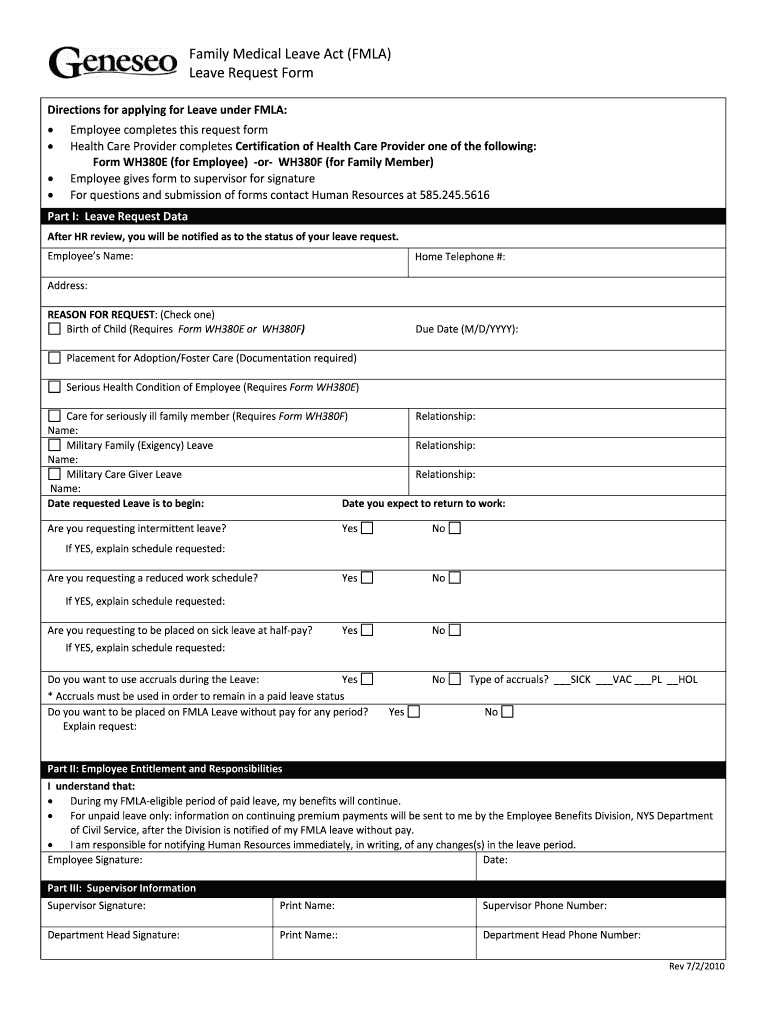
Click ‘Get Form’ to open the FMLA Leave Request Form in the editor.
Begin by filling out Part I: Leave Request Data. Enter your name, address, and home telephone number. Select the reason for your leave by checking the appropriate box.
Provide additional details such as the due date for childbirth or the name and relationship of a seriously ill family member if applicable.
Indicate the dates you wish to start and return from leave. If requesting intermittent leave or a reduced work schedule, provide an explanation in the designated fields.
Complete Part II by acknowledging your responsibilities regarding benefits during your leave. Sign and date this section.
Finally, ensure that your supervisor completes Part III by signing and providing their contact information before submitting the form to Human Resources.
Start using our platform today to easily complete your FMLA paperwork for free!
FMLA form (PDF)FMLA formsPrintable FMLA formsWhat conditions qualify for FMLA leaveFMLA forms for EmployeePrintable FMLA forms for family memberVA FMLA form pdfFMLA application
Security and compliance
At DocHub, your data security is our priority. We follow HIPAA, SOC2, GDPR, and other standards, so you can work on your documents with confidence.
When work absence is required due to health, University policy and best practices should apply to the use of FMLA, sick, vacation and unpaid leave.Read more
There are five DOL optional-use FMLA certification forms. Certification of Healthcare Provider for a Serious Health Condition. Employees serious healthRead more
Cookie consent notice
This site uses cookies to enhance site navigation and personalize your experience.
By using this site you agree to our use of cookies as described in our Privacy Notice.
You can modify your selections by visiting our Cookie and Advertising Notice.