Academy fence 2026

Get Form
academy fence Preview on Page 1

Here's how it works

01. Edit your form online
Type text, add images, blackout confidential details, add comments, highlights and more.
02. Sign it in a few clicks
Draw your signature, type it, upload its image, or use your mobile device as a signature pad.
03. Share your form with others
Send it via email, link, or fax. You can also download it, export it or print it out.

How to use or fill out academy fence with our platform

Form edit decoration
9.5
Ease of Setup
DocHub User Ratings on G2
9.0
Ease of Use
DocHub User Ratings on G2
  1. Click ‘Get Form’ to open the academy fence document in the editor.
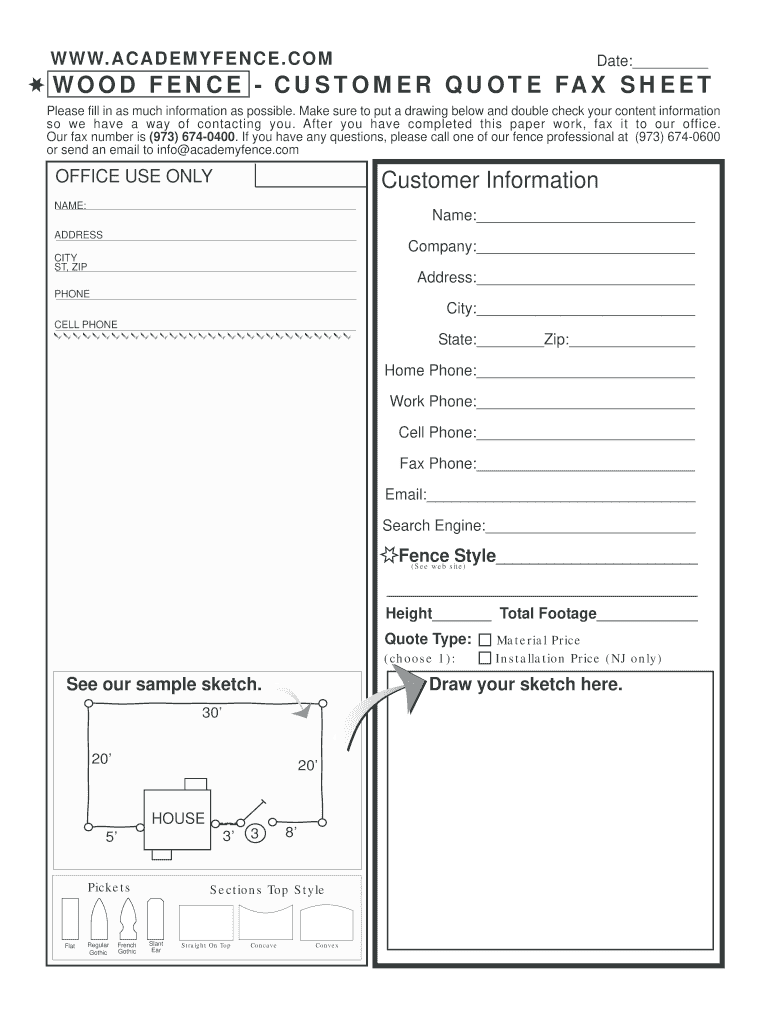
  2. Begin by filling in your personal information. Enter your name, address, and contact details in the designated fields. Ensure accuracy for effective communication.
  3. Select your preferred fence style from the options provided. Refer to the website for visual guidance on styles available.
  4. Indicate the height and total footage of the fence you require. This information is crucial for an accurate quote.
  5. Choose a quote type from the options given, ensuring it aligns with your project needs.
  6. Utilize the drawing area to sketch your desired fence layout. This visual aid will assist our professionals in understanding your requirements better.
  7. Review all entered information carefully before submitting. Once completed, fax it to our office at (973) 674-0400.

Start using our platform today to streamline your fencing project effortlessly!

be ready to get more

Complete this form in 5 minutes or less

Get form

Got questions?

We have answers to the most popular questions from our customers. If you can't find an answer to your question, please contact us.
Contact us

Yes, a typed name is recognized as a legitimate electronic signature when you create it on your paperwork utilizing a compliant solution like DocHub. Simply upload your academy fence to our editor, click Sign in the top tool pane → Create your signature → Type your name in the appropriate tab, and choose how it will appear on your document.

With DocHub, you have several convenient ways to edit your academy fence online. You can drag and drop the form and modify it straight at the DocHub site or use our browser extension to fill out your form immediately. On top of that, you can modify your PDF on your phone, as DocHub works with all the accessible mobile platforms.

be ready to get more

Complete this form in 5 minutes or less

Get form