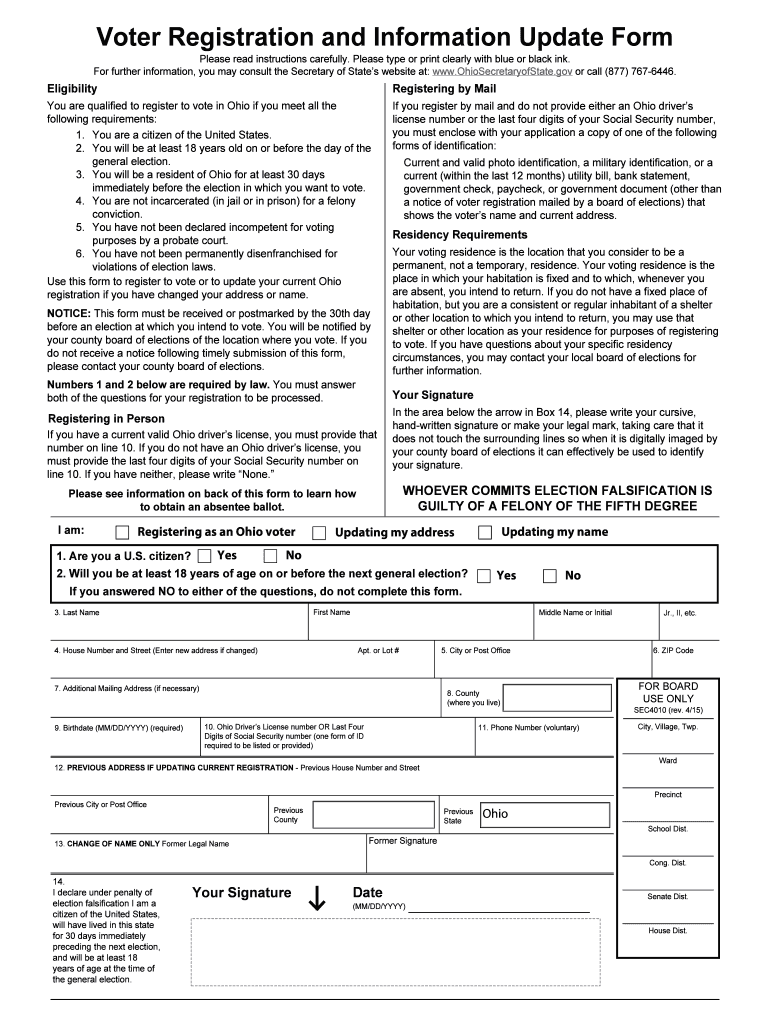
Ohio voter registration form 2026

Get Form
ohio voter registration form Preview on Page 1

Here's how it works

01. Edit your ohio voter registration form online
Type text, add images, blackout confidential details, add comments, highlights and more.
02. Sign it in a few clicks
Draw your signature, type it, upload its image, or use your mobile device as a signature pad.
03. Share your form with others
Send it via email, link, or fax. You can also download it, export it or print it out.

How to use or fill out Ohio voter registration form with our platform

Form edit decoration
9.5
Ease of Setup
DocHub User Ratings on G2
9.0
Ease of Use
DocHub User Ratings on G2
  1. Click ‘Get Form’ to open the Ohio voter registration form in the editor.
  2. Begin by answering the eligibility questions at the top of the form. Confirm you are a U.S. citizen and will be at least 18 years old by the next general election.
  3. Fill in your personal information, including your first name, last name, middle name or initial, and address details. Ensure accuracy as this information is crucial for your registration.
  4. Provide your birthdate in MM/DD/YYYY format and include either your Ohio driver’s license number or the last four digits of your Social Security number in the designated field.
  5. If updating your registration, complete the previous address section. Don’t forget to sign and date the form at Box 14 to validate your application.
  6. Once all fields are completed, print the form, fold it neatly, and mail it to your county board of elections as instructed.

Start using our platform today to easily fill out and submit your Ohio voter registration form for free!

be ready to get more

Complete this form in 5 minutes or less

Get form

Got questions?

We have answers to the most popular questions from our customers. If you can't find an answer to your question, please contact us.
Contact us

You need to use only trusted software solutions with strong security compliance to sign your paperwork electronically. DocHub is just the type of service you need! It stores data on Amazon Web Servers and complies with all required security requirements and eSignature laws, so it’s a reliable way to eSign your ohio voter registration form or other forms using this tool.

If you need to edit your ohio voter registration form online swiftly, it does not matter what web browser you employ. DocHub’s straightforward editing instruments are accessible using any internet browser. Simply open the appropriate tab in the editor, add your file, and fill it out without stress.

Security and compliance

At DocHub, your data security is our priority. We follow HIPAA, SOC2, GDPR, and other standards, so you can work on your documents with confidence.

Learn more
ccpa2
pci-dss
gdpr-compliance
hipaa
soc-compliance
be ready to get more

Complete this form in 5 minutes or less

Get form