South carolina abl 2026

Get Form
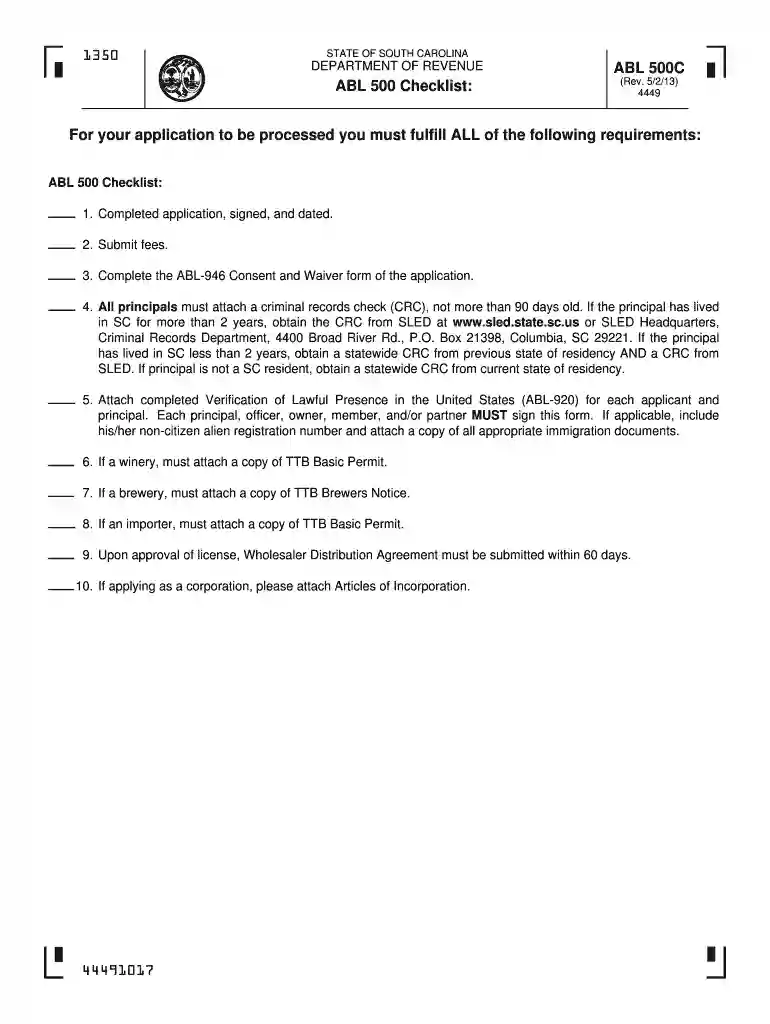
sc abl forms Preview on Page 1

Here's how it works

01. Edit your sc abl forms online
Type text, add images, blackout confidential details, add comments, highlights and more.

02. Sign it in a few clicks
Draw your signature, type it, upload its image, or use your mobile device as a signature pad.

03. Share your form with others
Send abl license south carolina ap via email, link, or fax. You can also download it, export it or print it out.

How to use or fill out south carolina abl with our platform

Form edit decoration
9.5
Ease of Setup
DocHub User Ratings on G2
9.0
Ease of Use
DocHub User Ratings on G2
  1. Click ‘Get Form’ to open the south carolina abl in the editor.
  2. Begin by filling out the OWNER, PARTNERSHIP, OR CORPORATE CHARTER NAME section. Ensure all information is printed clearly.
  3. Provide the PHYSICAL LOCATION OF BUSINESS, including street address, city, county, state, and zip code. Note that P.O. Boxes are not acceptable.
  4. Complete the MAILING ADDRESS section for correspondence. This should be distinct from your physical location.
  5. Select the TYPE OF OWNERSHIP from options such as Sole Proprietor, LLC/LLP, Partnership, etc., and provide any necessary details.
  6. Fill in additional fields like TRADE NAME and BUSINESS PHONE NUMBER accurately to ensure proper identification.
  7. Attach required documents such as criminal records checks and verification of lawful presence forms as specified in the checklist.
  8. Review all entries for accuracy before signing and dating the application at the bottom of the form.

Start using our platform today to streamline your south carolina abl application process for free!

be ready to get more

Complete this form in 5 minutes or less

Get form

Got questions?

We have answers to the most popular questions from our customers. If you can't find an answer to your question, please contact us.
Contact us
The new law, which takes effect July 1, 2026, includes additional safety and training measures. It mandates ID scanners at late-night venues and requires alcohol server training programsaimed at reducing risk and liability.
Obtaining a liquor license in South Carolina is fairly straightforward and not too dissimilar to other neighboring states. That being said, there are some unique requirements and steps to keep in mind throughout the application process.
Complete your renewal on MyDORWAY at MyDORWAY.dor.sc.gov. must cease all sales of , wine, or liquor upon the expiration of your license, and may not resume sales until you receive your new license. Therefore, file your renewal application promptly. For faster processing renew online at MyDORWAY.dor.sc.gov.
Renewing Business Licenses Online Or contact South Carolina licensing jurisdictions directly. Currently, business licenses for the 2025-2026 license year can be renewed using the Local Business License Renewal Center. As a business representative, you can create an account to start the renewal process.
Do not drive with an expired drivers license. If your license has been expired for less than nine months, you may renew it as if it wasnt expired.

Security and compliance

At DocHub, your data security is our priority. We follow HIPAA, SOC2, GDPR, and other standards, so you can work on your documents with confidence.

Learn more
ccpa2
pci-dss
gdpr-compliance
hipaa
soc-compliance

People also ask

The S.C. Insurance Reserve Fund (IRF) provides property and liability coverage to more than 1,000 state and local government entities in South Carolina. The reports below provide details on payments made by the IRF, including the amounts and reasons for the payments in claims and cases that have been concluded.
Whether youre a sales associate, broker, or property manager, South Carolina requires all real estate professionals to renew their licenses every two years by June 30. Missing this deadline can result in late fees, additional steps for compliance, or even temporary suspension of licensure.

abl 500