Uq corporate card 2026

Get Form
promaster uq Preview on Page 1

Here's how it works

01. Edit your promaster uq online
Type text, add images, blackout confidential details, add comments, highlights and more.

02. Sign it in a few clicks
Draw your signature, type it, upload its image, or use your mobile device as a signature pad.

03. Share your form with others
Send uq cardholder via email, link, or fax. You can also download it, export it or print it out.

How to use or fill out uq corporate card with our platform

Form edit decoration
9.5
Ease of Setup
DocHub User Ratings on G2
9.0
Ease of Use
DocHub User Ratings on G2
  1. Click ‘Get Form’ to open the uq corporate card in the editor.
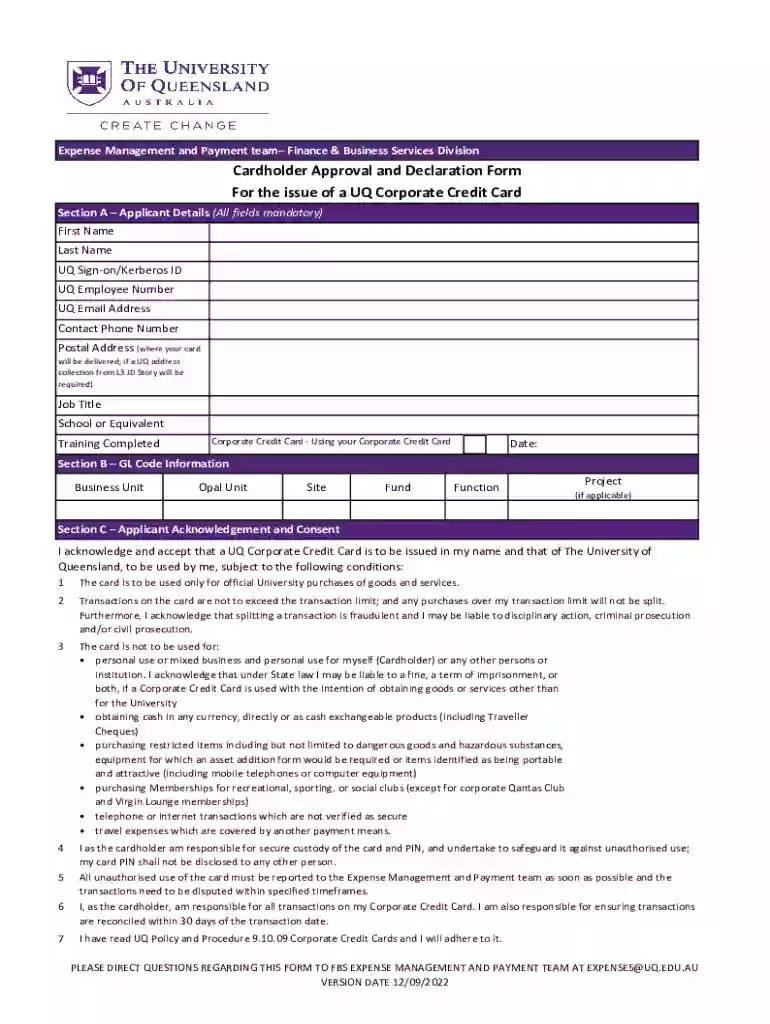
  2. Begin with Section A – Applicant Details. Fill in all mandatory fields including your First Name, Last Name, UQ Sign-on/Kerberos ID, UQ Employee Number, and UQ Email Address. Ensure your Contact Phone Number and Postal Address are accurate for card delivery.
  3. Proceed to Section B – GL Code Information. Enter details such as Business Unit, Opal Unit, Site, Fund, Function, and Project if applicable.
  4. In Section C – Applicant Acknowledgement and Consent, read through the conditions carefully. Confirm your understanding by checking the acknowledgment box.
  5. Complete Section D by providing a justification for the issuance of the UQ Corporate Credit Card based on your business needs.
  6. Finally, fill out Section E – Authorisation. Ensure all signatures are obtained from yourself, your supervisor, and the Head of Unit or equivalent before submission.

Start using our platform today to streamline your uq corporate card application process for free!

be ready to get more

Complete this form in 5 minutes or less

Get form

Got questions?

We have answers to the most popular questions from our customers. If you can't find an answer to your question, please contact us.
Contact us
Corporate cards are typically only issued to businesses with annual revenues of at least $4 million. Smaller businesses can apply for small-business credit cards.
You can apply in person for a photo identification card at a transport and motoring customer service centre, participating Queensland Government Agency Program Office (QGAP), or a police station that provides licensing services.
How do I Make a School ID Card? The ID Badge Template should be the same for all students including School Name, School year, School logo and color scheme, Address and Phone Number. Each Student and Staff ID Card needs to include their Name, photo, School ID Number, Grade, and medical information if needed.
Corporate cards are intended for business-related expenses, and using them for personal purchases can lead to consequences such as disciplinary action or being required to reimburse the company.
Submit a photo online to have your Unicard printed for you ahead of arriving on campus. If your work or studies require you to be on campus this fall, submit your photo now! Photos can not be taken in person at the Customer Service Centre.

Security and compliance

At DocHub, your data security is our priority. We follow HIPAA, SOC2, GDPR, and other standards, so you can work on your documents with confidence.

Learn more
ccpa2
pci-dss
gdpr-compliance
hipaa
soc-compliance

People also ask

Student ID cards Complete any outstanding tasks on mySI-net. Enrol in at least one course for the current semester on mySI-net. Check your graduation date is correct in mySI-net. Wait 48 hours for any changes to update.
Mobile ID Cards for Online Students Switch to digital ID cards and eliminate the need for costly shipping by providing online students with instant access to their mobile IDs, no matter where they are.
Business cards are designed for small businesses, while corporate cards are best for midsize and larger companies with complex needs. A big difference between the card programs is liability. Business cards usually rely on individual liability, while corporate cards rely on corporate liability.

Related links