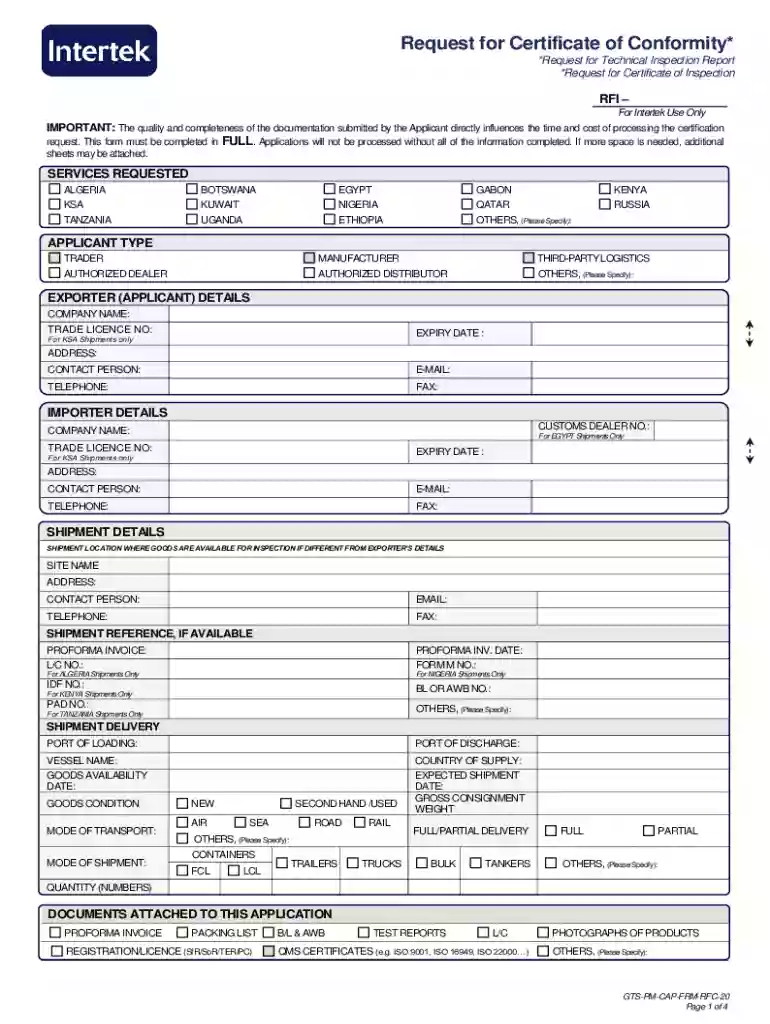
*Request for Technical Inspection Report *Request for 2026

Get Form
*Request for Technical Inspection Report *Request for Preview on Page 1

Here's how it works

01. Edit your form online
Type text, add images, blackout confidential details, add comments, highlights and more.

02. Sign it in a few clicks
Draw your signature, type it, upload its image, or use your mobile device as a signature pad.

03. Share your form with others
Send it via email, link, or fax. You can also download it, export it or print it out.

How to use or fill out the Request for Technical Inspection Report with our platform

Form edit decoration
9.5
Ease of Setup
DocHub User Ratings on G2
9.0
Ease of Use
DocHub User Ratings on G2
  1. Click ‘Get Form’ to open it in the editor.
  2. Begin by filling out the 'Applicant Type' section. Choose from options like Trader, Manufacturer, or Authorized Dealer, ensuring you select the most relevant category.
  3. In the 'Exporter Details' section, provide your company name, trade license number, and contact information. Make sure all fields are completed accurately to avoid processing delays.
  4. Next, move to 'Importer Details.' Fill in the customs dealer number and company name if applicable. Include contact details for effective communication.
  5. Complete the 'Shipment Details' section by specifying shipment location and reference numbers. This information is crucial for tracking your request.
  6. In the 'Payment Details' section, indicate who will be responsible for payment and provide their contact information. Select your preferred payment type and currency.
  7. Finally, review your entries in the 'Declaration' section before signing. Ensure that all provided information is accurate and complete.

Start using our platform today to streamline your document editing and submission process for free!

be ready to get more

Complete this form in 5 minutes or less

Get form

Got questions?

We have answers to the most popular questions from our customers. If you can't find an answer to your question, please contact us.
Contact us
A Virginia State Safety Inspection includes checking the safety equipment of your vehicle, such as brakes, wiper blades, headlights and tires, to ensure that all equipment is functioning properly. A safety inspection is required annually by the Commonwealth of Virginia.
If your car fails a Virginia State Inspection, a rejection sticker will be placed where the previous approval sticker was on your vehicles windshield. You have 15 days from the day of the rejection to properly fix the faulty equipment for which your vehicle failed to pass the inspection.
Allow at least 30 minutes for your vehicle inspection. Inspections are performed on a first-come, first-served basis. Other customers might have dropped off their vehicle earlier that day; inspections will be done in the order that each vehicle arrives for the day.
Virginia State Inspections are $20.00 and are valid for one year. Virginia State Emissions Inspection are $28.00 and are valid for two years.
All vehicles registered in Virginia must have an annual Virginia Safety Inspection and must display a valid inspection decal on the windshield.

Security and compliance

At DocHub, your data security is our priority. We follow HIPAA, SOC2, GDPR, and other standards, so you can work on your documents with confidence.

Learn more
ccpa2
pci-dss
gdpr-compliance
hipaa
soc-compliance

People also ask

A vehicle inspection report (VIR) is a document that records the results of a comprehensive vehicle assessment. Its often used by drivers, inspectors, and fleet managers to assess the overall condition of a vehicle and identify any issues.

Related links