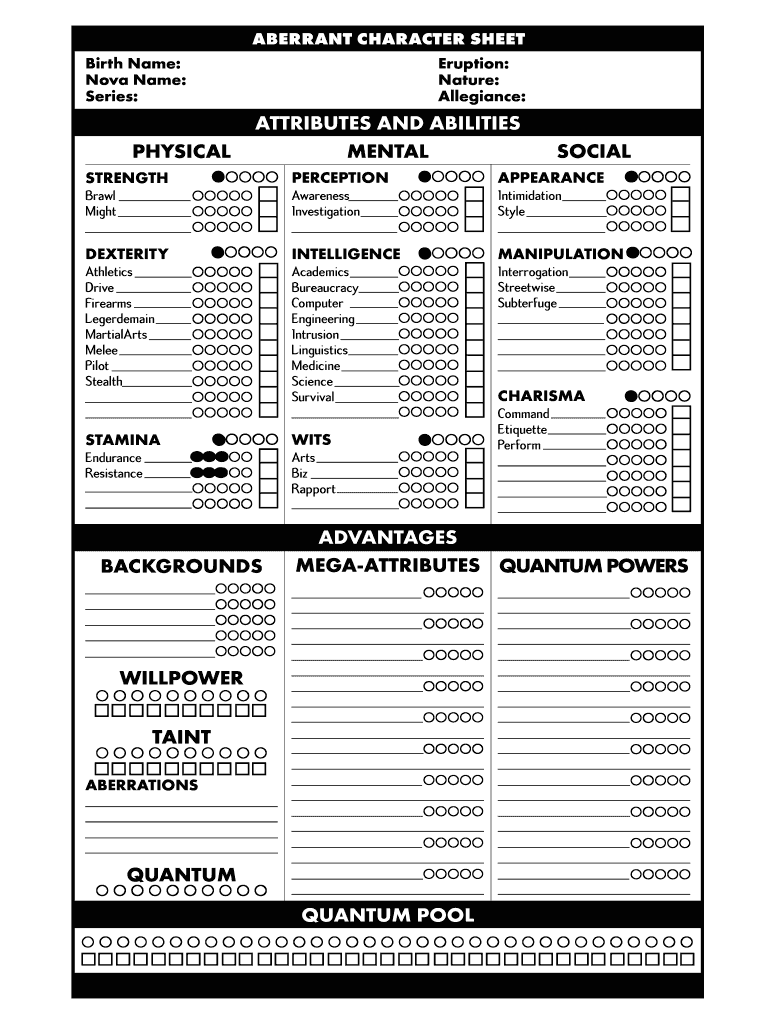
Aberrant character sheet 2026

Get Form
aberrant character sheet Preview on Page 1

Here's how it works

01. Edit your aberrant character sheet online
Type text, add images, blackout confidential details, add comments, highlights and more.
02. Sign it in a few clicks
Draw your signature, type it, upload its image, or use your mobile device as a signature pad.
03. Share your form with others
Send aberrant form via email, link, or fax. You can also download it, export it or print it out.

How to use or fill out the aberrant character sheet with our platform

Form edit decoration
9.5
Ease of Setup
DocHub User Ratings on G2
9.0
Ease of Use
DocHub User Ratings on G2
  1. Click ‘Get Form’ to open the aberrant character sheet in the editor.
  2. Begin by filling in your Eruption, Nature, and Allegiance at the top of the form. These fields define your character's core identity.
  3. Next, input your Birth Name, Nova Name, and Series. This information personalizes your character further.
  4. Move on to the PHYSICAL section. Here, allocate points to various attributes like Brawl and Might using the provided scales.
  5. In the MENTAL section, distribute points across skills such as Academics and Medicine. Ensure you reflect your character’s strengths accurately.
  6. Continue with SOCIAL attributes like Manipulation and Intimidation. This will shape how your character interacts with others.
  7. Finally, review all sections for accuracy before saving or sharing your completed character sheet.

Start editing your aberrant character sheet online for free today!

be ready to get more

Complete this form in 5 minutes or less

Get form

Got questions?

We have answers to the most popular questions from our customers. If you can't find an answer to your question, please contact us.
Contact us

Of course, electronically drawing your signature is appropriate, but only if you utilize a tool that complies with industry regulations and policies. Try DocHub, which ensures eSignature validity under ESIGN and UETA requirements. All you need to eSign your aberrant spectres is an account with DocHub and an internet connection. Once you open your paperwork in our editor, click Sign and choose the Draw option.

If you are using Chrome, there are two simple methods to edit your exalted rpg character sheet online. First, go to the DocHub site, add your document, and edit it utilizing our toolbar. You can also install our Chrome extension and edit any document by dragging and dropping it in your web browser tab.

Security and compliance

At DocHub, your data security is our priority. We follow HIPAA, SOC2, GDPR, and other standards, so you can work on your documents with confidence.

Learn more
ccpa2
pci-dss
gdpr-compliance
hipaa
soc-compliance
be ready to get more

Complete this form in 5 minutes or less

Get form