Type text, add images, blackout confidential details, add comments, highlights and more.
02. Sign it in a few clicks
Draw your signature, type it, upload its image, or use your mobile device as a signature pad.
03. Share your form with others
Send luba rules via email, link, or fax. You can also download it, export it or print it out.
How to use or fill out luba form with our platform
Ease of Setup
DocHub User Ratings on G2
Ease of Use
DocHub User Ratings on G2
Click ‘Get Form’ to open the luba form in the editor.
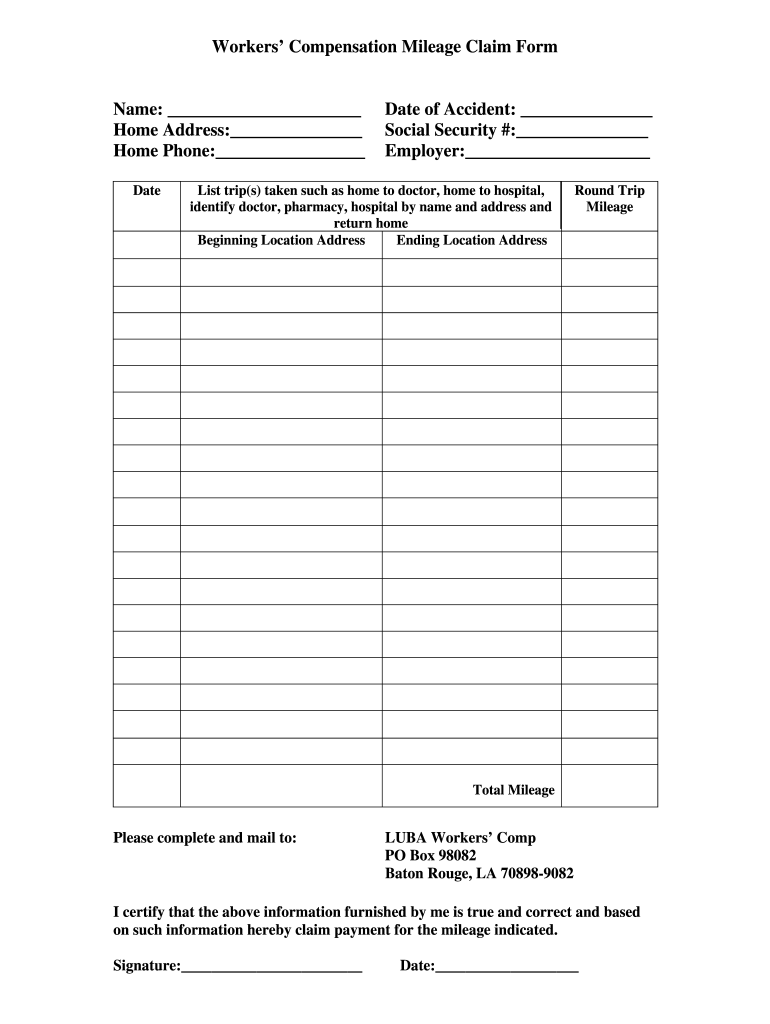
Begin by entering your name, home address, and phone number in the designated fields at the top of the form.
Next, input the date of the accident and your Social Security number. Ensure accuracy as this information is crucial for processing your claim.
Fill in your employer's name in the appropriate field.
List each trip taken for mileage reimbursement. Specify starting and ending locations, including addresses for doctors, pharmacies, or hospitals visited.
Calculate and enter the round trip mileage for each trip in the provided section.
Sum up all trips and enter the total mileage at the end of the form.
Finally, sign and date the form to certify that all information is true before mailing it to LUBA Workers’ Comp at the specified address.
Start filling out your luba form today using our platform for free!
Oregon Land Use Board of Appeals : Example Filings
The following example filings are provided for public informational use only. Please review the statutes and rules in Oregon Revised Statutes (ORS) chapter 197.Read more
Under OAR 661-010-0030(4), a petition to LUBA must contain: (a) the facts that establish petitioners standing; (b) a clear and concise statement of theRead more
Cookie consent notice
This site uses cookies to enhance site navigation and personalize your experience.
By using this site you agree to our use of cookies as described in our Privacy Notice.
You can modify your selections by visiting our Cookie and Advertising Notice.