Type text, add images, blackout confidential details, add comments, highlights and more.
02. Sign it in a few clicks
Draw your signature, type it, upload its image, or use your mobile device as a signature pad.
03. Share your form with others
Send aoc e via email, link, or fax. You can also download it, export it or print it out.
How to use or fill out aoc e 510 with our platform
Ease of Setup
DocHub User Ratings on G2
Ease of Use
DocHub User Ratings on G2
Click ‘Get Form’ to open the aoc e 510 in the editor.
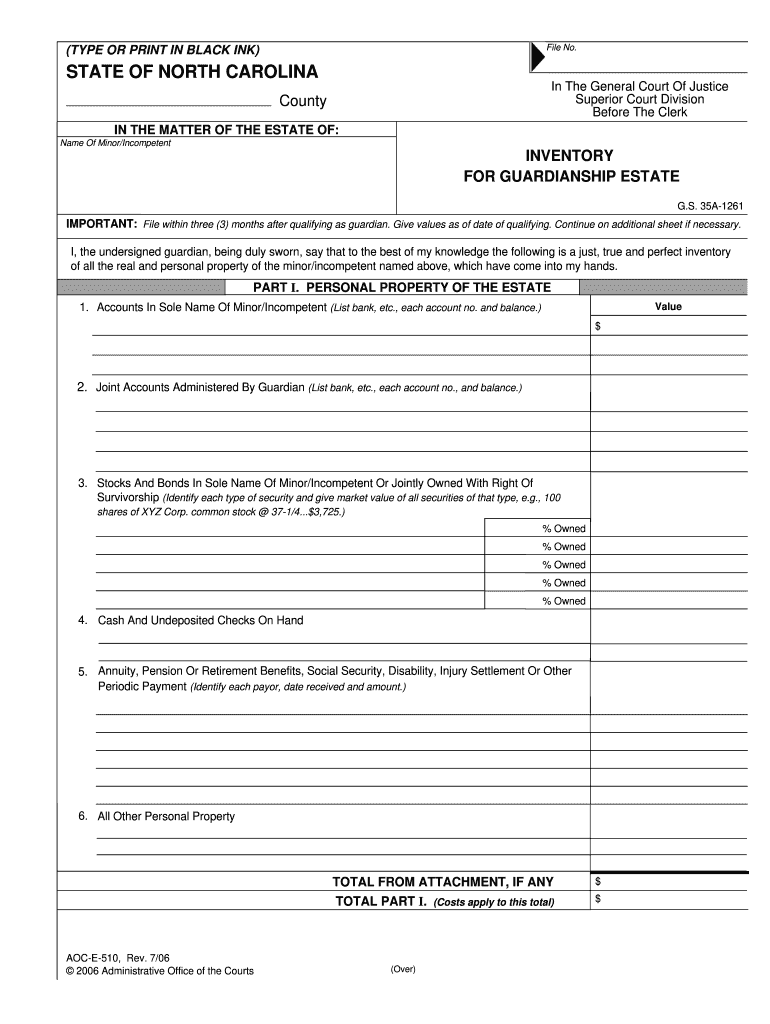
Begin by filling in the 'File No.' and 'County' sections at the top of the form. Ensure you type or print clearly in black ink.
In the 'INVENTORY FOR GUARDIANSHIP ESTATE' section, provide the name of the minor or incompetent individual. This is crucial for identifying the estate.
Proceed to Part I, where you will list personal property. For each item, such as accounts and stocks, enter detailed information including account numbers and values.
Continue to Part II for real property. List all real estate interests, providing legal descriptions and fair market values for each parcel owned by the minor/incompetent.
Finally, ensure that all signatures are completed at the bottom of the form, including those of any co-guardian and authorized personnel.
Start using our platform today to easily complete your aoc e 510 form online for free!
IMPORTANT: File within three (3) months after qualifying as guardian. Give values as of date of qualifying. Continue on additional sheet if necessary.Read more
*The following models meet ENERGY STAR requirements for On Mode efficiency as well as Standby Mode requirements listed in the Version 3.0 ENERGY.Read more
Cookie consent notice
This site uses cookies to enhance site navigation and personalize your experience.
By using this site you agree to our use of cookies as described in our Privacy Notice.
You can modify your selections by visiting our Cookie and Advertising Notice.