Download Form - Prime Minister's National Relief Fund 2026

Get Form
Download Form - Prime Minister's National Relief Fund Preview on Page 1

Here's how it works

01. Edit your form online
Type text, add images, blackout confidential details, add comments, highlights and more.
02. Sign it in a few clicks
Draw your signature, type it, upload its image, or use your mobile device as a signature pad.
03. Share your form with others
Send it via email, link, or fax. You can also download it, export it or print it out.

How to use or fill out Download Form - Prime Minister's National Relief Fund

Form edit decoration
9.5
Ease of Setup
DocHub User Ratings on G2
9.0
Ease of Use
DocHub User Ratings on G2
  1. Click ‘Get Form’ to open it in the editor.
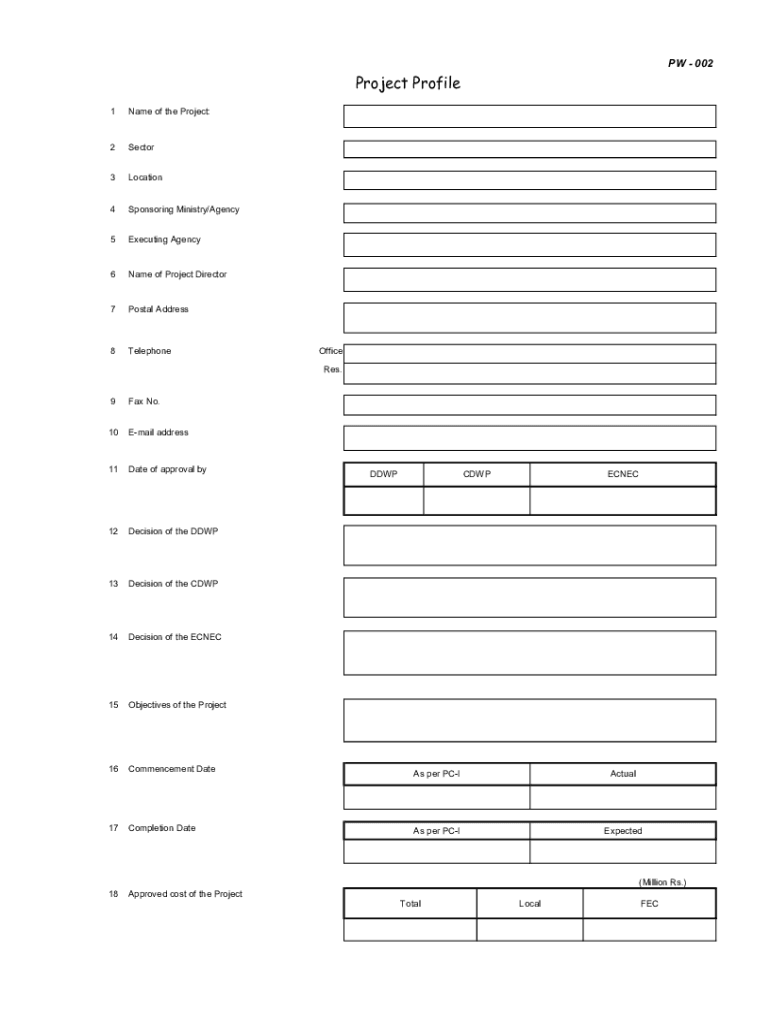
  2. Begin by entering the 'Name of the Project' in the designated field. This is crucial for identifying your submission.
  3. Fill in the 'Sector' and 'Location' fields to provide context about your project.
  4. Complete the sections for 'Sponsoring Ministry/Agency' and 'Executing Agency' to clarify who is responsible for the project.
  5. Input contact details, including 'Name of Project Director', 'Postal Address', and both office and residential telephone numbers.
  6. Document financial information by detailing the 'Approved cost of the Project', including local and foreign exchange components.
  7. Finally, review all entries for accuracy before saving or submitting your completed form through our platform.

Start using our platform today to fill out your form quickly and efficiently!

be ready to get more

Complete this form in 5 minutes or less

Get form

Got questions?

We have answers to the most popular questions from our customers. If you can't find an answer to your question, please contact us.
Contact us

Signing documents on a mobile device is quick, straightforward, and doesn’t require software installation when you have an account with DocHub. Sign in from any browser, complete your blank fields with your data, and click on Sign → Create your signature. You can draw your electronic signature the same way you usually do on paper, add its picture to your Download Form - Prime Minister's National Relief Fund, or type in your name and stylize its look. Whatever option you choose, your document will be valid.

You may complete and eSign your Download Form - Prime Minister's National Relief Fund online, even on a tight deadline. All you need to access high quality editing instruments on any device is a DocHub profile, that you can sign up in just a couple of moments. Once you register, add your file or find what you are searching for in our catalog, complete it utilizing the editing instruments you want, and place your electronic signature on it at the end.

PMNRF stands for Prime Ministers National Relief Fund. The fund was setup in the year 1948 to assist relief work. The details about the fund, its administration, ways to contribute etc. have been provided at website .pmindia.gov.in. Q.
About PMNRF The resources of the PMNRF are utilized to render immediate relief to families of those killed in natural calamities like floods, cyclones and earthquakes, etc.
INSTRUCTION TO THE APPLICANTS WHO APPLY FOR RELIEF UNDER CMRF The applicant should have a BPL, ration card. The applicant should have Aadhar number. The applicant or the mother of a minor applicant should have a bank account linked to his /her Aadhar number.

Security and compliance

At DocHub, your data security is our priority. We follow HIPAA, SOC2, GDPR, and other standards, so you can work on your documents with confidence.

Learn more
ccpa2
pci-dss
gdpr-compliance
hipaa
soc-compliance

People also ask

(rɪˈliːf fʌnd ) noun. social welfare. a fund of money set up to provide aid for people in need, esp in disaster areas.

Related links