Fill - P-Card Application & Change Request PDF form - Fill io 2026

Get Form
fill io Preview on Page 1

Here's how it works

01. Edit your fill io online
Type text, add images, blackout confidential details, add comments, highlights and more.

02. Sign it in a few clicks
Draw your signature, type it, upload its image, or use your mobile device as a signature pad.

03. Share your form with others
Send it via email, link, or fax. You can also download it, export it or print it out.

How to use or fill out Fill - P-Card Application & Change Request PDF form - Fill io with our platform

Form edit decoration
9.5
Ease of Setup
DocHub User Ratings on G2
9.0
Ease of Use
DocHub User Ratings on G2
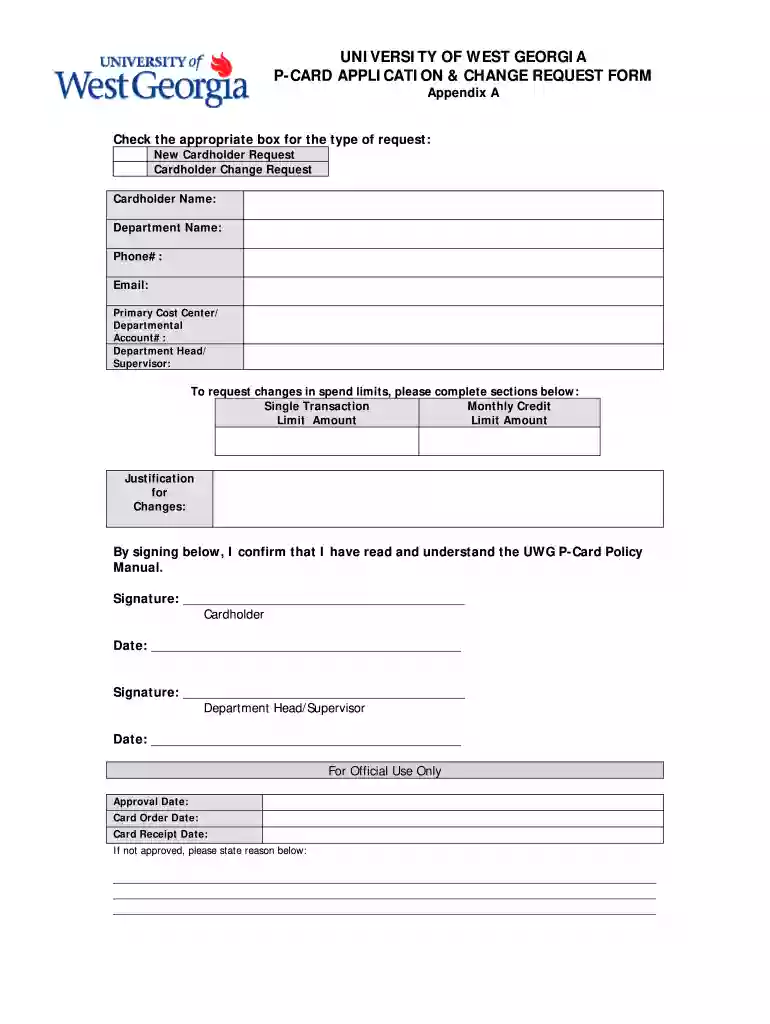
  1. Click ‘Get Form’ to open the P-Card Application & Change Request form in the editor.
  2. Begin by selecting the appropriate request type: either 'New Cardholder Request' or 'Cardholder Change Request' by checking the corresponding box.
  3. Fill in your personal details, including your name, department name, phone number, and email address in the designated fields.
  4. Enter your Primary Cost Center or Departmental Account number accurately to ensure proper processing.
  5. If you are requesting changes in spend limits, complete the sections for Single Transaction Limit Amount and Monthly Credit Limit Amount as needed.
  6. Provide a justification for any changes requested in the designated area to clarify your needs.
  7. Sign and date the form where indicated to confirm that you have read and understood the UWG P-Card Policy Manual.
  8. Ensure that your Department Head/Supervisor also signs and dates the form before submission.

Start using our platform today to easily fill out your P-Card Application & Change Request form for free!

be ready to get more

Complete this form in 5 minutes or less

Get form

Got questions?

We have answers to the most popular questions from our customers. If you can't find an answer to your question, please contact us.
Contact us

eSignatures are a perfect alternative to traditional signing, as they save time, effort, and costs people spend on printing, scanning, and paper delivery. You can electronically sign your Fill - P-Card Application & Change Request PDF form - Fill io utilizing a trustworthy and powerful online document processing tool like DocHub. It complies with primary eSignature standards (ESIGN and UETA), so all forms approved there are legally binding and have the same validity as physically signed ones.

If your go-to electronic mail service is Gmail, it is simple to integrate your DocHub editor in your work. Edit your Fill - P-Card Application & Change Request PDF form - Fill io with DocHub instruments and attach it to your drafts in Gmail. See how straightforward it can be to exchange files and work together having a swift PDF editing solution at hand.

Purchasing card Cons #1: There Is the Risk of Misuse. #2: Vendors May Change Use Often. #3: Some Are Virtual Which Increases Risk of Use. #4: There Is the Need to Train Employees. #5: There Is the Need to Invest in Reviews.
A purchasing card (also abbreviated as PCard, P-Card, or ProCard) is a form of company charge card that allows goods and services to be procured without using a traditional purchasing process. In the UK, purchasing cards are usually referred to as procurement cards.

Security and compliance

At DocHub, your data security is our priority. We follow HIPAA, SOC2, GDPR, and other standards, so you can work on your documents with confidence.

Learn more
ccpa2
pci-dss
gdpr-compliance
hipaa
soc-compliance

People also ask

Purchasing card (also known as procurement card or P-Card) programs provide an efficient, cost-effective method of purchasing and paying for small-dollar and high-volume purchases.
The employee makes a request through their p-card software. This includes the vendor, price, and reason for purchasing. Their manager gets a notification, and has all the information they need without leaving their desk. The manager approves, and the employee now has access to the funds.
P-card is a University issued credit card that is provided to University employees only and is the preferred method of payment for goods and services.
If you are wondering what is a p-card, a p-card is a type of company card that employees can use to charge goods and services on behalf of their employers without having to go through the traditional purchase request and approval process. They are also known as purchasing cards or procurement cards.
P-Card administrators can restrict usage to a certain dollar threshold or to a list of pre-approved merchants, which is why P-Cards are typically used for goods and services instead of travel. Corporate or travel cards typically have less restrictions and function in much the same way as personal credit cards do.

Related links