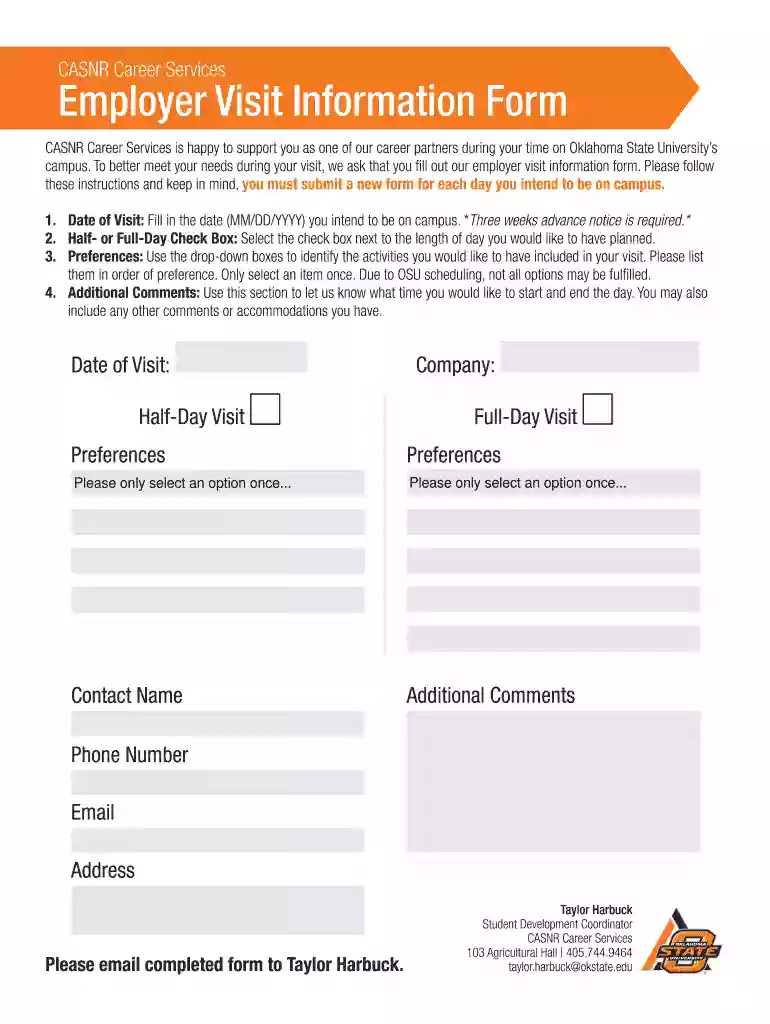
Employer Visit Information Form 2026

Get Form
Employer Visit Information Form Preview on Page 1

Here's how it works

01. Edit your form online
Type text, add images, blackout confidential details, add comments, highlights and more.

02. Sign it in a few clicks
Draw your signature, type it, upload its image, or use your mobile device as a signature pad.

03. Share your form with others
Send it via email, link, or fax. You can also download it, export it or print it out.

How to use or fill out Employer Visit Information Form with our platform

Form edit decoration
9.5
Ease of Setup
DocHub User Ratings on G2
9.0
Ease of Use
DocHub User Ratings on G2
  1. Click ‘Get Form’ to open the Employer Visit Information Form in the editor.
  2. Begin by entering the 'Date of Visit' in the format MM/DD/YYYY. Remember, a three-week advance notice is required.
  3. Select either 'Half-Day' or 'Full-Day' by checking the appropriate box to indicate your preferred visit length.
  4. In the 'Preferences' section, use the drop-down boxes to select activities for your visit. List them in order of preference, ensuring each option is selected only once.
  5. Utilize the 'Additional Comments' field to specify your desired start and end times for the day, along with any other comments or accommodations you may need.
  6. Fill in your contact information including your name, phone number, email address, and company details.
  7. Once completed, save your form and email it to Taylor Harbuck at taylor.harbuck@okstate.edu.

Start filling out your Employer Visit Information Form online for free today!

be ready to get more

Complete this form in 5 minutes or less

Get form

Got questions?

We have answers to the most popular questions from our customers. If you can't find an answer to your question, please contact us.
Contact us
LIST A: Documents That Establish Both Identity and Employment Authorization U.S. passport or U.S. passport card. Form I-551, Permanent Resident Card or Alien Registration Receipt Card (commonly called a Green Card.)

Security and compliance

At DocHub, your data security is our priority. We follow HIPAA, SOC2, GDPR, and other standards, so you can work on your documents with confidence.

Learn more
ccpa2
pci-dss
gdpr-compliance
hipaa
soc-compliance