Patient death reporting 2026

Get Form
patient death form Preview on Page 1

Here's how it works

01. Edit your patient death form online
Type text, add images, blackout confidential details, add comments, highlights and more.
02. Sign it in a few clicks
Draw your signature, type it, upload its image, or use your mobile device as a signature pad.
03. Share your form with others
Send it via email, link, or fax. You can also download it, export it or print it out.

How to use or fill out patient death reporting with our platform

Form edit decoration
9.5
Ease of Setup
DocHub User Ratings on G2
9.0
Ease of Use
DocHub User Ratings on G2
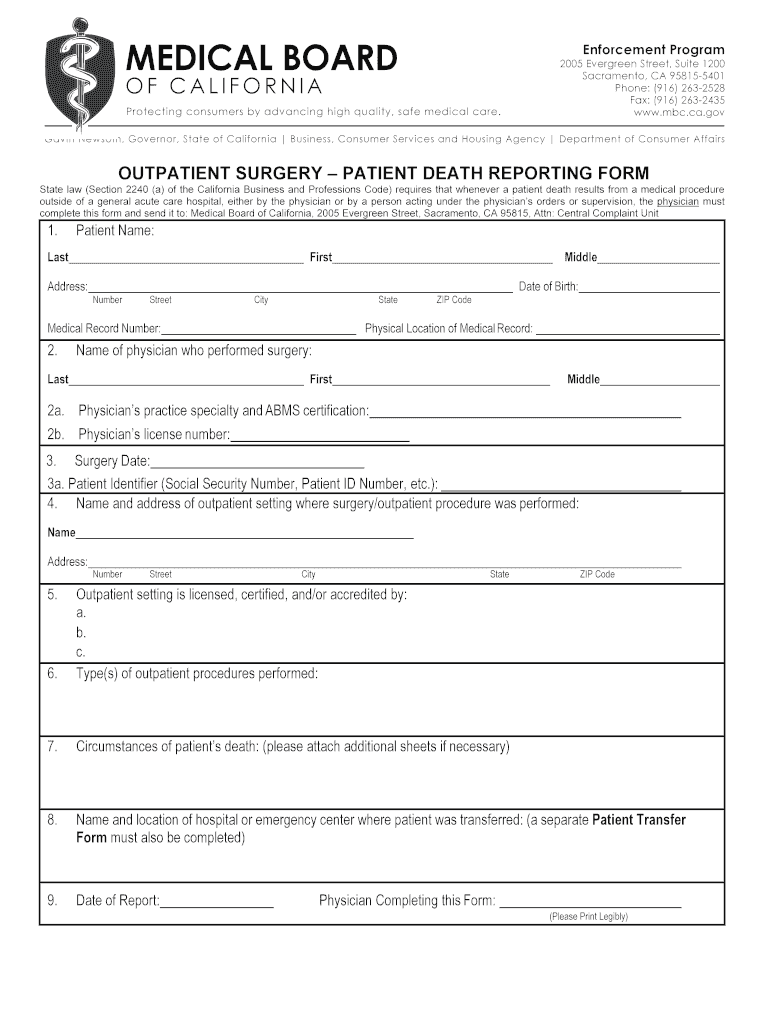
  1. Click ‘Get Form’ to open the patient death reporting form in the editor.
  2. Begin by entering the patient's name in the designated fields: Last, First, and Middle. Ensure accuracy for proper identification.
  3. Fill in the patient's address, including Street Number, City, State, and ZIP Code. This information is crucial for record-keeping.
  4. Provide the Medical Record Number and Date of Birth to further verify the patient's identity.
  5. Next, input details about the physician who performed the surgery: their name, practice specialty, ABMS certification, and license number.
  6. Document the Surgery Date and Patient Identifier (such as Social Security Number or Patient ID Number) for tracking purposes.
  7. Complete the section regarding the outpatient setting where the procedure was performed by entering its name and address.
  8. Describe the circumstances of the patient’s death. If more space is needed, attach additional sheets as necessary.
  9. Indicate where the patient was transferred after surgery by providing the name and location of that facility.
  10. Finally, enter today's date and sign off as the physician completing this form. Ensure all sections are filled accurately before submission.

Start using our platform today to streamline your patient death reporting process for free!

be ready to get more

Complete this form in 5 minutes or less

Get form

Got questions?

We have answers to the most popular questions from our customers. If you can't find an answer to your question, please contact us.
Contact us
The Pronouncement Identify the patient by the hospital ID tag. Ascertain that the patient does not rouse to verbal or tactile stimuli. Listen for the absence of heart sounds; feel for the absence of carotid pulse. Look and listen for the absence of spontaneous respirations.
Within a few days of the death you should: register the death within 5 days after the medical examiners office tells you the cause of death. use the Tell Us Once service to tell the government about the death. start arranging the funeral.
After a death, you must speak with the patients family and your medical colleagues. In lay language, explain to the family what happened and what efforts were made. Your colleagues need a medical reason for the death, and you may be required to discuss it during a morbidity and mortality conference.
Document the disposition of the patients body and the name, telephone number, and address of the funeral home. List the names of family members who were present at the time of death. If they werent present, note the name of the family member notified and who viewed the body.

Security and compliance

At DocHub, your data security is our priority. We follow HIPAA, SOC2, GDPR, and other standards, so you can work on your documents with confidence.

Learn more
ccpa2
pci-dss
gdpr-compliance
hipaa
soc-compliance
be ready to get more

Complete this form in 5 minutes or less

Get form