Football registration form online 2021-2026

Get Form
football form Preview on Page 1

Here's how it works

01. Edit your football form online
Type text, add images, blackout confidential details, add comments, highlights and more.
02. Sign it in a few clicks
Draw your signature, type it, upload its image, or use your mobile device as a signature pad.
03. Share your form with others
Send football application form via email, link, or fax. You can also download it, export it or print it out.

How to use or fill out football registration form online 2021 with DocHub

Form edit decoration
9.5
Ease of Setup
DocHub User Ratings on G2
9.0
Ease of Use
DocHub User Ratings on G2
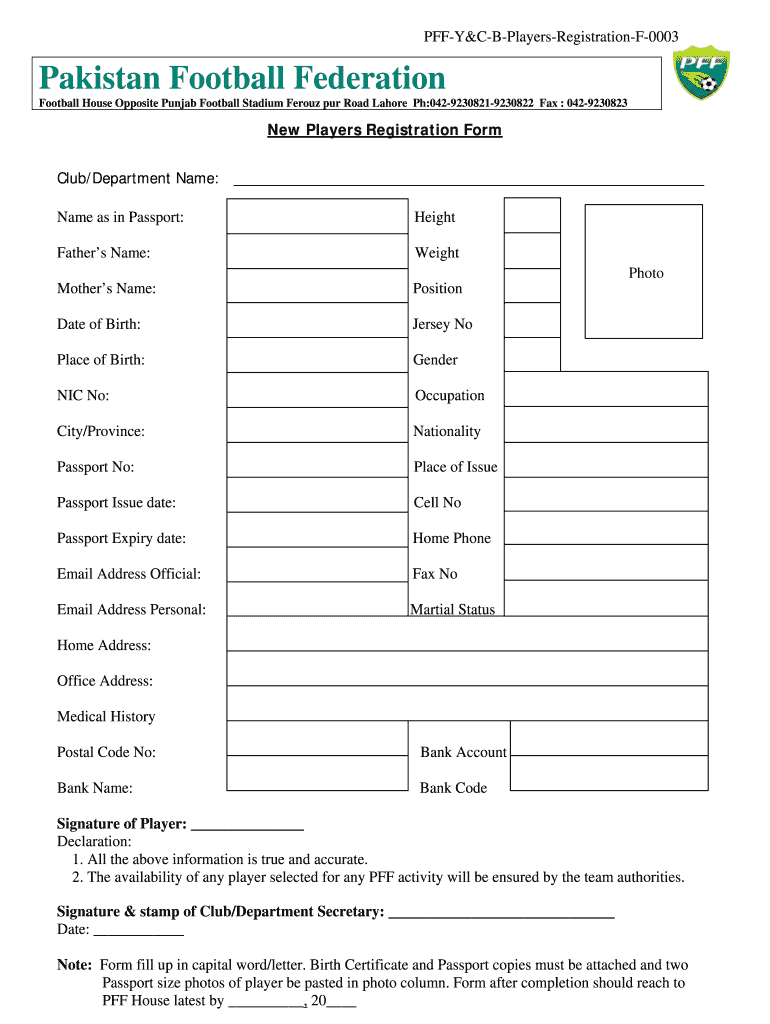
  1. Click ‘Get Form’ to open the football registration form online 2021 in our editor.
  2. Begin by entering the Club/Department Name at the top of the form. Ensure this is accurate as it identifies your affiliation.
  3. Fill in your name as it appears on your passport, followed by your height and weight. This information is crucial for player identification.
  4. Provide details about your parents, including Father's Name and Mother's Name, along with your Date of Birth and Place of Birth.
  5. Indicate your preferred Position and Jersey Number. This helps in team selection and uniform allocation.
  6. Complete the personal information section, including Gender, NIC No, Occupation, City/Province, Nationality, Passport No, and Place of Issue.
  7. Enter contact details such as Cell No, Home Phone, Email Address (both official and personal), and Fax No.
  8. Fill out additional fields like Marital Status, Medical History, Home Address, Office Address, Postal Code No, Bank Account details including Bank Name and Bank Code.
  9. Sign the form where indicated and ensure you read the declaration carefully before signing again for confirmation.
  10. Attach copies of your Birth Certificate and Passport along with two passport-sized photos in the designated area before submitting the completed form to PFF House by the specified deadline.

Start filling out your football registration form online today for free using our platform!

be ready to get more

Complete this form in 5 minutes or less

Get form

Got questions?

We have answers to the most popular questions from our customers. If you can't find an answer to your question, please contact us.
Contact us

eSignatures are a great replacement for traditional signing, as they save time, effort, and costs people spend on printing, scanning, and paper delivery. You can eSign your player registration form football using a trustworthy and powerful online document processing services like DocHub. It complies with main eSignature policies (ESIGN and UETA), so all forms approved there are legally binding and have the same validity as manually signed ones.

If you use Chrome, there are two easy methods to edit your football player registration form online. First, go to the DocHub site, add your document, and edit it utilizing our toolbar. You can also set up our Chrome extension and edit any document by dragging and dropping it in your web browser tab.

How to Create a Youth Football Player Registration Form Crucial personal details. Parent or guardian details. Additional football players information. Acknowledgement disclaimer. Private information sharing disclaimer. Signature.
Understanding Form in Football In football, form often refers to how well a player or team has performed lately. Many fans and experts see it as a way to guess if a player will do well in upcoming games. Clubs from Leicester to Sunderland rely on winning streaks to beat their competitors.
Player Registration means the execution of intent to play the sport of soccer by signing either a player registration form or a team roster.

Security and compliance

At DocHub, your data security is our priority. We follow HIPAA, SOC2, GDPR, and other standards, so you can work on your documents with confidence.

Learn more
ccpa2
pci-dss
gdpr-compliance
hipaa
soc-compliance
be ready to get more

Complete this form in 5 minutes or less

Get form

People also ask

A player may have a valid contract with their club, but if they are not registered, they cannot practice their profession. In most legal systems, the employment contract between club and player only takes full effect once the athlete is registered with the corresponding federation or league.
To start, navigate to the Squad tab on the left-hand menu in-game. From there, select the Overview drop-down menu and click Registration to open up the FM24 registration menu. Here, you can register and unregister your players.
This information is for clubs to explain how to register a Player for the current season when logged in at Club level. Select People. Select Add Player Complete Personal Details. Contact Details. Registrations. Required Documents. Licence. Payment Options.
How to get your child scouted for football Help them with their temperament and attitude. Most parents assume that the most important skills that a young player can have are technical ones. Take them to watch as much live football as possible. Create playing opportunities.

membership application