Contractor Consent Form - Kentucky Power 2026

Get Form
Contractor Consent Form - Kentucky Power Preview on Page 1

Here's how it works

01. Edit your form online
Type text, add images, blackout confidential details, add comments, highlights and more.

02. Sign it in a few clicks
Draw your signature, type it, upload its image, or use your mobile device as a signature pad.

03. Share your form with others
Send it via email, link, or fax. You can also download it, export it or print it out.

How to use or fill out Contractor Consent Form - Kentucky Power with our platform

Form edit decoration
9.5
Ease of Setup
DocHub User Ratings on G2
9.0
Ease of Use
DocHub User Ratings on G2
  1. Click ‘Get Form’ to open the Contractor Consent Form in the editor.
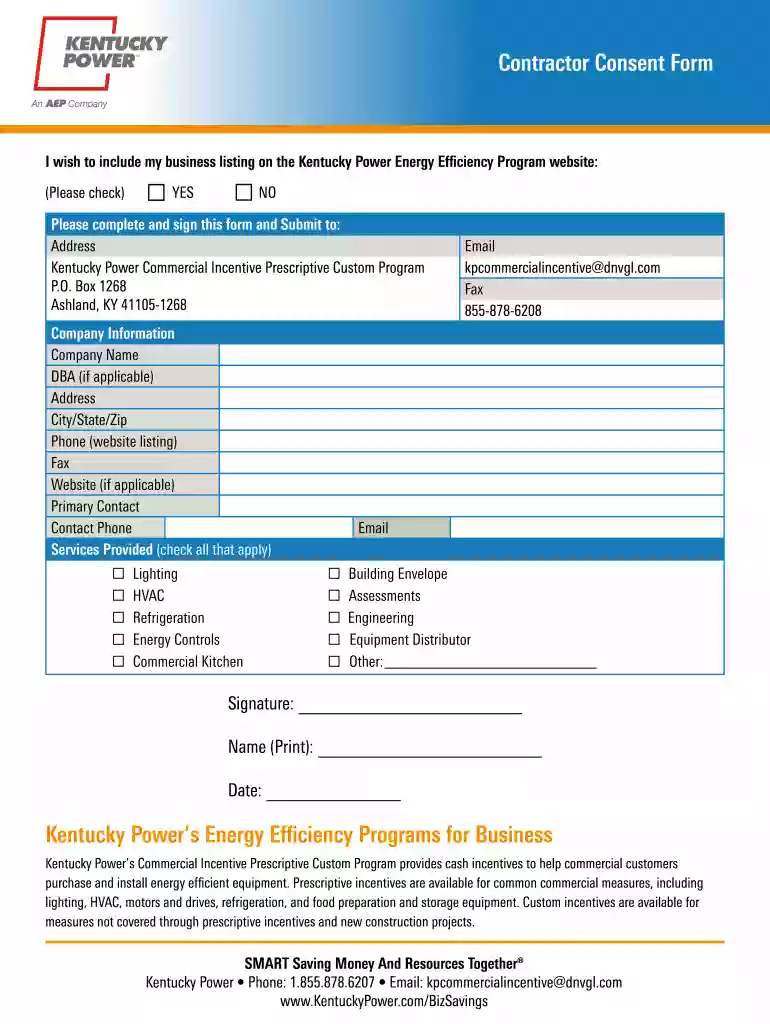
  2. Begin by indicating your preference for including your business listing on the Kentucky Power Energy Efficiency Program website. Check either 'YES' or 'NO'.
  3. Fill in the Company Information section. Provide your Company Name, DBA (if applicable), Address, City/State/Zip, Phone number, Fax number, and Website (if applicable).
  4. Identify the Primary Contact by entering their name and contact phone number.
  5. In the Services Provided section, check all applicable services such as Lighting, HVAC, Refrigeration, Energy Controls, Commercial Kitchen, Building Envelope Assessments, Engineering, Equipment Distributor, or Other.
  6. Finally, sign the form by printing your name and adding the date before submitting it to the provided address.

Start using our platform today to easily complete and submit your Contractor Consent Form for free!

be ready to get more

Complete this form in 5 minutes or less

Get form

Got questions?

We have answers to the most popular questions from our customers. If you can't find an answer to your question, please contact us.
Contact us

Yes, you can use DocHub for signing any business and private documentation, including your Contractor Consent Form - Kentucky Power. All eSignatures you create with our service are legally binding and court-admissible, as DocHub complies with standards required by ESIGN and UETA. Save your completed paperwork with a detailed Audit Trail if needed.

If you store your papers in Google Drive, there is no need to download your Contractor Consent Form - Kentucky Power on your computer and upload it back to our editor. A significantly easier way is to set up a browser extension created by DocHub to streamline this flow. The extension allows editing PDFs right in your browser. Alternatively, you may integrate your DocHub and Gmail accounts for more efficient modifying.

Thank you for your patience. Account Summary. Bills Payments. View Bills. Payment Assistance. Outages Overview. Report an Outage. Safety. Savings Overview. Home Energy Savings. EnergyAdvantage at Home. Community(current) Community Overview. Caring for Our Community. Contact Overview. Contact by Phone: 1-800-572-1113.
A Kentucky independent contractor agreement is a legal document signed by a contractor and the entity that hired them for a specific job or task. This document includes terms the two signing parties negotiated that help establish a working relationship for a designated period.
AEPs utility units operate as AEP Ohio, AEP Texas, Appalachian Power (in Virginia, West Virginia, and Tennessee), Indiana Michigan Power, Kentucky Power, Public Service Company of Oklahoma, and Southwestern Electric Power Company (in Arkansas, Louisiana and east Texas). AEPs headquarters are in Columbus, Ohio.

Security and compliance

At DocHub, your data security is our priority. We follow HIPAA, SOC2, GDPR, and other standards, so you can work on your documents with confidence.

Learn more
ccpa2
pci-dss
gdpr-compliance
hipaa
soc-compliance

People also ask

Use our online form to request permanent service for a new home. You can also request service by calling us at 800-572-1113. When placing your order, please have the following information ready: Contact for project (name, phone number and email address)
Call BillMatrix toll-free at 800-611-0964 to make a payment. Pay by credit, debit, some ATM cards or e-check. Youll need your account number.
Welcome to a better way to manage your account with our mobile app. You can report an outage, check outage status, manage your accounts and more! Use the Remember me feature to make login a breeze. Everything is now at the touch of your fingertips.

Related links