Contact InformationUniversity of West Florida 2026

Get Form
Contact InformationUniversity of West Florida Preview on Page 1

Here's how it works

01. Edit your form online
Type text, add images, blackout confidential details, add comments, highlights and more.
02. Sign it in a few clicks
Draw your signature, type it, upload its image, or use your mobile device as a signature pad.
03. Share your form with others
Send it via email, link, or fax. You can also download it, export it or print it out.

How to use or fill out Contact Information University of West Florida with our platform

Form edit decoration
9.5
Ease of Setup
DocHub User Ratings on G2
9.0
Ease of Use
DocHub User Ratings on G2
  1. Click ‘Get Form’ to open the Contact Information University of West Florida in the editor.
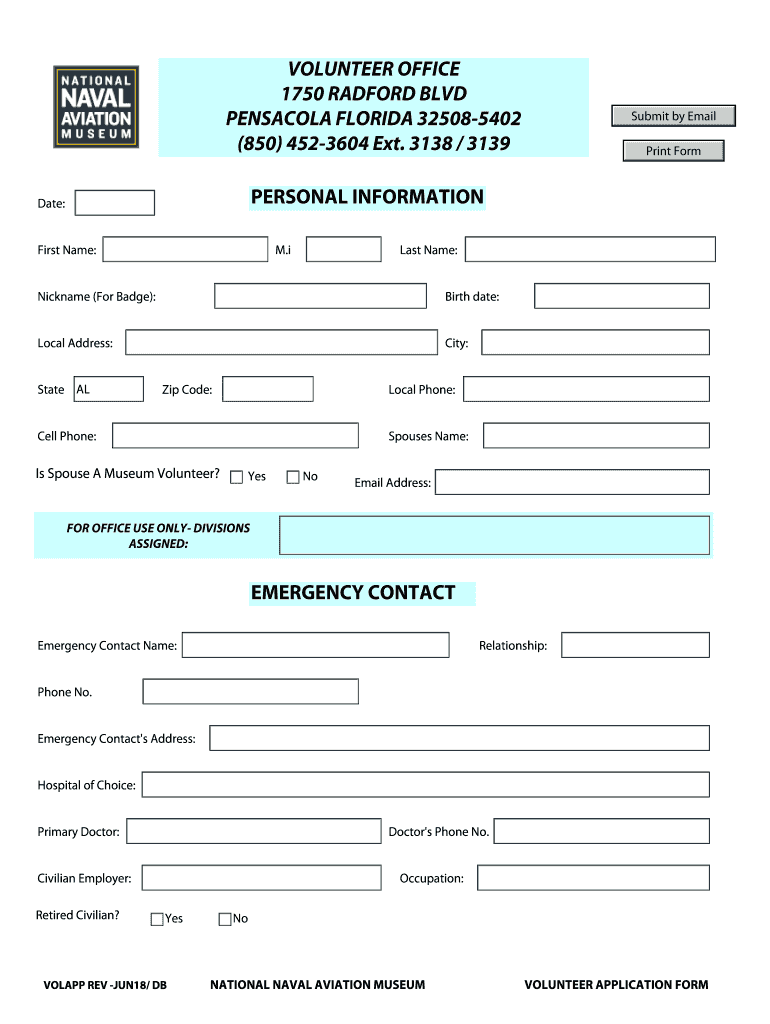
  2. Begin by entering the date at the top of the form. This helps establish a timeline for your application.
  3. Fill in your personal information, including your first name, middle initial, last name, and nickname for your badge. Ensure accuracy as this will be used for identification.
  4. Provide your birth date and local address details, including city, state (select 'AL'), and zip code. This information is crucial for contact purposes.
  5. Enter both local and cell phone numbers to ensure multiple ways to reach you. Include your spouse's name and indicate if they are also a museum volunteer.
  6. Complete the emergency contact section by providing their name, relationship to you, phone number, address, hospital of choice, primary doctor’s name, and their phone number.
  7. Fill out military history if applicable. Indicate service branch, dates of service, highest rank achieved, and current military status.
  8. List three references who are not relatives along with their relationship to you and contact numbers.
  9. Check areas of interest where you would like to volunteer. This helps match you with suitable roles within the museum.
  10. Review all entered information for accuracy before submitting. Once satisfied, submit by email or print the form directly from our platform.

Start filling out your Contact Information University of West Florida form today for free using our platform!

be ready to get more

Complete this form in 5 minutes or less

Get form

Got questions?

We have answers to the most popular questions from our customers. If you can't find an answer to your question, please contact us.
Contact us
The Office of the Registrar is in Building 18 on the Pensacola campus and can be docHubed at 850.474. 2244 or registrar@uwf.edu.
UWFs Office of Undergraduate Admissions looks forward to assisting you throughout the application process. Feel free to contact our team or admissions@uwf.edu.
Faculty and Staff: Log in at gmail.uwf.edu. Students: Log in at gmail.students.uwf.edu.
Admissions Information Admissions address:201 Criser Hall PO Box 114000 Gainesville, FL 32611-4000 Phone number: (352) 392-1365 Fax number: (352) 392-2115 Admissions Website: Email: freshman@ufl.edu3 more rows
The most common University of West Florida email format is [firstinitial][last] (ex. jdoe@uwf.edu), which is being used by 72.3% of University of West Florida work email addresses. Other common University of West Florida email patterns are [first][last] (ex. janedoe@uwf.edu) and [last] (ex.

Security and compliance

At DocHub, your data security is our priority. We follow HIPAA, SOC2, GDPR, and other standards, so you can work on your documents with confidence.

Learn more
ccpa2
pci-dss
gdpr-compliance
hipaa
soc-compliance
be ready to get more

Complete this form in 5 minutes or less

Get form

People also ask

University of West Florida Rankings University of West Florida is ranked #23 out of 135 Regional Universities South.
For email, calendar, and collaboration tools, log into Google Apps at gmail.students.uwf.edu. Your email address is your ArgoNet username followed by @students.uwf.edu.
1.1 Go to google and select Gmail. Welcome from the Information and. To all our first-year students, we wish you a successful academic year. 1.4 Make sure you read and. understand the Google Terms of. Engage with. Internet Access. connect via UWCs. using UWC. Collaborate with. your mates. using your UWC. All the very best!

Related links