NTRP Self-Rate Appeal Form - USTA TennisLink Default Page 2026

Get Form
ustatennislink Preview on Page 1

Here's how it works

01. Edit your ustatennislink online
Type text, add images, blackout confidential details, add comments, highlights and more.
02. Sign it in a few clicks
Draw your signature, type it, upload its image, or use your mobile device as a signature pad.
03. Share your form with others
Send it via email, link, or fax. You can also download it, export it or print it out.

How to use or fill out NTRP Self-Rate Appeal Form - USTA TennisLink Default Page with DocHub

Form edit decoration
9.5
Ease of Setup
DocHub User Ratings on G2
9.0
Ease of Use
DocHub User Ratings on G2
  1. Click ‘Get Form’ to open the NTRP Self-Rate Appeal Form in our platform's editor.
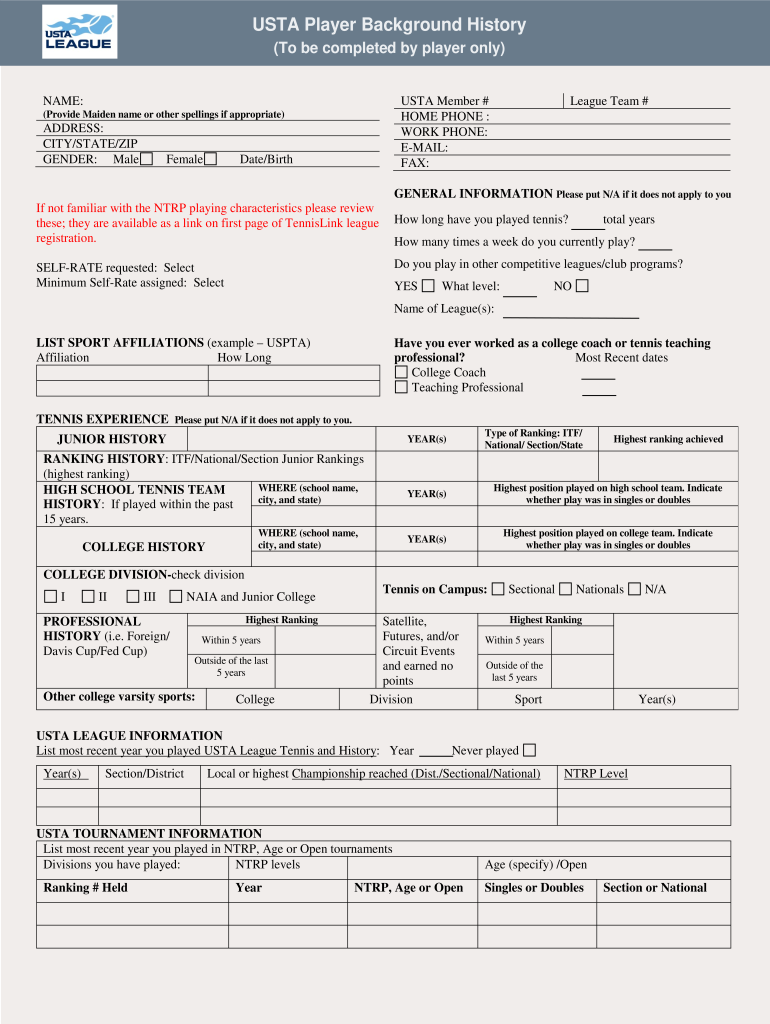
  2. Begin by entering your personal information in the designated fields, including your name, USTA Member number, and contact details. Ensure accuracy for effective communication.
  3. In the 'General Information' section, provide details about your tennis experience. Indicate how long you have played and your current playing frequency. If applicable, list any competitive leagues you participate in.
  4. Complete the 'Tennis Experience' section by detailing your junior and college history. Include rankings and positions held on teams, specifying whether they were singles or doubles.
  5. Address any medical considerations that may affect your play in the 'Other Considerations' section. Be concise but thorough in describing any relevant conditions.
  6. Finally, review all entered information for accuracy before signing and submitting the form electronically through our platform.

Start using our platform today to easily complete your NTRP Self-Rate Appeal Form for free!

be ready to get more

Complete this form in 5 minutes or less

Get form

Got questions?

We have answers to the most popular questions from our customers. If you can't find an answer to your question, please contact us.
Contact us
Automated Appeal (Computer) or Self-Rate Appeal (Up) Sign on to TennisLink. Log in to your TennisLink account (input USTA # and password). Once logged in, click link at the top right side of My Tennis Page or search for your name by inputting USTA # in Find NTRP Rating Information and hit appeal button.
You dont have to appeal up to play league or tournaments at a higher level. In fact, Id recommend you dont appeal up, just play. If you do well enough youll get bumped up and if you dont, then youll stay 3.5.
In the case of a team default or double team default any individual matches actually played will count only for NTRP ratings and eligibility for advancement and cannot count for determining standings (USTA National League Regulations: 2.01C(3) Team Match).
Self-Rated Player Self-rated players may appeal their rating once every 365 days. Players can appeal their self-rating up or down by clicking Appeal Rating Level in the top right corner of their TennisLink homepage. Self-rates may take up to 3 weeks to be reviewed.
Log-in to the National USTA website with your credentials. On the upper right corner of the screen, look for NTRP Rating Level and please click the link below where it says Appeal Rating Level ● Please select the up or down button to appeal to the appropriate rating.

Security and compliance

At DocHub, your data security is our priority. We follow HIPAA, SOC2, GDPR, and other standards, so you can work on your documents with confidence.

Learn more
ccpa2
pci-dss
gdpr-compliance
hipaa
soc-compliance

People also ask

If you do not see the option to Appeal Rating Level, this means you will need to complete a NTRP Leagues Self Rate. USTA Section League Coordinators review self-rate appeals once they are submitted. The approximate turn around time is 3 weeks. You will receive an email once a decision is made.

Related links