




Here's how it works

01. Edit your form online
Type text, add images, blackout confidential details, add comments, highlights and more.

02. Sign it in a few clicks
Draw your signature, type it, upload its image, or use your mobile device as a signature pad.

03. Share your form with others
Send it via email, link, or fax. You can also download it, export it or print it out.
How to use or fill out PROVISIONAL ABA APPROVED LAW SCHOOL CERTIFICATION

- Click ‘Get Form’ to open it in the editor.
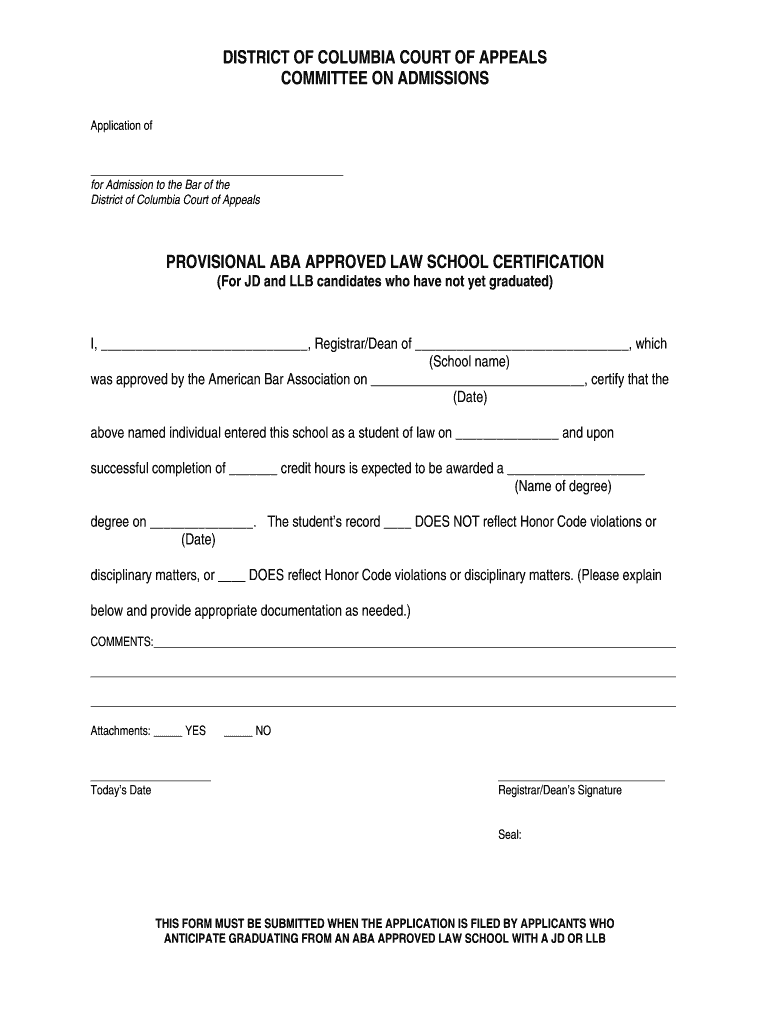
- Begin by entering the applicant's name in the designated field at the top of the form.
- In the 'School name' section, input the name of the law school that is certifying the applicant.
- Fill in the date when the law school was approved by the American Bar Association.
- Indicate when the student entered law school and how many credit hours they have completed or are expected to complete.
- Specify the degree that will be awarded upon graduation and include the expected graduation date.
- Address any Honor Code violations or disciplinary matters by checking the appropriate box and providing explanations if necessary.
- If applicable, indicate whether there are attachments and ensure you sign as Registrar/Dean before submitting.
Start using our platform today to easily complete your PROVISIONAL ABA APPROVED LAW SCHOOL CERTIFICATION for free!
Fill out PROVISIONAL ABA APPROVED LAW SCHOOL CERTIFICATION online
It's free
It's free
Security and compliance
At DocHub, your data security is our priority. We follow HIPAA, SOC2, GDPR, and other standards, so you can work on your documents with confidence.
Learn more




