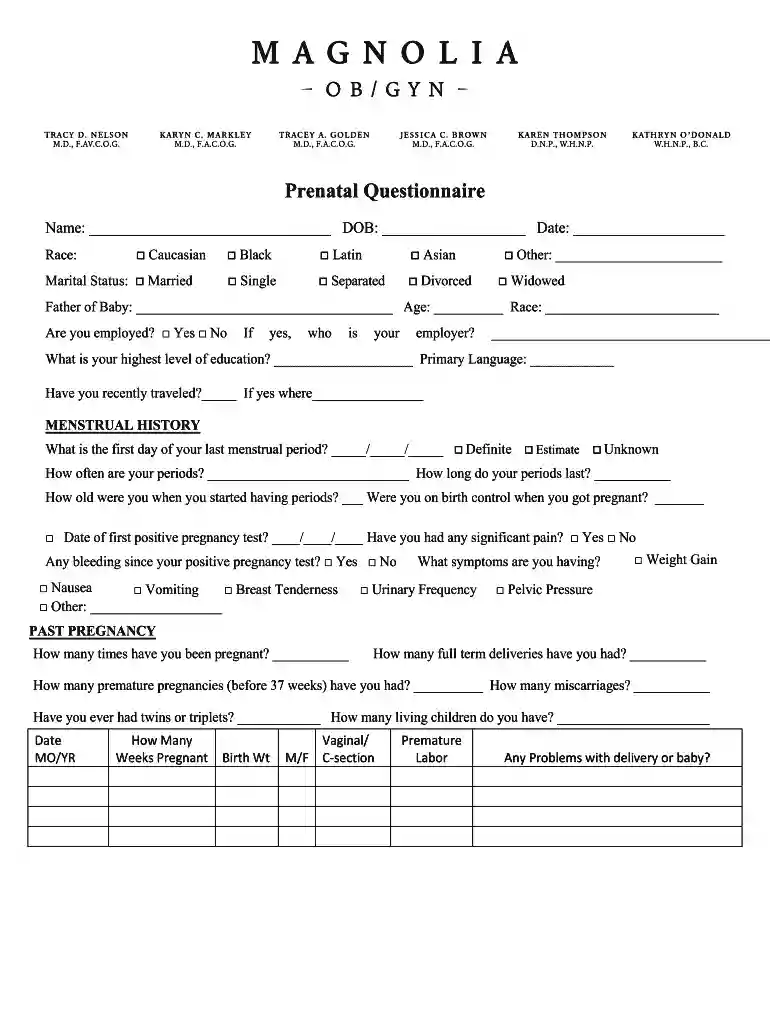
Prenatal questionnaire form 2026

Get Form
prenatal questionnaire form Preview on Page 1

Here's how it works

01. Edit your prenatal questionnaire form online
Type text, add images, blackout confidential details, add comments, highlights and more.

02. Sign it in a few clicks
Draw your signature, type it, upload its image, or use your mobile device as a signature pad.

03. Share your form with others
Send it via email, link, or fax. You can also download it, export it or print it out.

How to use or fill out prenatal questionnaire form with our platform

Form edit decoration
9.5
Ease of Setup
DocHub User Ratings on G2
9.0
Ease of Use
DocHub User Ratings on G2
  1. Click ‘Get Form’ to open the prenatal questionnaire in the editor.
  2. Begin by entering your name, date of birth, and the current date at the top of the form. This information is essential for identifying your records.
  3. Fill in your race and marital status by selecting the appropriate options provided. If applicable, specify any other status.
  4. Provide details about the father of the baby, including his name, age, and race. Indicate your employment status and highest level of education.
  5. Complete the menstrual history section by noting the first day of your last menstrual period and answering related questions regarding your cycle.
  6. In the personal medical history section, check 'Yes' or 'No' for each medical condition listed. Be thorough to ensure accurate health assessments.
  7. Finally, review all sections for completeness before saving or submitting your form. Ensure that any additional notes or questions are included in the summary section.

Start filling out your prenatal questionnaire today for free using our platform!

be ready to get more

Complete this form in 5 minutes or less

Get form

Got questions?

We have answers to the most popular questions from our customers. If you can't find an answer to your question, please contact us.
Contact us

Electronic document approval requires a software solution that complies with data security and eSignature standards. DocHub is an excellent tool for that, since it meets all the previously mentioned requirements. Whatever method you like to sign your prenatal questionnaire form in DocHub, your electronic signature will be legally binding and court-admissible.

Document editing with DocHub is equally convenient on desktop and mobile devices. You just need an internet browser to modify your prenatal questionnaire form on Android. Open our website and sign in to access the tools you require. Add your file and introduce your intended modifications. After that, you can keep your form in your file storage or send it out right away.

Outline History. Calculating the estimated date of delivery. Physical examination. Ultrasound examination. Discussion of screening and diagnostic testing for genetic and anatomic abnormalities. Aneuploidy screening and diagnosis. Fetal anomaly screening. Laboratory tests. Confirmation of pregnancy. Standard panel.
Check your sample for infection and to confirm your pregnancy. Check your blood pressure, weight, and height. Calculate your due date based on your last menstrual cycle and ultrasound exam. Ask about your health, including previous conditions, surgeries, or pregnancies.
General questions for obstetricians or midwives during pregnancy When is my baby due? How often do I need to see you during my pregnancy ? Will I have scans throughout my pregnancy? What other tests will I have? How can I manage my morning sickness?

Security and compliance

At DocHub, your data security is our priority. We follow HIPAA, SOC2, GDPR, and other standards, so you can work on your documents with confidence.

Learn more
ccpa2
pci-dss
gdpr-compliance
hipaa
soc-compliance

People also ask

Components of the initial prenatal visit should include a complete medical history, physical exam, pregnancy confirmation, initial prenatal screening tests, genetic screening or diagnostic studies, and anticipatory counseling.
The Quality of Prenatal Care Questionnaire is a self-report, 46-item instrument with 6 subscales, which were validated by confirmatory factor analysis. The subscales are Information Sharing, Anticipatory Guidance, Sufficient Time, Approachability, Availability, and Support and Respect.
Ask the four cardinal questions of every pregnant woman: 1) Do you feel fetal movement? (expect this only after ~20 wks) 2) Are you having vaginal bleeding? 3) Do you have any leaking fluid? 4) Are you having contractions?
The Get Active Questionnaire for Pregnancy (GAQ-P) has been designed to identify the small number of women who need to consult with a healthcare professional before they begin or continue to be physically active, and to help the majority of healthy pregnant women overcome any concerns they might have about getting or

Related links