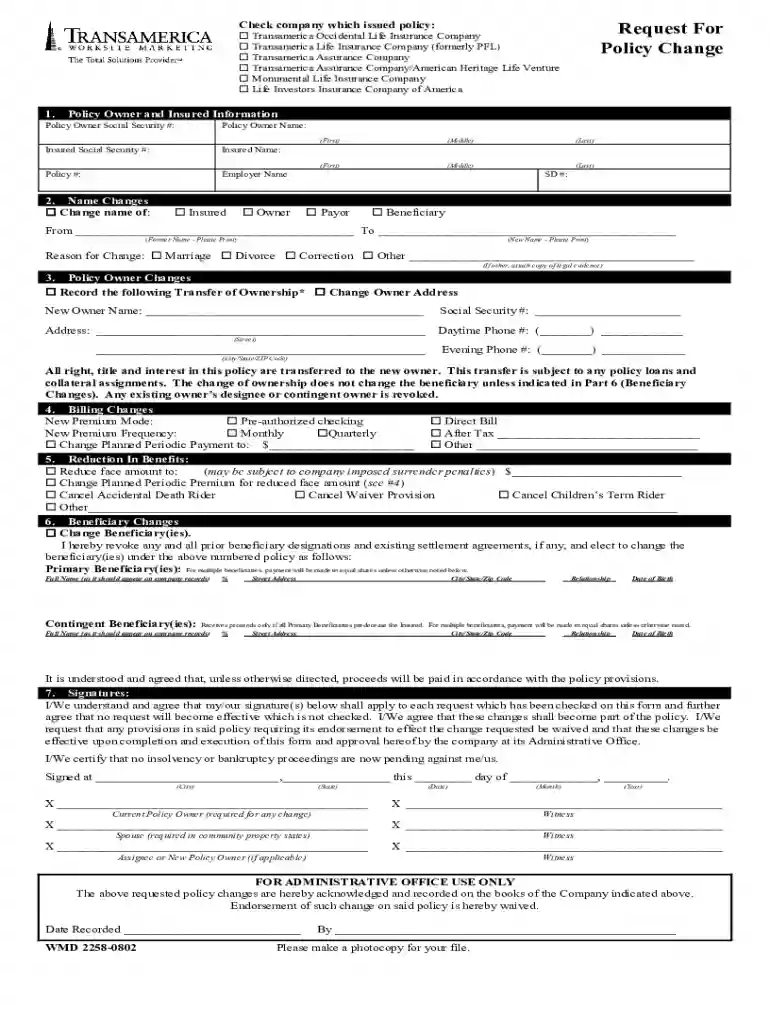
Transamerica policy change form 2026

Get Form
transamerica policy change form Preview on Page 1

Here's how it works

01. Edit your transamerica policy change form online
Type text, add images, blackout confidential details, add comments, highlights and more.

02. Sign it in a few clicks
Draw your signature, type it, upload its image, or use your mobile device as a signature pad.

03. Share your form with others
Send it via email, link, or fax. You can also download it, export it or print it out.

How to use or fill out transamerica policy change form with our platform

Form edit decoration
9.5
Ease of Setup
DocHub User Ratings on G2
9.0
Ease of Use
DocHub User Ratings on G2
  1. Click ‘Get Form’ to open the transamerica policy change form in the editor.
  2. Begin by filling out the Policy Owner and Insured Information section. Enter the Policy Owner's name, Social Security number, and the Insured's details along with the policy number and employer name.
  3. If you need to make a name change, complete Section 2. Specify whether it’s for the Insured, Owner, Payor, or Beneficiary and provide both former and new names along with the reason for the change.
  4. For ownership changes, fill out Section 3 with the new owner's information including their name, Social Security number, address, and phone numbers.
  5. In Section 4, indicate any billing changes by selecting your preferred premium mode and frequency.
  6. If reducing benefits is necessary, complete Section 5 by specifying the new face amount or any riders you wish to cancel.
  7. Section 6 is for changing beneficiaries. List primary and contingent beneficiaries along with their details ensuring to specify percentage shares.
  8. Finally, sign in Section 7 where all required signatures must be provided. Ensure that each signature is witnessed as per instructions.

Start using our platform today to easily fill out your transamerica policy change form online for free!

be ready to get more

Complete this form in 5 minutes or less

Get form

Got questions?

We have answers to the most popular questions from our customers. If you can't find an answer to your question, please contact us.
Contact us
To submit the Beneficiary Change Form, you may fax it to 1-800-235-4782 or mail it to Transamericas administrative office at 4333 Edgewood Rd. NE, Cedar Rapids, IA 52499. Ensure that all signatures are in place before submitting.
How can I change the investments in my IRA? Log in to your account. Opens in a new window Under My Account, look for the Retirement Plans IRAs section. Select Manage Investments. Next, select Change My Investments and choose the IRA.
Step-by-step guide to make changes to your Transamerica 401(k) portfolio Log in to your Transamerica account. On the homepage, select the 401(k) account. Youll need to change the current investments in your portfolio, as well as change your investment elections for any future contributions to this account.
As an alternative, you should give consideration to sending it by U.S. postal service. Mailing Address. PO Box 189. Cedar Rapids, IA 52406-0189. Administrative Office. PO Box 189 Cedar Rapids, IA 52406-0189. Customer Service. 800-523-7900. Weekdays 8 a.m. - 7 p.m. ET. Fax Number. 972-881-4527.
Yes, you can rebalance your portfolio without selling. Add new money into the portfolio and buy the asset class that is underrepresented. If you need to withdraw funds from your account, sell a portion of the overrepresented asset. You can also reinvest cash dividend payments into an under-allocated asset class.

Security and compliance

At DocHub, your data security is our priority. We follow HIPAA, SOC2, GDPR, and other standards, so you can work on your documents with confidence.

Learn more
ccpa2
pci-dss
gdpr-compliance
hipaa
soc-compliance
be ready to get more

Complete this form in 5 minutes or less

Get form

People also ask

Our parent company, Aegon, boasts a legacy of financial services expertise. Netherlands-based Aegon has been a leader in the space since 1844. They acquired Transamerica in 1999, and today, were proud to represent their U.S. operations and largest market.

Related links