




Here's how it works



How to use or fill out Abbys Road Veterinary Care History Form with our platform

- Click ‘Get Form’ to open the Abbys Road Veterinary Care History Form in the editor.
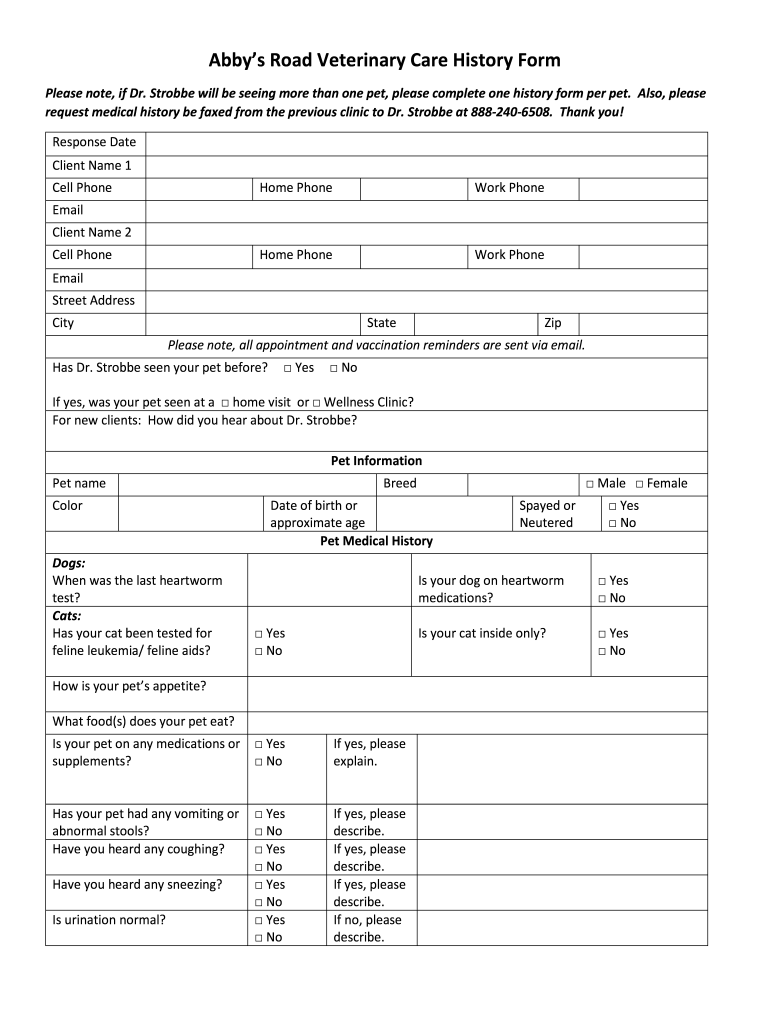
- Begin by entering your personal information, including Client Name, Cell Phone, Home Phone, Work Phone, and Email. Ensure all contact details are accurate for appointment reminders.
- Indicate whether Dr. Strobbe has seen your pet before by selecting 'Yes' or 'No'. If applicable, specify if it was a home visit or at the Wellness Clinic.
- Fill in your pet's information such as name, color, breed, and date of birth or approximate age. For dogs, provide the date of the last heartworm test; for cats, indicate if they have been tested for feline leukemia/feline aids.
- Complete the medical history section by answering questions about your pet’s appetite, medications, any vomiting or coughing episodes, and other health concerns. Be thorough to help Dr. Strobbe understand your pet's needs.
- Finally, review all entered information for accuracy and completeness before submitting. You can email or fax the completed form as instructed.
Start filling out your Abbys Road Veterinary Care History Form today for free and ensure a smooth visit for your pet!
It's free
Got questions?
How can I create an electronic signature in my Abbys Road Veterinary Care History Form on Android?
Signing documents on a mobile device is quick, easy, and doesn’t require software installation if you have an account with DocHub. Log in from any browser, fill in your blank fields with your information, and click on Sign → Create your signature. You can draw your electronic signature just as you usually do on paper, add its image to your Abbys Road Veterinary Care History Form, or type in your name and stylize its look. No matter what option you select, your document will be valid.
How do you fill out Abbys Road Veterinary Care History Form on iOS?
You need only an internet connection and a browser to complete your Abbys Road Veterinary Care History Form by using an iOS phone. Open the DocHub website and authenticate. Then, add your file or choose it from the list in your dashboard. Then use our editing instruments to complete your form and preserve all your modifications. You may also send it to a specified recipient immediately.
How to look up vet credentials?
What are the legal responsibilities of a veterinarian?
Can vets pull records from other vets?
Security and compliance
At DocHub, your data security is our priority. We follow HIPAA, SOC2, GDPR, and other standards, so you can work on your documents with confidence.
Learn more


