




Here's how it works



How to use or fill out Leslie C Kilpatrick, M Ed, LCSW, LLC POBox 204 Oakton, VA with our platform

- Click ‘Get Form’ to open it in the editor.
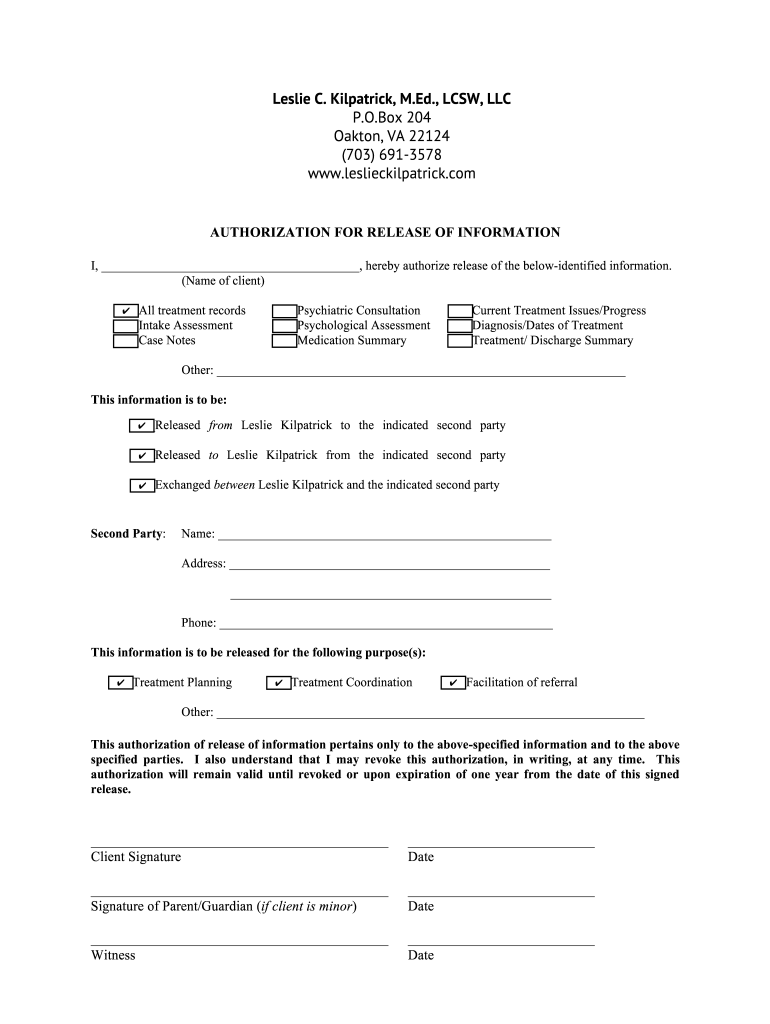
- Begin by entering the client's name in the designated field at the top of the authorization form. This is crucial for identifying who the information pertains to.
- Select the specific types of information you wish to authorize for release by checking the appropriate boxes. Options include treatment records, intake assessments, and more.
- Indicate whether the information will be released from Leslie Kilpatrick to another party, received from another party, or exchanged between parties by checking the relevant options.
- Fill in the second party's details including their name, address, and phone number in the provided fields.
- Specify the purpose for which this information is being released by checking all applicable boxes such as treatment planning or coordination.
- Ensure that all signatures are completed at the bottom of the form. This includes client signature, date, and if applicable, parent/guardian signature and witness.
Start using our platform today to streamline your document editing and signing process for free!
It's free
Got questions?
Is it safe to sign my Leslie C Kilpatrick, M Ed , LCSW, LLC POBox 204 Oakton, VA electronically?
You need to use only trustworthy software solutions with strong data protection compliance to sign your documents electronically. DocHub is just the type of service you need! It stores data on Amazon Web Servers and complies with all necessary security criteria and eSignature laws, so it’s a reliable way to eSign your Leslie C Kilpatrick, M Ed , LCSW, LLC POBox 204 Oakton, VA or other paperwork with this tool.
How to fill out Leslie C Kilpatrick, M Ed , LCSW, LLC POBox 204 Oakton, VA on the internet free of charge in 2024?
Having a swift editing system like DocHub, you do not need anything but a browser and connection to the internet to edit your Leslie C Kilpatrick, M Ed , LCSW, LLC POBox 204 Oakton, VA online quickly. Upload your file or get the appropriate form in DocHub’s catalog, open our editor with one click, and complete it digitally. To edit your forms at any time, sign up a free account with DocHub.
Security and compliance
At DocHub, your data security is our priority. We follow HIPAA, SOC2, GDPR, and other standards, so you can work on your documents with confidence.
Learn more


