



Ca addresses 2026

Get Form
pablo ca Preview on Page 1

Here's how it works

01. Edit your pablo ca online
Type text, add images, blackout confidential details, add comments, highlights and more.

02. Sign it in a few clicks
Draw your signature, type it, upload its image, or use your mobile device as a signature pad.

03. Share your form with others
Send it via email, link, or fax. You can also download it, export it or print it out.

How to use or fill out ca addresses with our platform

Form edit decoration
9.5
Ease of Setup
DocHub User Ratings on G2
9.0
Ease of Use
DocHub User Ratings on G2
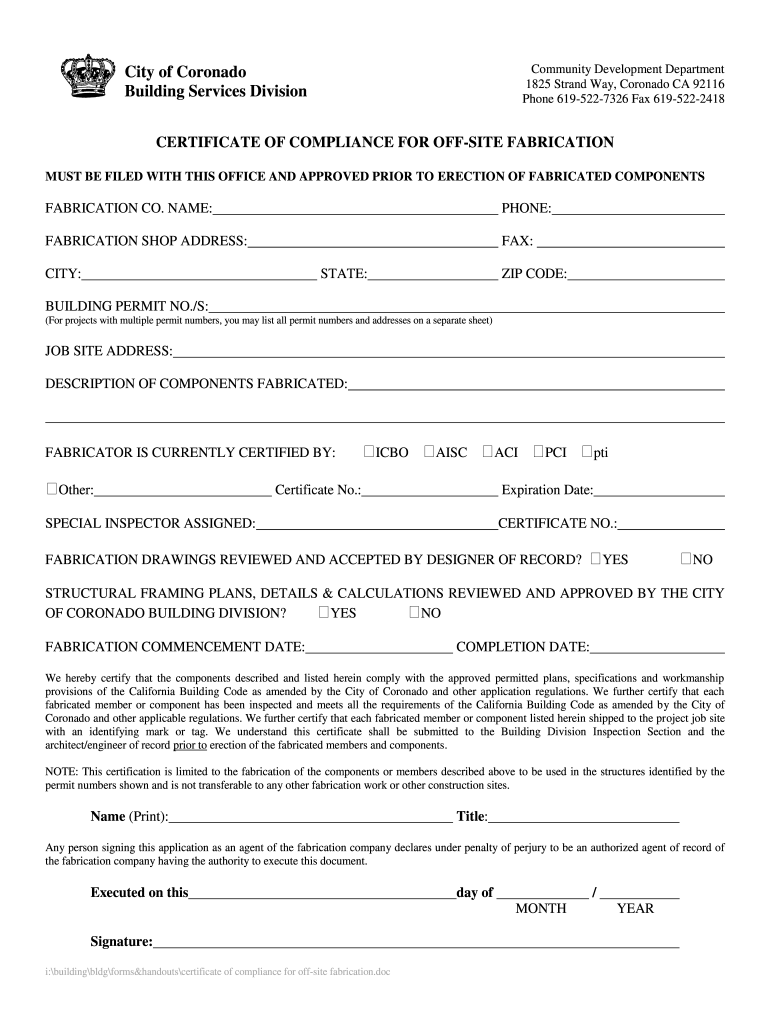
  1. Click ‘Get Form’ to open the ca addresses document in the editor.
  2. Begin by entering the 'FABRICATION CO. NAME' in the designated field, ensuring accuracy for identification purposes.
  3. Fill in the 'PHONE' and 'FAX' fields with the appropriate contact numbers for your fabrication company.
  4. Provide the 'FABRICATION SHOP ADDRESS', including street, city, state, and ZIP code to ensure proper location identification.
  5. List all relevant 'BUILDING PERMIT NO./S' associated with your project. If there are multiple permits, you may attach a separate sheet.
  6. Complete the 'JOB SITE ADDRESS' and describe the components fabricated in detail to provide clarity on your submission.
  7. Indicate if the fabricator is currently certified by checking the appropriate box and providing any necessary certificate numbers and expiration dates.
  8. Confirm whether fabrication drawings have been reviewed by marking ‘YES’ or ‘NO’ as applicable.
  9. Enter both 'FABRICATION COMMENCEMENT DATE' and 'COMPLETION DATE' to outline your project timeline.
  10. Finally, print your name, title, sign, and date at the bottom of the form to certify its accuracy before submission.

Start using our platform today for free to streamline your document editing and form completion!

be ready to get more

Complete this form in 5 minutes or less

Get form

Got questions?

We have answers to the most popular questions from our customers. If you can't find an answer to your question, please contact us.
Contact us
Address Formatting Tips Type or print the address. Use a fixed space 10- or 12-point font (e.g., Courier) Use all capitals and no punctuation. Use the correct abbreviations (e.g., CA instead of Calif.) Include a ZIP Code (or ZIP+4 if available).
What is the Canadian address format? Recipients name. Recipients business name (if applicable) Apartment, unit, or street address number and street name. City, province or territory, and postal and province or territory code.
Include the name of the city followed by the two-letter state abbreviation and the ZIP code. States are represented with abbreviations such as CA for California and NY for New York. For international mail, always write UNITED STATES OF AMERICA or USA in capital letters on the last line.
County Clerk-Recorder. This county office keeps records about people and businesses in that county. Voter registration records. If they registered to vote, the registrar of voters will have their address from when they registered to vote. County Assessors Office.
Address Line 1 helps identify the specific location or building where mail or packages should be delivered. For example, in the address 123 Main Street, apt 4B San Diego CA, 91911, 123 Main Street, apt 4B would be considered address line 1.

Security and compliance

At DocHub, your data security is our priority. We follow HIPAA, SOC2, GDPR, and other standards, so you can work on your documents with confidence.

Learn more
ccpa2
pci-dss
gdpr-compliance
hipaa
soc-compliance
be ready to get more

Complete this form in 5 minutes or less

Get form

People also ask

Hollywood Boulevard It is famous for running through the Hollywood commercial and entertainment district, including attractions like the Hollywood Walk of Fame.

Related links

