EX-10 37 - SEC 2026

Get Form
EX-10 37 - SEC Preview on Page 1

Here's how it works

01. Edit your form online
Type text, add images, blackout confidential details, add comments, highlights and more.
02. Sign it in a few clicks
Draw your signature, type it, upload its image, or use your mobile device as a signature pad.
03. Share your form with others
Send it via email, link, or fax. You can also download it, export it or print it out.

How to use or fill out EX-10 37 - SEC with our platform

Form edit decoration
9.5
Ease of Setup
DocHub User Ratings on G2
9.0
Ease of Use
DocHub User Ratings on G2
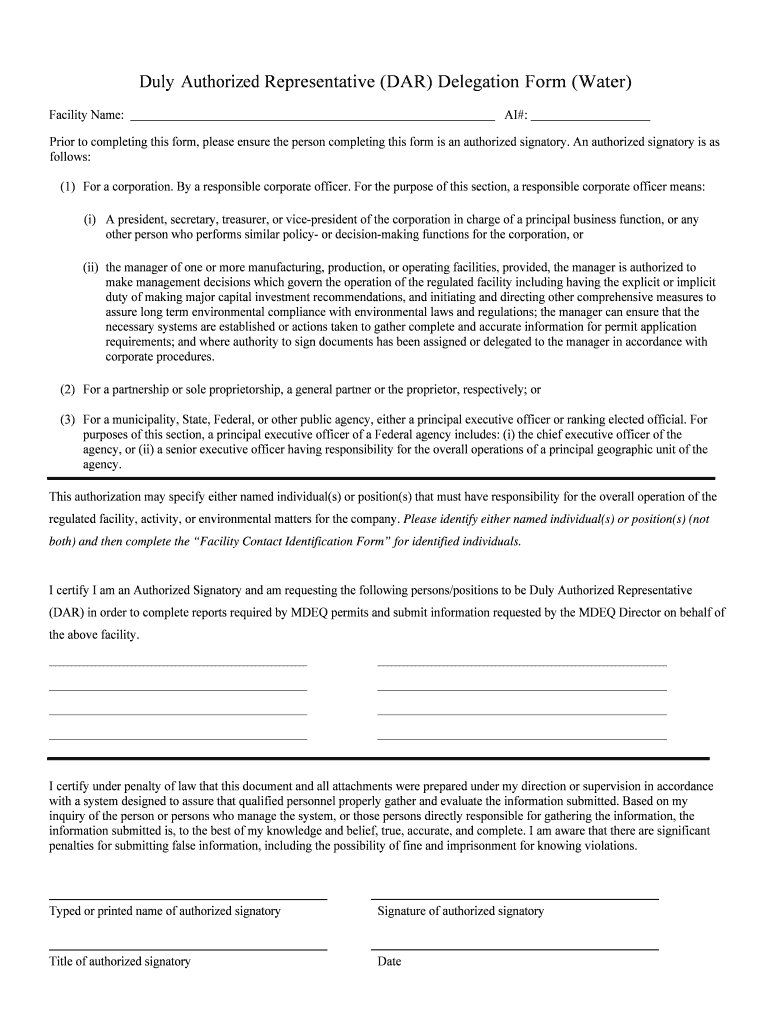
  1. Click ‘Get Form’ to open the EX-10 37 - SEC document in the editor.
  2. Begin by entering the Facility Name and AI# at the top of the form. Ensure that these details are accurate as they identify your organization.
  3. In the section for Authorized Signatory, confirm that you are an authorized signatory. This may include a corporate officer or a designated manager responsible for compliance.
  4. List the individuals or positions you wish to designate as Duly Authorized Representatives (DAR). Make sure to complete this section carefully, as it impacts who can act on behalf of your facility.
  5. Certify your submission by typing or printing your name, signing, and providing your title and date. This step is crucial for legal compliance.
  6. Complete the Facility Contact Identification Form by filling in all required fields for new contacts and replacing existing ones if necessary.

Start using our platform today to streamline your document editing and ensure efficient completion of your forms!

be ready to get more

Complete this form in 5 minutes or less

Get form

Got questions?

We have answers to the most popular questions from our customers. If you can't find an answer to your question, please contact us.
Contact us

Electronic document signing requires a software solution that works in compliance with data security and eSignature standards. DocHub is a perfect tool for that, because it fulfills all the above mentioned requirements. Whatever method you prefer to sign your EX-10 37 - SEC in DocHub, your eSignature will be legally binding and court-admissible.

It is a no-brainer on a computer or via a mobile device to fill out a EX-10 37 - SEC with DocHub. All you need to do is open any installed internet browser on your smartphone and go to the DocHub website. Once authenticated, add your document and open it in editing mode. Use our toolbar to make your edits and save changes. Optionally, keep your file in your files or send it to a recipient immediately.

Security and compliance

At DocHub, your data security is our priority. We follow HIPAA, SOC2, GDPR, and other standards, so you can work on your documents with confidence.

Learn more
ccpa2
pci-dss
gdpr-compliance
hipaa
soc-compliance
be ready to get more

Complete this form in 5 minutes or less

Get form