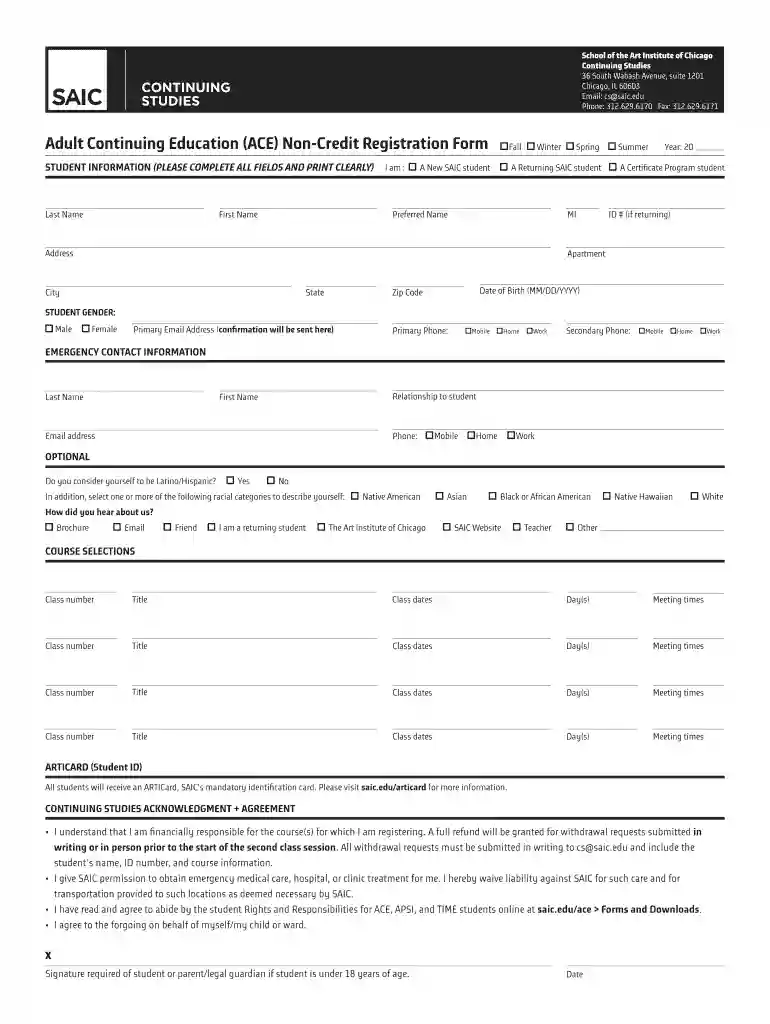
ACE: Forms and DownloadsSchool of the Art Institute of Preview on Page 1

ACE: Forms and DownloadsSchool of the Art Institute of 2026

Here's how it works

  • 01. Edit your form online

    Type text, add images, blackout confidential details, add comments, highlights and more.

  • 02. Sign it in a few clicks

    Draw your signature, type it, upload its image, or use your mobile device as a signature pad.

  • 03. Share your form with others

    Send it via email, link, or fax. You can also download it, export it or print it out.

How to use or fill out ACE: Forms and DownloadsSchool of the Art Institute of with our platform

Form edit decoration
9.5
Ease of Setup
DocHub User Ratings on G2
9.0
Ease of Use
DocHub User Ratings on G2
  1. Click ‘Get Form’ to open the ACE: Forms and Downloads in our editor.
  2. Begin by filling out the STUDENT INFORMATION section. Ensure all fields are completed clearly, including your last name, first name, preferred name, and date of birth.
  3. Indicate whether you are a returning or new student and provide your ID number if applicable. Fill in your address details accurately.
  4. Complete the STUDENT GENDER section by selecting your gender. Then, provide your primary email address and phone numbers for contact purposes.
  5. In the EMERGENCY CONTACT INFORMATION section, enter the details of someone who can be contacted in case of an emergency.
  6. Select your course preferences under COURSE SELECTIONS by entering class numbers, titles, dates, days, and meeting times for each course you wish to enroll in.
  7. Review the CONTINUING STUDIES ACKNOWLEDGMENT + AGREEMENT section carefully before signing. Ensure you understand the financial responsibilities outlined.
  8. Finally, complete the PAYMENT INFORMATION section with accurate billing details and select your payment method before submitting the form.

Start using our platform today to easily fill out your ACE registration form for free!

be ready to get more

Complete this form in 5 minutes or less

Security and compliance

At DocHub, your data security is our priority. We follow HIPAA, SOC2, GDPR, and other standards, so you can work on your documents with confidence.

Related links

School of Visual Arts Institutional Self-Study 2026

Students are given the opportunity, by way of an art work and model release form, to either accept or decline publication of their work or use of their likenessRead more

Learn more
If you believe that this page should be taken down, please follow our DMCA take down process here