v zone design certificate Preview on Page 1

V zone design certificate 2026

Here's how it works

  • 01. Edit your v zone design certificate online

    Type text, add images, blackout confidential details, add comments, highlights and more.

  • 02. Sign it in a few clicks

    Draw your signature, type it, upload its image, or use your mobile device as a signature pad.

  • 03. Share your form with others

    Send v zone certificate form via email, link, or fax. You can also download it, export it or print it out.

How to use or fill out v zone design certificate with our platform

Form edit decoration
9.5
Ease of Setup
DocHub User Ratings on G2
9.0
Ease of Use
DocHub User Ratings on G2
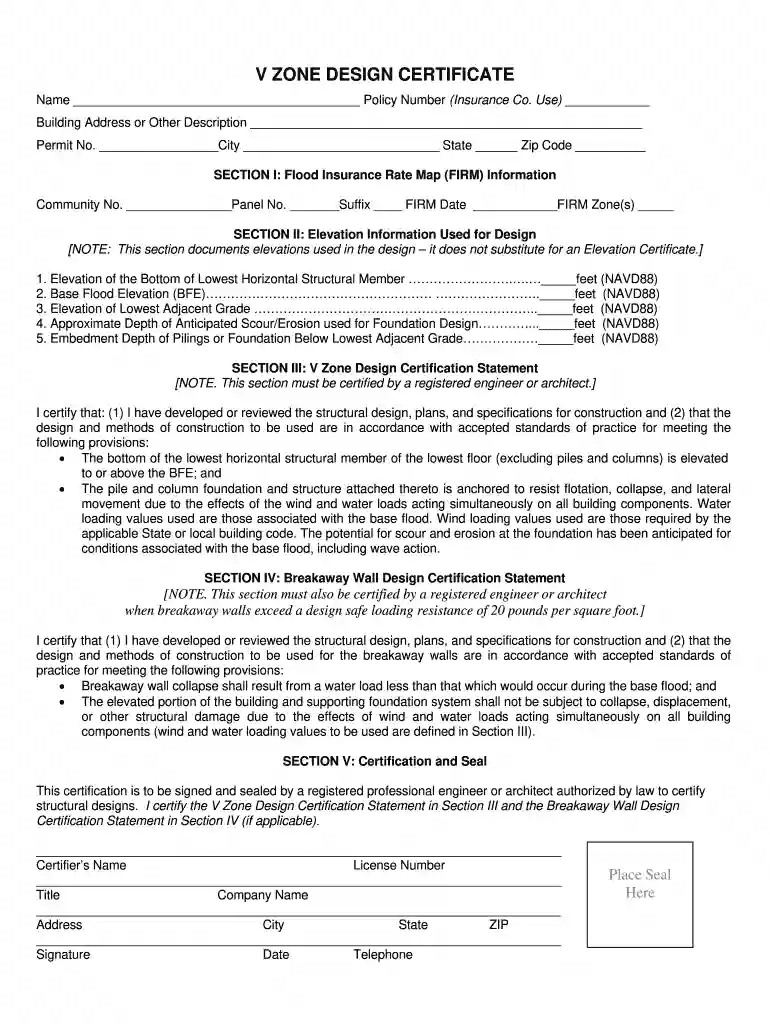
  1. Click ‘Get Form’ to open the V Zone Design Certificate in the editor.
  2. Begin by filling in your name and policy number in the designated fields at the top of the form.
  3. Provide the building address or description, along with the permit number, city, state, and zip code.
  4. In SECTION I, enter the community number, panel number, suffix, FIRM date, and FIRM zone(s) as required.
  5. SECTION II requires you to document elevation information. Fill in each field with accurate measurements for lowest horizontal structural member, base flood elevation (BFE), lowest adjacent grade, anticipated scour/erosion depth, and embedment depth of pilings.
  6. In SECTION III and IV, ensure that a registered engineer or architect certifies the design statements by signing and providing their details in SECTION V.

Start using our platform today to easily complete your V Zone Design Certificate online for free!

be ready to get more

Complete this form in 5 minutes or less

Security and compliance

At DocHub, your data security is our priority. We follow HIPAA, SOC2, GDPR, and other standards, so you can work on your documents with confidence.

v zone certificate

UNIVERISTY OF FLORIDA ZONE V DESIGN CERTIFICATE

This certification is to be signed and sealed by a Florida licensed professional engineer or architect authorized by law to DocHub structural designs.

Learn more
If you believe that this page should be taken down, please follow our DMCA take down process here