




Here's how it works



How to use or fill out pa intention with our platform

- Click ‘Get Form’ to open the pa intention document in the editor.
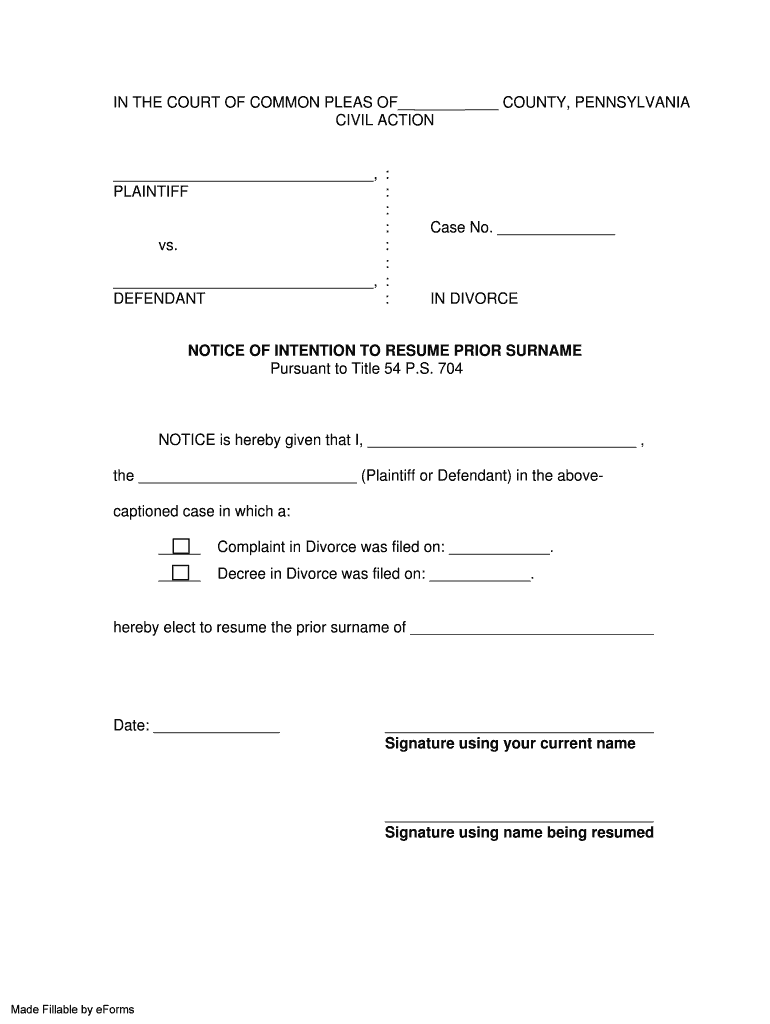
- Begin by filling in your name in the designated field for the plaintiff or defendant. Ensure accuracy as this is crucial for legal documentation.
- Indicate whether a Complaint in Divorce or Decree in Divorce was filed by checking the appropriate box and entering the corresponding dates.
- In the section where you elect to resume your prior surname, clearly write your previous surname to avoid any confusion.
- Sign using your current name and then again with the name you are resuming. This confirms your intent legally.
- Complete the notary section by providing your full married name and ensuring a Notary Public witnesses your signature.
Start using our platform today to easily fill out and manage your pa intention form online for free!
It's free
Got questions?
Can I type my electronic signature on my surname form fill?
Sure, a typed name is accepted as a legitimate electronic signature when you create it on your paperwork utilizing a compliant solution like DocHub. Simply upload your surname form fill to our editor, click Sign in the top tool pane → Create your signature → Type your name in the proper tab, and decide how it will look on your document.
How do you complete pa resume prior surname on iOS?
You need only an internet connection and a browser to complete your pa resume prior surname on an iOS phone. Open the DocHub website and authenticate. Then, add your file or select it from the list in your dashboard. Then use our editing instruments to complete your form and preserve all your adjustments. You can also send it to a specified recipient immediately.
Security and compliance
At DocHub, your data security is our priority. We follow HIPAA, SOC2, GDPR, and other standards, so you can work on your documents with confidence.
Learn more




