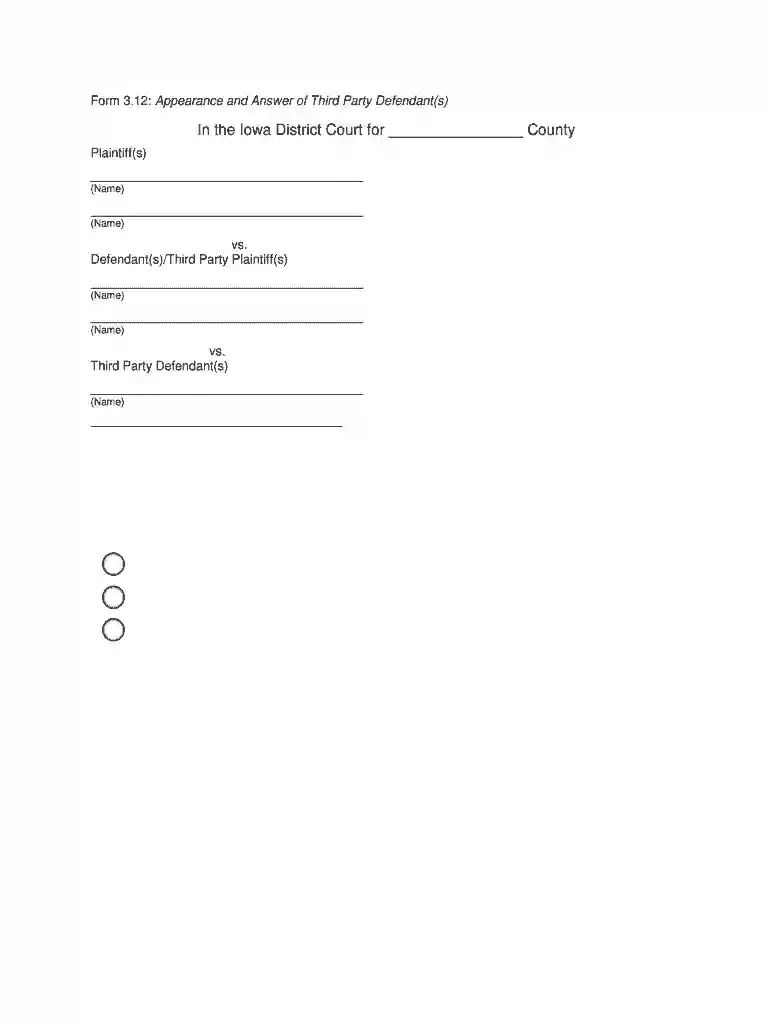
Form 3 12 Preview on Page 1

Form 3 12 2026

Here's how it works

  • 01. Edit your form online

    Type text, add images, blackout confidential details, add comments, highlights and more.

  • 02. Sign it in a few clicks

    Draw your signature, type it, upload its image, or use your mobile device as a signature pad.

  • 03. Share your form with others

    Send it via email, link, or fax. You can also download it, export it or print it out.

How to use or fill out Form 3 12 with our platform

Form edit decoration
9.5
Ease of Setup
DocHub User Ratings on G2
9.0
Ease of Use
DocHub User Ratings on G2
  1. Click ‘Get Form’ to open Form 3 12 in the editor.
  2. Begin by entering the name of the county where the case is filed at the top of the form.
  3. Fill in your name as the Third Party Defendant in the designated fields, ensuring accuracy.
  4. Provide the Small Claim Number associated with your case for proper identification.
  5. In the section for Defendant(s)/Third Party Plaintiff(s), enter their names as required.
  6. Complete the address fields for both yourself and any other Third Party Defendants listed.
  7. Select one of the options regarding your claim: deny, admit, or partially admit, and fill in any necessary amounts.
  8. Sign and print your name in the appropriate signature fields, along with your mailing address, phone number, and email address.

Start using our platform today to easily complete and manage your forms online for free!

be ready to get more

Complete this form in 5 minutes or less

Security and compliance

At DocHub, your data security is our priority. We follow HIPAA, SOC2, GDPR, and other standards, so you can work on your documents with confidence.

Related links

2017 General Instructions for Forms W-2 and W-3

May 2, 2017 A new box 12 Code FF has been added to report the total amount of permitted benefits under a qualified small employer health reimbursement.Read more

Learn more
Manual Form 3+

The Form 3+ regulates the volume of resin in the tank through a sensor called the LevelSense board, which is located behind the resin tank. The printer beginsRead more

Learn more
If you believe that this page should be taken down, please follow our DMCA take down process here