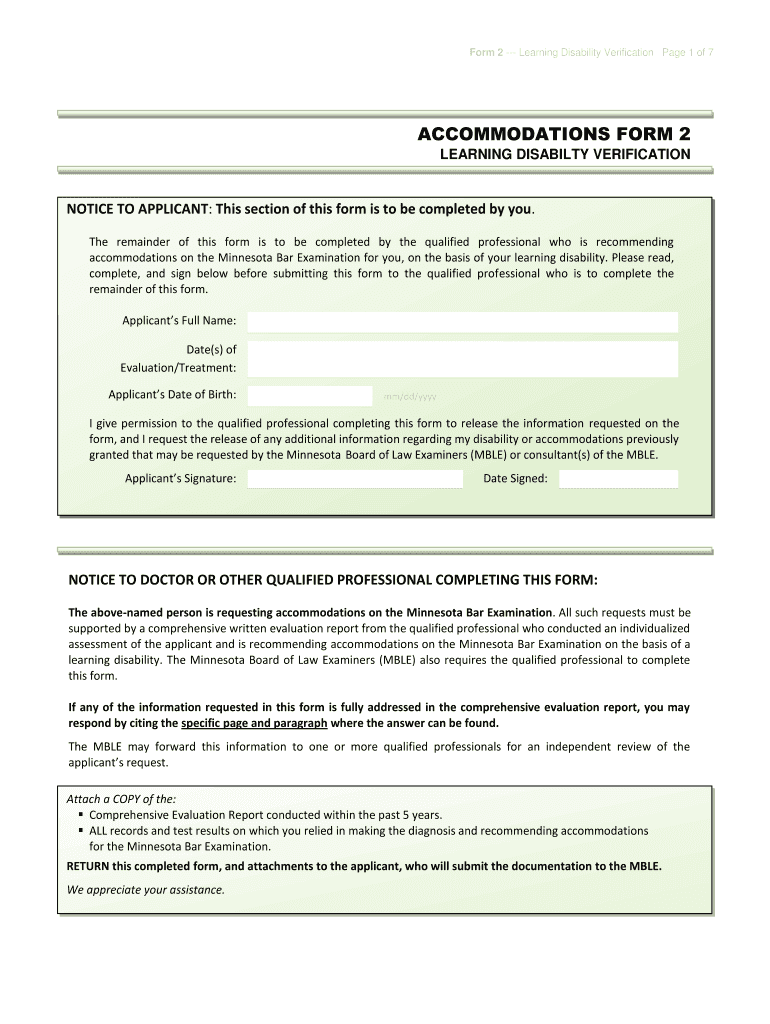
Minnesota disabilty verification form 2026

Get Form
mn accommodation verification Preview on Page 1

Here's how it works

01. Edit your mn accommodation verification online
Type text, add images, blackout confidential details, add comments, highlights and more.
02. Sign it in a few clicks
Draw your signature, type it, upload its image, or use your mobile device as a signature pad.
03. Share your form with others
Send ble accommodation form via email, link, or fax. You can also download it, export it or print it out.

How to use or fill out the Minnesota Disability Verification Form with DocHub

Form edit decoration
9.5
Ease of Setup
DocHub User Ratings on G2
9.0
Ease of Use
DocHub User Ratings on G2
  1. Click ‘Get Form’ to open the Minnesota Disability Verification Form in our editor.
  2. Begin by filling out your personal information in the Applicant’s section, including your full name, date of birth, and evaluation dates. Ensure accuracy as this information is crucial for processing.
  3. Sign the permission statement allowing the qualified professional to release necessary information. This step is essential for compliance with the Minnesota Board of Law Examiners (MBLE).
  4. Next, provide details about the evaluator or treating professional. This includes their name, contact information, and qualifications. Make sure to type or print clearly for legibility.
  5. In the Diagnosis and Current Functional Limitations section, answer all questions thoroughly. Include specific diagnoses and describe how they impact your daily life.
  6. Attach any required documents such as a comprehensive evaluation report from within the last five years. Use our platform's upload feature to easily add these files.
  7. Finally, review all entries for completeness and accuracy before submitting it back to your qualified professional for their input.

Start using our platform today to fill out your Minnesota Disability Verification Form online for free!

be ready to get more

Complete this form in 5 minutes or less

Get form

Got questions?

We have answers to the most popular questions from our customers. If you can't find an answer to your question, please contact us.
Contact us

As outlined by eSignature regulations, forms approved digitally have the same validity as those approved with pen and paper. You can eSign almost any business and private documentation. Four types of documents still demand wet signatures only - wills and testamentary trusts, court orders and other court forms, state statutes governing divorce, adoption, or other family law, and notice of cancellation of utility services. If you adhere to the regulations and use a reliable and compliant software solution, like DocHub, you can eSign your ble accommodation form without printing it.

It is a no-brainer on a computer or via a mobile phone to complete a minnesota disabilty verification form with DocHub. All you need to do is open any installed internet browser on your smartphone and go to the DocHub website. Once authenticated, add your document and open it in editing mode. Use our toolbar to make your edits and save changes. Optionally, keep your file in your files or send it to a recipient on the spot.

If you are eligible for disability parking certificates or license plates, you can: Park in properly designated disability parking spaces. Park at public parking meters without having to pay. Park in non-metered passenger spaces without regard to time limits unless the limits are posted on a sign.
Federal nondiscrimination laws define a person with a disability to include any (1) individual with a physical or mental impairment that substantially limits one or more major life activities; (2) individual with a record of such impairment; or (3) individual who is regarded as having such an impairment.
A student enrolled in a State School has a verified disability if official State verifiers confirm that the disability impedes the students learning.

Security and compliance

At DocHub, your data security is our priority. We follow HIPAA, SOC2, GDPR, and other standards, so you can work on your documents with confidence.

Learn more
ccpa2
pci-dss
gdpr-compliance
hipaa
soc-compliance
be ready to get more

Complete this form in 5 minutes or less

Get form

People also ask

Disability parking at metered spaces Vehicles with disability plates or certificates may park for free at some parking meters. Some meters allow you to park beyond the normal time limit. No vehicles, even those with disability plates or certificates, can park at metered spaces in some situations, including: Rush hour. Disability Parking - City of Minneapolis City of Minneapolis (.gov) parking-driving d City of Minneapolis (.gov) parking-driving d
(a) Parking spaces reserved for physically disabled persons must be designated and identified by the posting of signs incorporating the international symbol of access in white on blue and indicating that violators are subject to a fine of up to $200. Sec. 169.346 MN Statutes MN Revisors Office (.gov) statutes cite MN Revisors Office (.gov) statutes cite
Application Fees There is no fee for a Permanent (valid for 6 years) or Long-Term (valid for 13 to 72 months) disability parking certificate. There is a $5 fee for a Temporary (valid up to 6 months) or Short-Term (valid up to 12 months) disability parking certificate. Disability Parking | Minnesota Council On Disability Minnesota Council On Disability technical-assistance Minnesota Council On Disability technical-assistance
A local governmental unit may, by ordinance, prohibit parking on any street or highway to create a fire lane, or to accommodate heavy traffic during morning and afternoon rush hours and these ordinances also apply to physically disabled persons. Sec. 169.345 MN Statutes MN Revisors Office (.gov) statutes cite MN Revisors Office (.gov) statutes cite

Related links